
Web app · Utilities
Filterfresh
Every household filter, one place — with a live life bar per slot
Track HEPA purifiers, HVAC vents, RO stages, fridge cartridges and vacuum filters as filter slots: model number, physical size, rated life and install date, with percentage-life bars, overdue flags and a full replacement history. Free, no install, no account.
Stored in your browser only. Nothing you do in the web version is sent to our servers. Clear your browser data and it's gone — so export a backup from the in-app menu if you want to keep it.
This app is a community proposal.
Try the full browser version now. We build the iPhone and Android app once 100 people upvote it.
We'll email you once, when it ships. Unsubscribe anytime.
In your browser
What you can do in Filterfresh on the web
The filter slot is the record
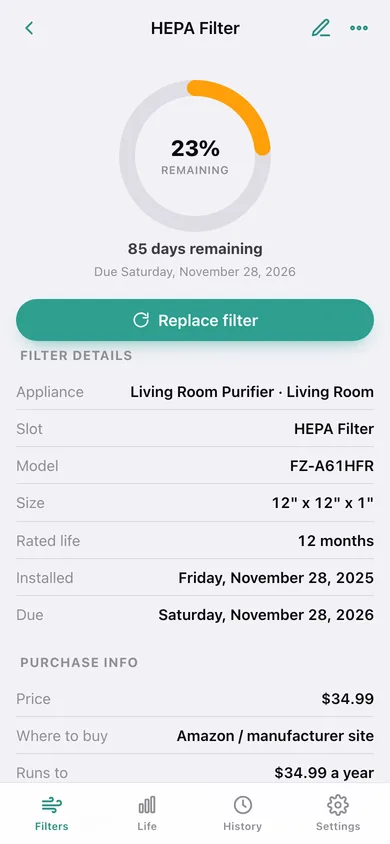
Each appliance holds as many slots as it really has, and every slot keeps its own model number, physical size, rated life in months, install date, price note and where-to-buy note.
Live percentage-life bars
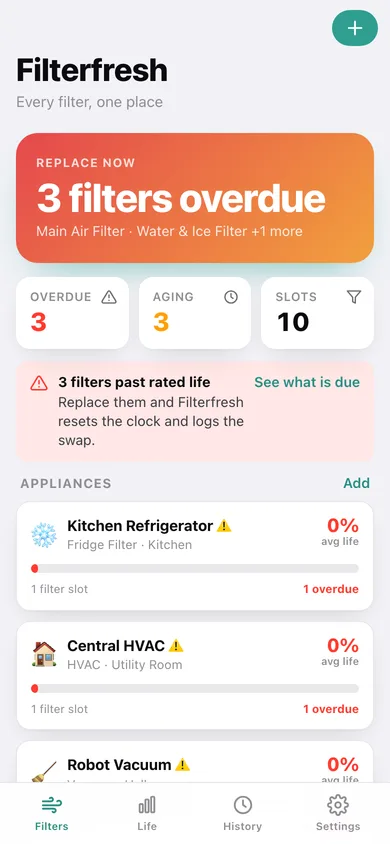
The same 30.44-days-a-month maths as the iPhone app: green above 50%, amber to 20%, red below — and overdue slots float to the top of the list.
One-tap Replace resets the clock
Confirm the swap date and an optional note; Filterfresh restarts the countdown from that date and appends the swap to the slot's history.
Common slots, pre-filled
Seventeen typical filter slots with manufacturer-rated lives — MERV HVAC panels, RO sediment/carbon/membrane stages, fridge inline cartridges, vacuum cartridges — one tap to prefill a new slot.
Replacement history and swaps per month
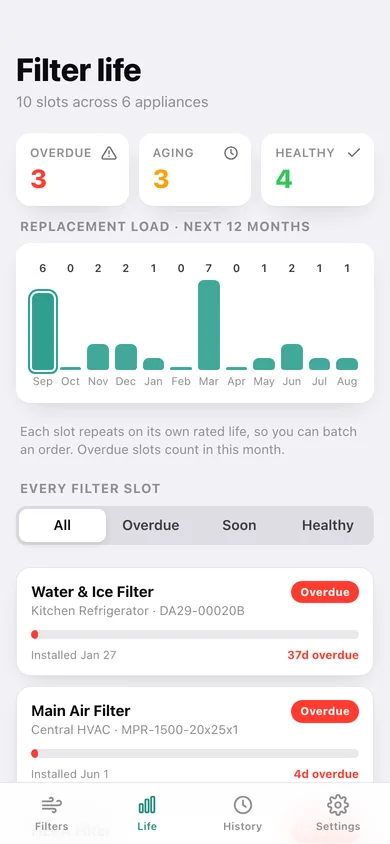
Every swap you log is kept with date and note, grouped by month with a bar chart, and filterable down to one slot for a warranty claim.
Yearly filter budget
Filterfresh reads the price notes you type and spreads each one over its rated life to show what your filters actually cost per year.
Screens
Every screen, rebuilt for the browser
-
1
Filters
The next replacement due, overdue and nearing-end counts, and every appliance with its average life bar.
-
2
Filter life
Every filter slot across the house sorted lowest-life-first, filterable by overdue, soon or healthy, with replacements coming up by month.
-
3
Filter slot
The big life ring, days remaining or days overdue, Replace filter, full specs and purchase info, and recent swaps.
-
4
Appliance
Average life ring for one appliance with its slot count, overdue count and every filter slot it holds.
-
5
Add or edit a filter slot
Common-slot presets plus label, model number, size, rated life, last-installed date, price and buy notes.
-
6
Add or edit an appliance
Name, room and one of six appliance types — air purifier, HVAC, water/RO, fridge, vacuum or other.
-
7
Replacement history
Every swap you have logged, grouped by month with a swaps-per-month chart, editable notes and per-slot filtering.
-
8
Settings
Default rated life, the nearing-end threshold, currency symbol, CSV and JSON export, sample data and erase.
Try it with sample data: Loads six appliances — two air purifiers, a central HVAC, a four-stage under-sink RO system, a fridge and a robot vacuum — with ten filter slots and thirteen logged replacements going back a year. You can start fresh at any time.
Ready? It's free.
No account, no install, no subscription. Everything you do stays in this browser.
Your say
What should Filterfresh do? Tell us before we build it.
Tell us what to build next.
Comments need a free Google sign-in, so every one is from a real person.
Sign in with Google to commentNo comments yet — be the first to say what this app should do next.
Questions
Is the web version of Filterfresh free?+
Yes. Every screen is free to use: no subscription, no in-app purchases, no account.
Do I need an account?+
No. Open Filterfresh and start using it right away. Sign in with Google only if you want to upvote an app, save it to your list, or leave a comment.
Where is my data stored?+
Only in this browser's local storage. Nothing you enter is sent to our servers, so we can't see it, back it up, or restore it. Clearing site data, a private window, or another device starts empty. Export a backup from the in-app menu to keep it.
Is there a Filterfresh app for iPhone or Android?+
Not yet. Filterfresh is a community proposal: the browser version is complete, and we build the iPhone and Android app once 100 people upvote it. Upvoters get one email when it ships.