
Web app · Photo And Video
Filmroll
The darkroom notebook your film camera can't keep
Load a roll from a bundled library of 70 stocks and 32 bodies, log every frame's aperture, shutter, lens and exposure compensation, write down the C-41, B&W or E-6 recipe, and watch your cost per frame. Free, offline, no account.
Stored in your browser only. Nothing you do in the web version is sent to our servers. Clear your browser data and it's gone — so export a backup from the in-app menu if you want to keep it.
This app is a community proposal.
Try the full browser version now. We build the iPhone and Android app once 100 people upvote it.
We'll email you once, when it ships. Unsubscribe anytime.
In your browser
What you can do in Filmroll on the web
Load a roll, log every frame
Pick the stock and body, set format, frame count, push/pull and the ISO you actually metered at — then log each frame with the real printed dial sequences: 21 apertures from f/1.0 to f/32 and 19 shutter speeds from 30s to 1/4000 plus B.
Full offline stock library
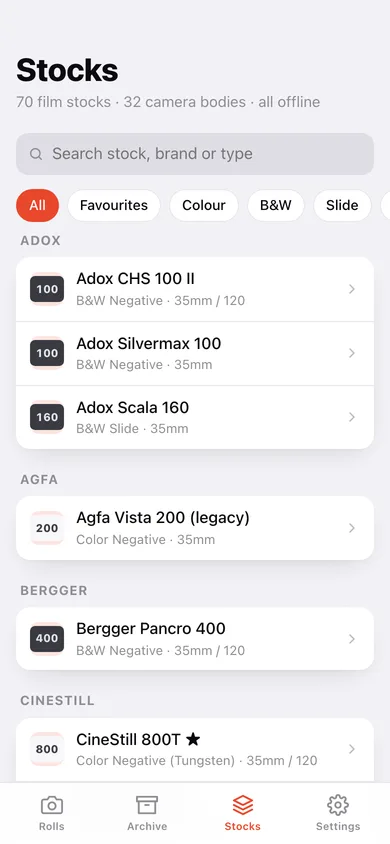
All 70 bundled film stocks — Portra, HP5, Gold, CineStill, Velvia, Foma, Lomography and more — with brand, box ISO, type, formats and characteristic notes, filterable by colour, B&W, slide or instant, plus 32 camera bodies.
Develop log
Record the recipe per roll: process (C-41 / B&W / E-6 / ECN-2), chemistry, dilution, time, temperature in °F and °C, agitation scheme and the result — so a keeper is repeatable and a dud never happens twice.
Cost per frame
Enter film, develop and scan cost and Filmroll divides by the frames you actually shot, then rolls a lifetime spend, total frames and average per frame across the whole archive.
Filmstrip and archive
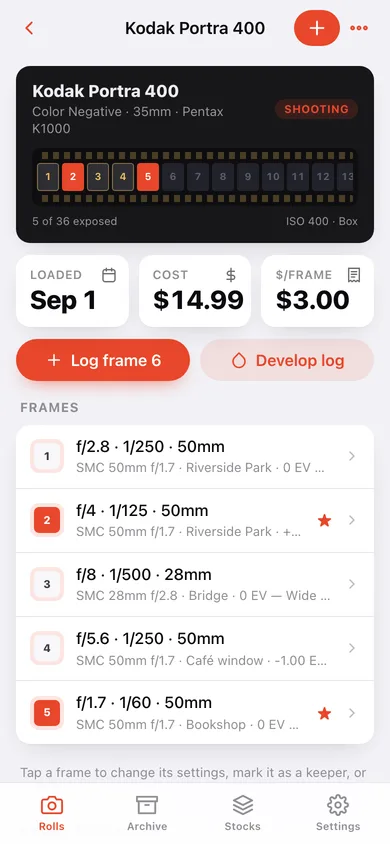
Every roll shows a sprocketed filmstrip with exposed frames lit and keepers flagged; the archive groups every roll by year with a stock/camera search and format filters.
Sunny-16 in your pocket
Pick a film speed and a lighting condition and Filmroll gives you the reciprocal aperture and shutter pair — the same table the phone carries.
Export the roll
Download any roll as a CSV with every frame's settings, lens, exposure compensation, location, keeper flag and note.
Screens
Every screen, rebuilt for the browser
-
1
Rolls
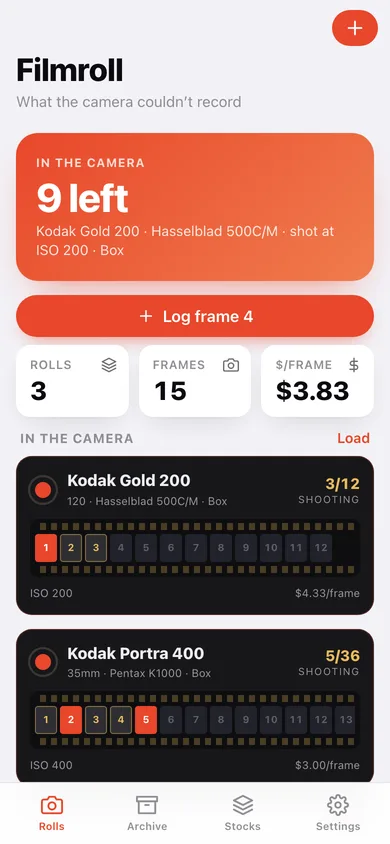
Frames left on the roll in the camera, lifetime cost per frame, and a sprocketed canister card for every loaded roll.
-
2
Roll detail
The filmstrip of exposed frames, ISO and push/pull, cost per frame, every logged frame and the develop recipe.
-
3
Stock library
All 70 bundled stocks grouped by brand with ISO badges, filters and a sheet for each stock's notes and favourite toggle.
-
4
Frame entry
The exposure slate with aperture, shutter and exposure compensation on the printed dial sequences, plus lens, focal length, location, note and keeper flag.
-
5
Load a roll
Pick the stock and body from the offline library, set format, frame count, push/pull, metered ISO and the roll's costs.
-
6
Develop log
Recipe cards with process, chemistry, dilution, time, temperature and agitation, and a form to add another.
-
7
Cost
Film, develop and scan cost for the roll, cost per frame, and the lifetime spend across the archive.
-
8
Archive
Every roll grouped by year with a stock and camera search and format filter chips.
-
9
Sunny-16
Film ISO plus a lighting condition gives the aperture and shutter pair.
-
10
Settings
Tools, the exposure sequences the logger uses, backup, sample data and erase.
Try it with sample data: Loads three rolls — a Portra 400 half-shot in a Pentax K1000, an Ilford HP5 Plus pushed to 800 in a Nikon FM2 with its DD-X develop recipe and scan notes, and a Gold 200 on the Hasselblad — with 15 logged frames and three favourited stocks. You can start fresh at any time.
Ready? It's free.
No account, no install, no subscription. Everything you do stays in this browser.
Your say
What should Filmroll do? Tell us before we build it.
Tell us what to build next.
Comments need a free Google sign-in, so every one is from a real person.
Sign in with Google to commentNo comments yet — be the first to say what this app should do next.
Questions
Is the web version of Filmroll free?+
Yes. Every screen is free to use: no subscription, no in-app purchases, no account.
Do I need an account?+
No. Open Filmroll and start using it right away. Sign in with Google only if you want to upvote an app, save it to your list, or leave a comment.
Where is my data stored?+
Only in this browser's local storage. Nothing you enter is sent to our servers, so we can't see it, back it up, or restore it. Clearing site data, a private window, or another device starts empty. Export a backup from the in-app menu to keep it.
Is there a Filmroll app for iPhone or Android?+
Not yet. Filmroll is a community proposal: the browser version is complete, and we build the iPhone and Android app once 100 people upvote it. Upvoters get one email when it ships.