
Web app · Productivity
Fanforge
Keep your hundredth page consistent with your first — story bible, plot board and canon ledger
A character bible with want/wound/motive/secret craft prompts, a four-act board of scene cards, a canon ledger of the rules your world runs on, a relationship graph and a continuity scan that catches POVs who don't exist. Free, no install, nothing sent to a server.
Stored in your browser only. Nothing you do in the web version is sent to our servers. Clear your browser data and it's gone — so export a backup from the in-app menu if you want to keep it.
This app is a community proposal.
Try the full browser version now. We build the iPhone and Android app once 100 people upvote it.
We'll email you once, when it ships. Unsubscribe anytime.
In your browser
What you can do in Fanforge on the web
Character bible with craft prompts
Name, role, the want, the wound, motive, secret, voice tics, three things they'd never say, three things they always do, appearance and relationships — the same nine craft fields as the iPhone app, with a filled-fields meter per character.
Four-act plot board
Scene cards grouped into Setup, Rising complication, Crisis and Resolution, each with goal, conflict, outcome, POV character, location and canon references — plus a scenes-per-act chart and a per-act view.
Canon ledger
The rules of your world in five categories (magic, technology, geography, language, politics), each a one-paragraph statement that shows every scene citing it.
Continuity scan
Flags scenes with no goal, a POV who isn't a character, canon citations that don't resolve to a ledger rule, and two cards sharing an act and order index — grouped by kind, each flag opening the scene.
Relationship graph
Every character is a node, every declared relationship a labelled edge; focus one character to light up only their lines, and see names cited in a relationship that never got a character page.
Markdown, CSV and outline export
The whole bible as Markdown, the plot board as CSV, or the four-act outline copied to the clipboard — all included, no Plus tier.
Screens
Every screen, rebuilt for the browser
-
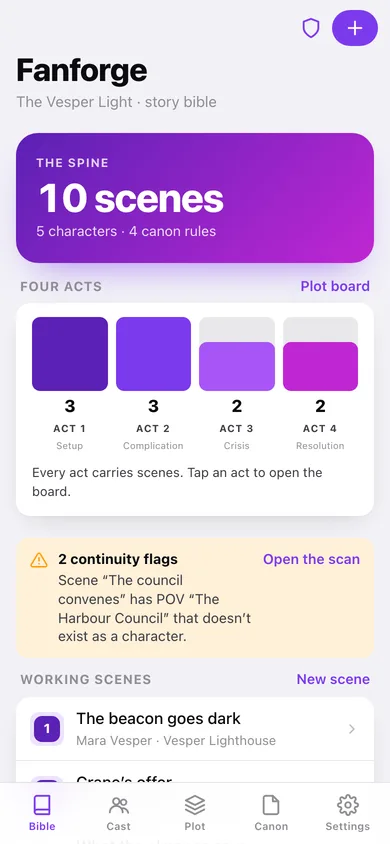
1
Story bible
The four-act spine with scene counts, the continuity verdict, working scenes and the cast.
-
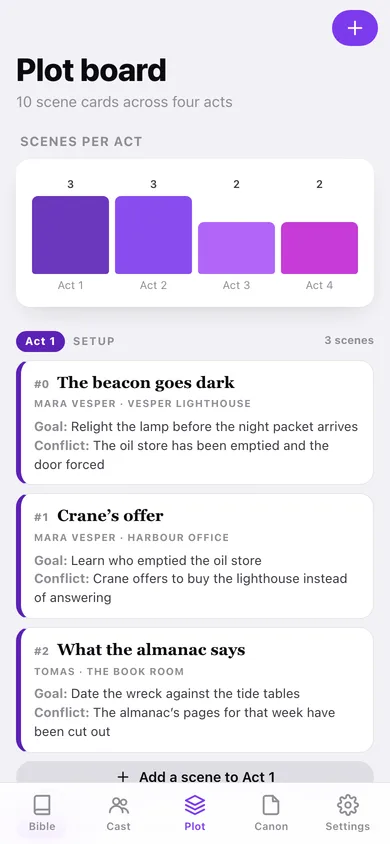
2
Plot board
Scene cards in four acts with goal and conflict on the face of every card.
-
3
Scene card
Goal, conflict and outcome, the POV and location, and the canon rules this scene cites.
-
4
Edit a scene
Title, act, order within act, the three beats, POV, location and canon references.
-
5
Characters
The cast filtered by role, searched by want or wound, with a POV-share chart.
-
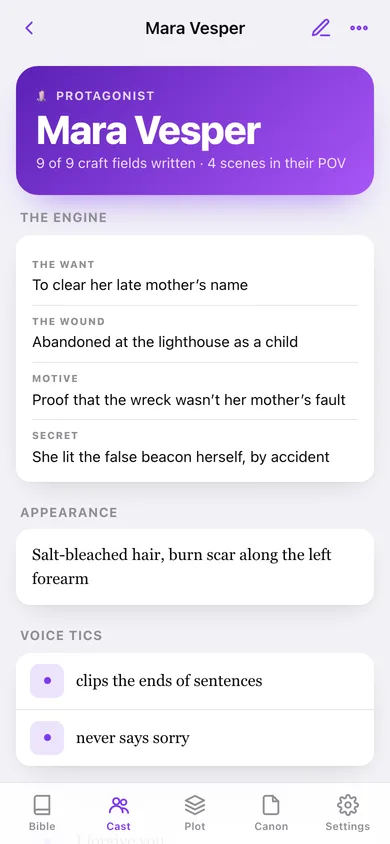
6
Character page
The want/wound engine, voice tics, never-says, always-does, relationships and every scene in their POV.
-
7
Edit a character
All nine craft fields plus role and the name:relation relationship list.
-
8
Relationship graph
Characters as nodes, labelled relationship edges, focusable per character.
-
9
Canon ledger
Rules by category with a donut of the ledger and a count of scenes citing each rule.
-
10
Edit a canon rule
Title, category and the one-paragraph statement, with the scenes that cite it.
-
11
Continuity scan
Every flag grouped by kind, with what the scan checks and why.
-
12
Settings
Project name, serif body type, canon mode, Markdown/CSV/outline export, backup, sample data and erase.
Try it with sample data: Loads The Vesper Light — five characters with full craft pages and relationships, ten scene cards across all four acts, four canon rules, and two deliberate continuity flags so the scan has something to catch. You can start fresh at any time.
Ready? It's free.
No account, no install, no subscription. Everything you do stays in this browser.
Your say
What should Fanforge do? Tell us before we build it.
Tell us what to build next.
Comments need a free Google sign-in, so every one is from a real person.
Sign in with Google to commentNo comments yet — be the first to say what this app should do next.
Questions
Is the web version of Fanforge free?+
Yes. Every screen is free to use: no subscription, no in-app purchases, no account.
Do I need an account?+
No. Open Fanforge and start using it right away. Sign in with Google only if you want to upvote an app, save it to your list, or leave a comment.
Where is my data stored?+
Only in this browser's local storage. Nothing you enter is sent to our servers, so we can't see it, back it up, or restore it. Clearing site data, a private window, or another device starts empty. Export a backup from the in-app menu to keep it.
Is there a Fanforge app for iPhone or Android?+
Not yet. Fanforge is a community proposal: the browser version is complete, and we build the iPhone and Android app once 100 people upvote it. Upvoters get one email when it ships.