
Lifestyle
Evenhand: sibling eldercare fair-share ledger
Fair-share ledger for sibling eldercare
No account, no install. What you do stays in your browser.
This app is a community proposal.
Try the full browser version now. We build the iPhone and Android app once 100 people upvote it.
We'll email you once, when it ships. Unsubscribe anytime.
| Price | Free, no subscription |
|---|---|
| Account | None needed to try |
| Works offline | Yes |
| Data | On your device, never on our servers |
| Platforms | Browser |
| Status | Community proposal (built for phones at 100 upvotes) |
| Last updated | 2026-06-20 |
Accessibility: Larger Text · Light & Dark · VoiceOver labels · iPad layout · Browser version How we checked →
 Try it live
The full Evenhand, right here in your browser.
No account and no install. What you enter is saved in this browser only, never on our servers.
Open Evenhand →


About this app
What Evenhand does
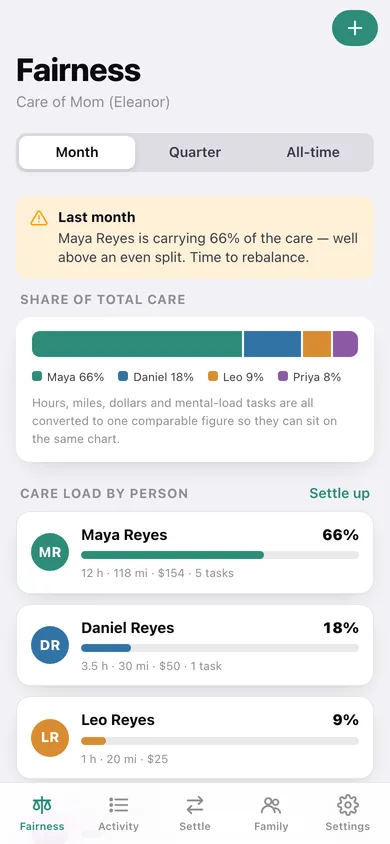
One sibling drives Mom to every appointment, pays the pharmacy, and lies awake managing it all. The others say they had no idea. Evenhand ends that argument by quietly keeping score of who actually does the eldercare. Caring for an aging parent is rarely split evenly. The closest child, often a daughter, ends up the default caregiver while brothers and sisters drift to the edges. Resentment grows not because anyone is selfish, but because the work is invisible. Hours on hold with Medicare, a 90-minute round trip to the clinic, a refill paid out of pocket, the 2 a.m. worry, none of it shows up anywhere. Evenhand makes it show up. It is Splitwise for the sandwich generation: a private contribution ledger for siblings sharing the care of a parent. Log a contribution in a few taps. Pick the family member, choose a type, time spent, miles driven, money paid, or mental-load tasks like coordinating, researching, and worrying, and add an optional note. The fairness dashboard converts everything into a single picture: who has carried what this month, this quarter, and all-time. When the numbers feel lopsided, Settle Up suggests a money or hours figure to even things out, and the Rebalancing Roster proposes a rotation so the next month lands more fairly. Bring it to the family meeting and replace a tense guess with a calm, shared fact. The mental-load category is where Evenhand goes further than any expense splitter. Caregiving is not only drives and dollars. It is the sibling who remembers the cardiology follow-up, who fights the insurance denial, who researches assisted-living costs at midnight, who carries the constant low hum of worry. Evenhand lets you log those tasks too, so the work that never produced a receipt finally counts. Over a few weeks the dashboard tells a story that words could not, and the imbalance becomes impossible to dismiss. Evenhand is built for privacy first. There is no account to create and no server to trust. Everything lives on your iPhone or iPad, so the details of your family's caregiving stay between you. There are no ads, no trackers, and no analytics watching how you use it. Export a clean PDF summary when you need to show a sibling, an attorney, a financial advisor, or yourself that the load needs to change, and the rest stays sealed on your device. Use it solo to understand your own contribution, or share the picture with the whole family before the next hard conversation. The Rebalancing Roster turns that conversation into a plan, naming who takes which weeks so the next month does not default back to one exhausted person. Settle Up puts a fair, honest number on what would even things out, whether in shared expenses or traded hours. This is not a medical app and it does not track your parent's pills or vitals, plenty of tools already do that. Evenhand tracks the family doing the caring, and the fairness between them.
Features
Built to be useful, not noisy.
Quick contribution log
Tap a family member, pick a type (hours, drive miles, money, or mental-load task), enter the amount, add an optional note and date. Recent entry templates make repeat logging one tap.
Fairness dashboard
A pie and bar view of each sibling's share of total care across hours, miles, dollars, and mental load, filterable by month, quarter, and all-time, with a plain-language fairness read.
Settle Up and Rebalancing Roster
Computes a suggested money-or-hours figure to even the load, and proposes a forward care rotation so upcoming weeks land fairly across siblings.
Family and recipient setup with PDF export
Add care recipients and family members with shares and roles, then export a clean dated PDF summary to bring to a family meeting, attorney, or care manager.
Why it exists
The problem
Eldercare is split unevenly across siblings but the labor is invisible, so the primary caregiver builds resentment and family meetings devolve into he-said-she-said with no shared record of who actually did what.
What's different
How Evenhand stands out
Caregiver-ledger, pillpath, and brainfold track the PARENT's care (meds, symptoms, appointments); splitcheck and kitty split one-off expenses among friends. None quantify caregiving CONTRIBUTION across family members. Versus Splitwise it understands non-money load: hours, miles, and mental work, with a fairness dashbo…
You might also like
All apps →
Auraboard
Lifestyle
Your daily aesthetic vibe, as a shareable aura card.

Weekdots: Life in Weeks
Lifestyle
See your life in weeks

Ins & Outs
Lifestyle
Make shareable editorial list cards

Receiptd
Lifestyle
Turn your day into a retro receipt

Blind Box Vault
Lifestyle
Collect, complete, trade your figures

AptBook
Lifestyle
Tour, compare, see true rent
FAQ
Questions about Evenhand
How much does Evenhand cost?▾
Evenhand is free. All features are included from day one — no subscription, no in-app purchases, no paid tiers. Everything you see in this listing works the moment you install it.
Where does Evenhand store my data?▾
Evenhand stores what you enter on your device. No account is required, and we never sell your data. Any anonymous usage data or optional notifications are explained in the Evenhand privacy policy.
What platforms does Evenhand support?▾
iOS, on iPhone and iPad. You can find the latest availability on this page.
How do I get support for Evenhand?▾
Use the Support link on this page, or email support@allthingsn.com. We answer every message and keep responses on the same thread.
Related guide
Best iPhone apps with no subscription (one-time purchase & free), 2026
More baby, family & home apps with no subscription →
More in Lifestyle

