
Web app · Photo And Video
GhostFrame
One photo a day, ghosted over the camera so every frame lines up
Start a film for your face, your plant or your renovation, shoot with yesterday's frame faded over the live view at 10–60%, then play the whole stack back at 4–60 fps and download a contact sheet. Everything unlocked, no account, nothing uploaded.
Stored in your browser only. Nothing you do in the web version is sent to our servers. Clear your browser data and it's gone — so export a backup from the in-app menu if you want to keep it.
In your browser
What you can do in GhostFrame on the web
Ghost-overlay camera
Your browser's camera with the previous day's frame composited on top at an opacity you set, plus a thirds grid and a front/back switch — so today's shot matches without measuring.
Parallel films
Track a plant, a self-portrait and a renovation as separate films side by side, each with its own subject, colour, day count and shooting slot.
Day-numbered timeline
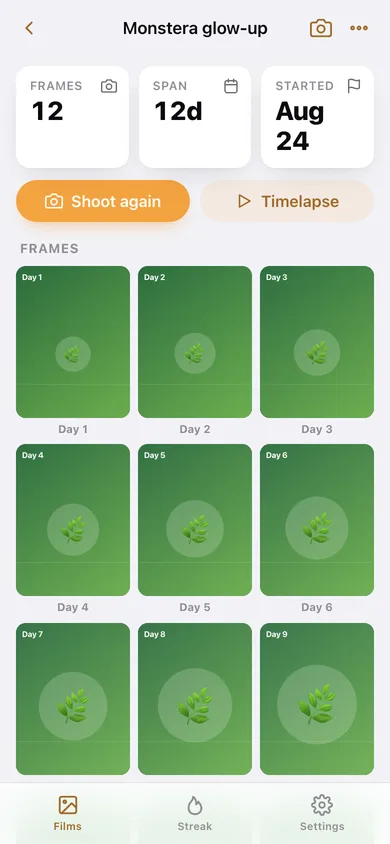
Every frame in a grid labelled Day 1, Day 2, Day 3, with the span, start date and frame count — tap any frame to open it full width and step through the days.
Timelapse player
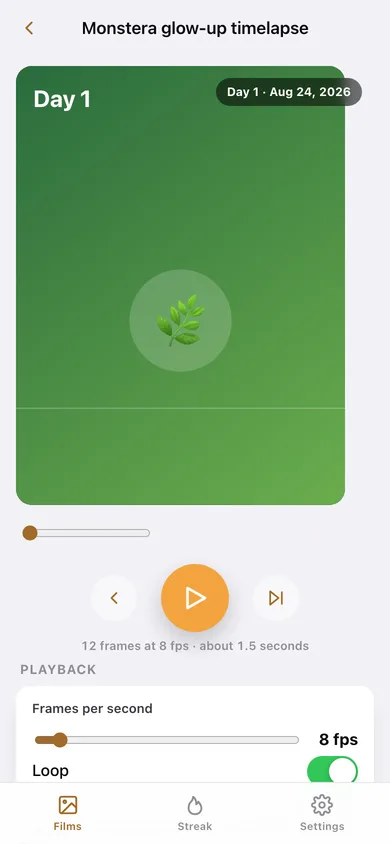
Play the stack in the page at anything from 4 to 60 fps, scrub it, loop it, and see the runtime the film would have as a video.
Contact sheet and frame list
Download up to 24 frames as one SVG contact sheet, a CSV of every frame with its day and capture time, or copy a one-line summary of the film.
Streak and shooting days
A day streak across every film, how many films you have already shot today, and a twelve-week heatmap of the days you showed up.
Screens
Every screen, rebuilt for the browser
-
1
Films
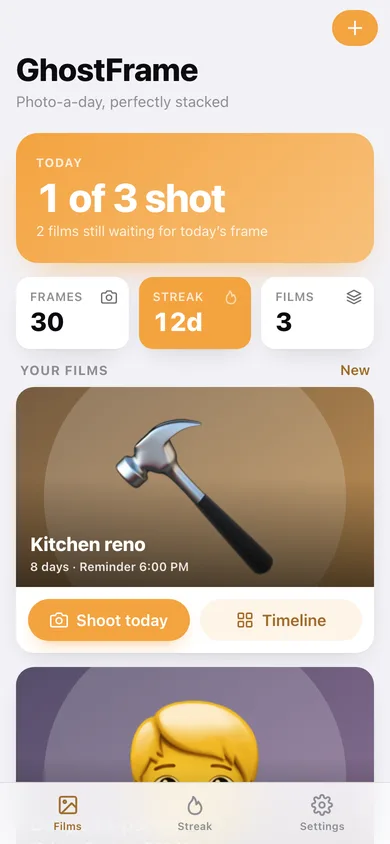
Today's count, day streak, and a card per film with its latest frame, day count and a Shoot today button.
-
2
Timeline
Frames, span and start date, the day-numbered grid, and the film's daily reminder slot.
-
3
Timelapse
The stack playing back with a scrubber, frames-per-second and loop controls, and the contact-sheet download.
-
4
Shoot
The live camera with yesterday's frame ghosted on top, an opacity slider, the thirds grid and the shutter.
-
5
Frame
One frame full width with its day number, capture time and source, and previous/next day navigation.
-
6
New film
Name the film, pick its subject and colour, and set the daily shooting slot.
-
7
Streak
Day streak, films shot today, a twelve-week heatmap, and every recent frame across all films.
-
8
Settings
Default ghost opacity, thirds grid, playback fps and loop, backup, sample data and erase.
Try it with sample data: Loads three films — Monstera glow-up (12 days), Daily self-portrait (10 days) and Kitchen reno (8 days) — with 30 stacked frames whose subject grows and lightens across the run, each with its own reminder slot. You can start fresh at any time.
Ready? It's free.
No account, no install, no subscription. Everything you do stays in this browser.
Your say
Is GhostFrame useful? Tell us what to build next.
Sign in with Google to vote.
Tell us what to build next.
Comments need a free Google sign-in, so every one is from a real person.
Sign in with Google to commentNo comments yet — be the first to say what this app should do next.
Questions
Is the web version of GhostFrame free?+
Yes. Every screen is free to use: no subscription, no in-app purchases, no account.
Do I need an account?+
No. Open GhostFrame and start using it right away. Sign in with Google only if you want to upvote an app, save it to your list, or leave a comment.
Where is my data stored?+
Only in this browser's local storage. Nothing you enter is sent to our servers, so we can't see it, back it up, or restore it. Clearing site data, a private window, or another device starts empty. Export a backup from the in-app menu to keep it.
How is the web version different from the GhostFrame phone app?+
The Shoot screen asks for your browser's camera. If you allow it, the live view is ghosted with the previous frame and the shutter saves a compressed still in this browser — the video stream and the photo never leave the page and are never uploaded. If there is no camera, or you decline, you can still stack today's frame and GhostFrame draws it from the film's own subject and colour. Camera frames are stored as compressed stills inside this browser's storage, so a very long film can run out of room — the iPhone app writes full-resolution JPEGs to disk instead. There is no video export: the timelapse plays in the page and downloads as an SVG contact sheet plus a CSV frame list, where the phone writes a real 1080 × 1920 MP4 to your camera roll. A browser tab cannot post a daily notification, so the reminder time is kept as your intended shooting slot rather than an actual nudge. The 1.2 Captions feature, which burns subtitles into a video file, is iPhone-only. Films and frames are stored in this browser only; clearing site data erases them, and they do not sync to your phone.