
Web app · Productivity
DUI Road
Every deadline back to a full license, in one private place
A DUI is a dozen obligations across agencies that don't talk to each other. DUI Road holds the reinstatement road map, the interlock calibration clock, the class attendance ledger with its absence meter, the SR-22 coverage countdown and the running cost. Free, nothing reported to anyone.
Stored in your browser only. Nothing you do in the web version is sent to our servers. Clear your browser data and it's gone — so export a backup from the in-app menu if you want to keep it.
This app is a community proposal.
Try the full browser version now. We build the iPhone and Android app once 100 people upvote it.
We'll email you once, when it ships. Unsubscribe anytime.
In your browser
What you can do in DUI Road on the web
Reinstatement road map
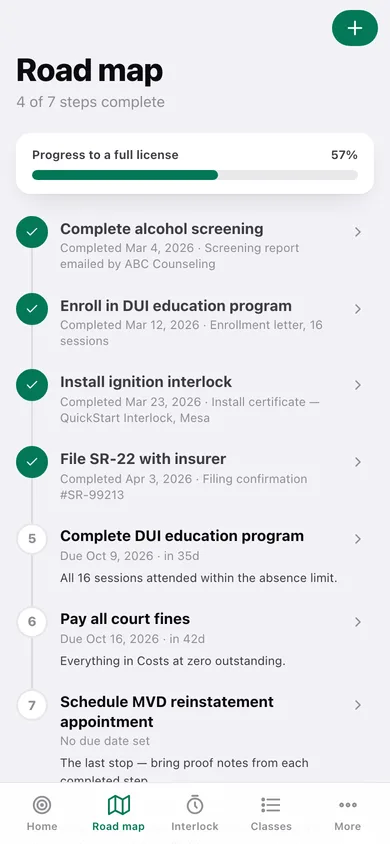
An ordered, fully editable milestone list — screening, enrollment, interlock install, SR-22 filing, program completion, fines, the DMV appointment — drawn as a road you check off, each step holding a due date and a note about the proof you received.
Interlock calibration clock
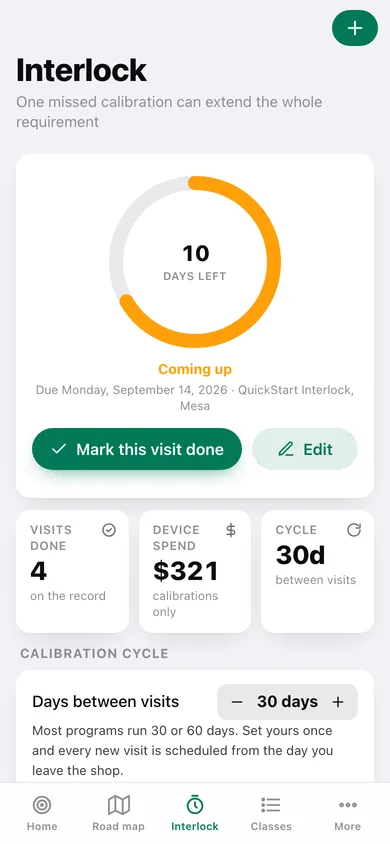
A big countdown to the next service visit that turns amber at 14 days and red at 3, one tap to mark it done and roll the clock forward by your cycle, and a full dated visit history with shop and cost.
Class attendance ledger with an absence meter
Sessions attended against sessions required, and absences used against the limit — so you always know exactly how much margin is left before the program can drop you and report non-compliance.
SR-22 continuous-coverage countdown
Enter the filing once and see the days left on the multi-year clock, the percentage behind you, and the next premium date — because a single lapse can restart the whole filing period.
Cost dashboard across every agency
Court fines, class fees, device leases, insurance premiums and DMV charges in one ledger with paid and outstanding totals and a bar per category — the real cost, visible and finite.
Dated completion record
One page with your completed steps, calibration history, attendance record, filing and payments — downloadable as text, with a costs CSV, to hand an office that asks what you have finished.
Screens
Every screen, rebuilt for the browser
-
1
Dashboard
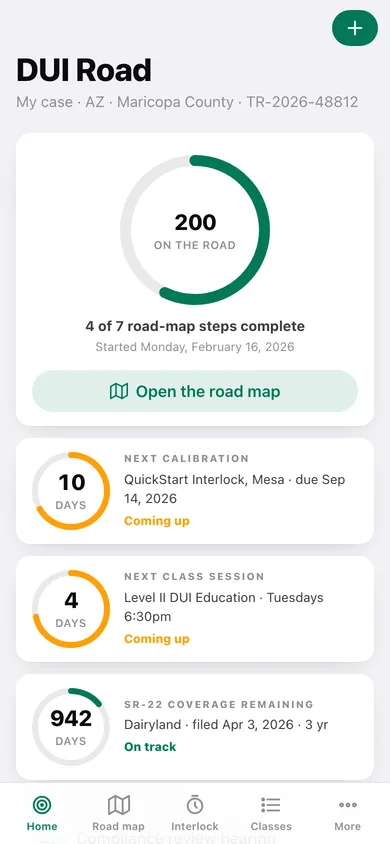
Days on the road and steps complete, then the calibration, class and SR-22 countdowns, the next appointment and what is outstanding.
-
2
Road map
Every milestone as a connected road you tap through, with progress to a full license.
-
3
Road-map step
One milestone: what it involves, its due date, a complete toggle and the proof note you will read from at the DMV.
-
4
Edit a step
Title, detail, due date, position on the road and the proof note.
-
5
Interlock clock
The countdown to the next calibration with its urgency colour, one-tap completion that rolls the clock, and your cycle length.
-
6
Calibration visit
Due date, completed date, shop, cost, result and notes for one service visit.
-
7
Calibration history
Every service visit, dated, with a spend-per-visit chart.
-
8
Classes
The session meter, the absence-limit meter, your program settings and the full attendance ledger.
-
9
Class session
Date, status (attended, absent, excused, scheduled), topic and notes.
-
10
SR-22
The continuous-coverage countdown, the percentage of the period behind you, the next premium and the filing details.
-
11
Costs
Total, paid and outstanding, a bar per category, and every fine and fee.
-
12
Fine or fee
What it is, who it goes to, the amount, category, due date and paid date.
-
13
Court and DMV dates
Upcoming appointments with their countdowns, plus what has already happened.
-
14
Completion record
A dated summary of steps, calibrations, attendance, filing and payments to download or copy.
-
15
More
Your case details, calibration cycle, preferences, backup, sample data and erase.
Try it with sample data: Loads a full Arizona case 200 days in: four road-map steps done and three ahead, four completed interlock calibrations with the next due in ten days, eleven logged class sessions with one absence of two used, a three-year SR-22 with a premium due this week, six cost entries including an outstanding $1,840 court fine, and two upcoming appointments. You can start fresh at any time.
Ready? It's free.
No account, no install, no subscription. Everything you do stays in this browser.
Your say
What should DUI Road do? Tell us before we build it.
Tell us what to build next.
Comments need a free Google sign-in, so every one is from a real person.
Sign in with Google to commentNo comments yet — be the first to say what this app should do next.
Questions
Is the web version of DUI Road free?+
Yes. Every screen is free to use: no subscription, no in-app purchases, no account.
Do I need an account?+
No. Open DUI Road and start using it right away. Sign in with Google only if you want to upvote an app, save it to your list, or leave a comment.
Where is my data stored?+
Only in this browser's local storage. Nothing you enter is sent to our servers, so we can't see it, back it up, or restore it. Clearing site data, a private window, or another device starts empty. Export a backup from the in-app menu to keep it.
Is there a DUI Road app for iPhone or Android?+
Not yet. DUI Road is a community proposal: the browser version is complete, and we build the iPhone and Android app once 100 people upvote it. Upvoters get one email when it ships.