
Web app · Travel
DryDays
How many days off-grid do you actually have left?
Set up your rig once — fresh, gray and black tanks, propane bottles, battery bank — then log fills, dumps and level checks. DryDays fits your real consumption and names the resource that ends the trip first. Free, offline, no account.
Stored in your browser only. Nothing you do in the web version is sent to our servers. Clear your browser data and it's gone — so export a backup from the in-app menu if you want to keep it.
This app is a community proposal.
Try the full browser version now. We build the iPhone and Android app once 100 people upvote it.
We'll email you once, when it ships. Unsubscribe anytime.
In your browser
What you can do in DryDays on the web
Days remaining per resource
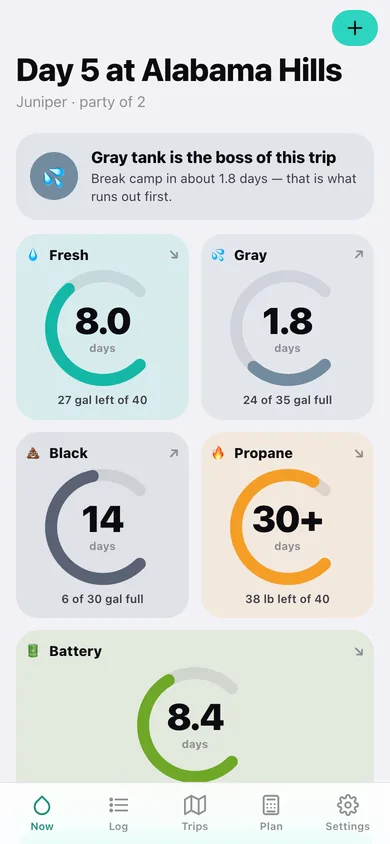
Five arc gauges — fresh, gray, black, propane, battery — each showing days left, not a level a factory sender guessed at.
Names the binding constraint
Gray water is the boss of this trip: break camp in about 1.9 days. The one number that decides when you leave, in plain words.
Learns your real rates
A least-squares fit over your own level checks gives gallons and amp-hours per day, refit from the last fill or dump so a mid-trip dump station does not corrupt the slope.
Correct battery math
Lead-acid stops at 50%, LiFePO4 runs to 10% — so 200 Ah on the label means 100 or 180 Ah in camp, and the countdown uses the right one.
Pre-trip planner
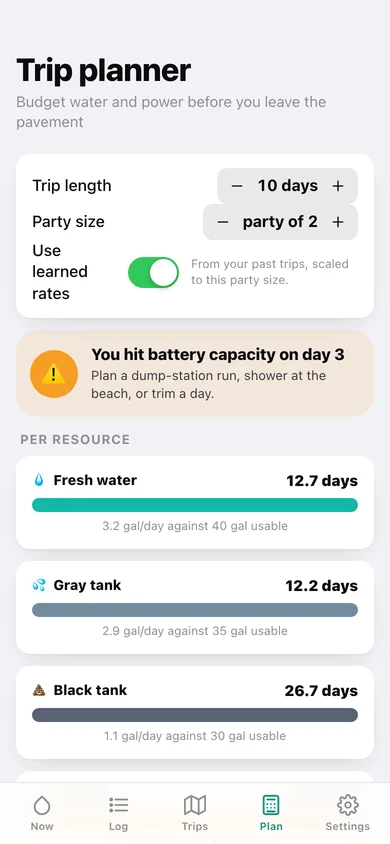
Days, party size and your learned per-person rates produce a verdict — you make all 10 days, or you hit gray capacity on day six — plus a copyable plan.
Trips as calibration
Ending a trip snapshots its rates; rate trends then compare trips and tell you how much more water the crew uses with guests aboard.
Screens
Every screen, rebuilt for the browser
-
1
Countdown dashboard
Day N at camp, the binding constraint in plain words, and a days-remaining gauge for all five resources.
-
2
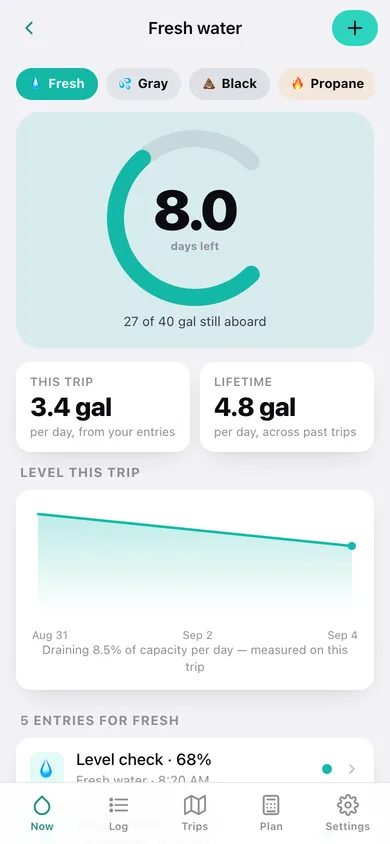
Resource detail
One resource up close: big gauge, this-trip vs lifetime rate, level chart and every entry.
-
3
Log an entry
Pick the resource, pick what happened — full fill, dump, bottle swap, level check — and drag the level.
-
4
Event log
Every fill, dump and check grouped by day, filterable by resource.
-
5
Trips
The camp you are on now plus past trips, each showing which resource bound it.
-
6
Trip detail
Nights, party size, rates so far, notes and the End trip button that saves your calibration.
-
7
Rate trends
Your gallons and amp-hours per day across past trips, with the guest multiplier.
-
8
Trip planner
Budget the next trip against your learned rates and get the verdict per resource.
-
9
Battery bank
Bank editor, usable-capacity gauge, days at your draw and why chemistry matters.
-
10
Your rig
Tank capacities with presets, propane bottles and battery chemistry.
-
11
Settings
Rig and battery setup, JSON backup, CSV export of entries, sample data and erase.
Try it with sample data: Loads Juniper, a 25-ft trailer (40/35/30 gal, 2x20 lb propane, 200 Ah lithium), two ended trips at Quartzsite and the Alvord Desert, and a live four-day camp at Alabama Hills with 21 logged entries — gray tank binding at about two days. You can start fresh at any time.
Ready? It's free.
No account, no install, no subscription. Everything you do stays in this browser.
Your say
What should DryDays do? Tell us before we build it.
Tell us what to build next.
Comments need a free Google sign-in, so every one is from a real person.
Sign in with Google to commentNo comments yet — be the first to say what this app should do next.
Questions
Is the web version of DryDays free?+
Yes. Every screen is free to use: no subscription, no in-app purchases, no account.
Do I need an account?+
No. Open DryDays and start using it right away. Sign in with Google only if you want to upvote an app, save it to your list, or leave a comment.
Where is my data stored?+
Only in this browser's local storage. Nothing you enter is sent to our servers, so we can't see it, back it up, or restore it. Clearing site data, a private window, or another device starts empty. Export a backup from the in-app menu to keep it.
Is there a DryDays app for iPhone or Android?+
Not yet. DryDays is a community proposal: the browser version is complete, and we build the iPhone and Android app once 100 people upvote it. Upvoters get one email when it ships.