
Web app · Sports
Hyzerlog
Your rounds, your bag and your lost plastic — the disc golf logbook in a browser tab
Score a round hole by hole against par, build a course library with play counts and best scores, catalogue every disc with its flight numbers, see the whole bag on a stability-versus-speed flight chart, and log the discs that go swimming. Free, no account.
Stored in your browser only. Nothing you do in the web version is sent to our servers. Clear your browser data and it's gone — so export a backup from the in-app menu if you want to keep it.
This app is a community proposal.
Try the full browser version now. We build the iPhone and Android app once 100 people upvote it.
We'll email you once, when it ships. Unsubscribe anytime.
In your browser
What you can do in Hyzerlog on the web
Hole-by-hole round scoring
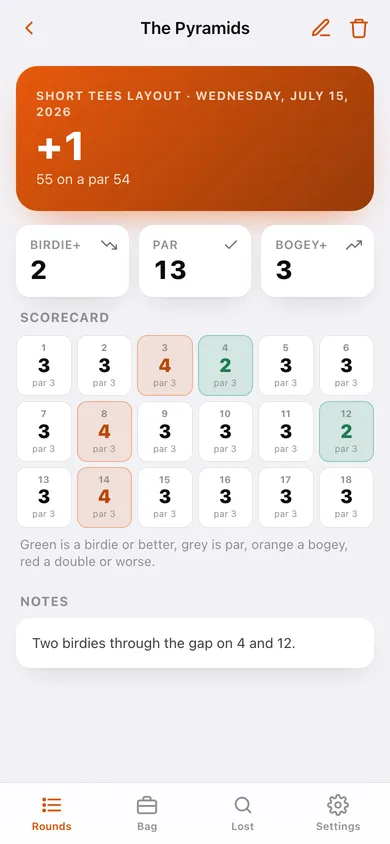
Set par and your score for 9, 18, 24 or 27 holes; the total and score-to-par update as you go, then the scorecard colours every birdie, par, bogey and double.
Course library
Every course keeps its city, hole count, notes, play count, best round against par and average — created automatically the first time you log a round there.
The full disc bag
Mold, brand, plastic, weight, condition, replacement price and the four flight numbers — speed, glide, turn and fade — grouped by putter, midrange, fairway and distance.
Flight chart with gap finder
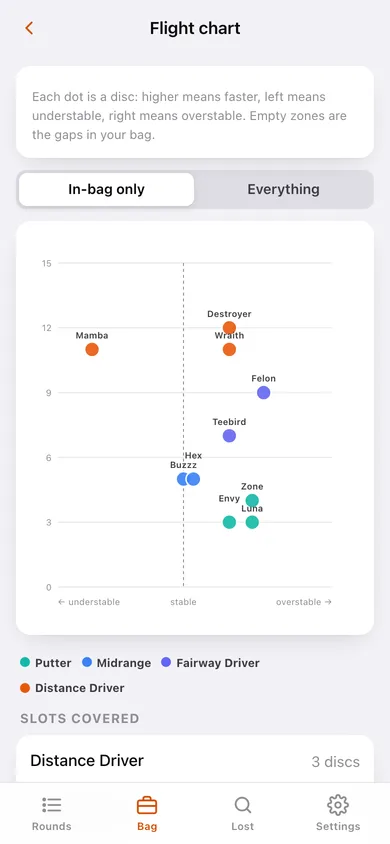
Every disc plotted on stability (turn + fade) against speed, so the hole between your beat-in mid and your most understable fairway is obvious before you are on the tee.
Lost-disc log with recovery
Record the course, the hole and how it vanished — water, woods, tall grass, out of bounds or never found — then flip it back to recovered when a stranger calls the number.
Season cost of donated plastic
Open losses are totalled at replacement price, so you know what the pond on 16 has actually cost you this year.
Screens
Every screen, rebuilt for the browser
-
1
Rounds
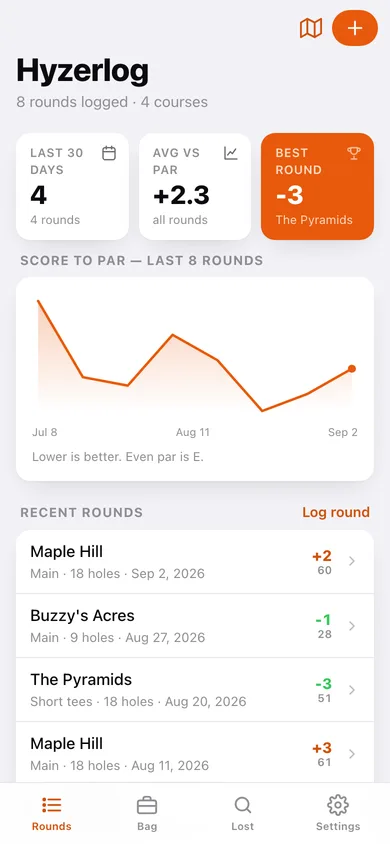
Rounds in the last 30 days, average against par, best round, a score-to-par trend line and every round you have logged.
-
2
Round
Score to par, birdie/par/bogey counts and the colour-coded hole-by-hole scorecard.
-
3
Flight chart
The whole bag on a stability-versus-speed grid with a slots-covered gap list.
-
4
Log round
Pick or create a course, set the layout, date and hole count, then par and score for every hole.
-
5
Courses
Every course with its city, hole count, play count and best score against par.
-
6
Course
Plays, best and average against par, course notes and every round played there.
-
7
Edit course
Name, city, hole count and the notes that matter before you tee off.
-
8
Bag
Every disc with its flight-number badge, grouped by type, filtered to in-bag or everything.
-
9
Disc
Flight numbers, stability reading, plastic, weight, price, in-bag toggle and the mark-lost flow.
-
10
Edit disc
Mold, brand, plastic, weight, type, condition, flight numbers, price and notes.
-
11
Lost Discs
Discs still out there, what they cost, what came back and where losses happen.
-
12
Mark a disc lost
Which disc, which course, which hole and how it vanished.
-
13
Settings
Bag defaults, bag and round CSV export, backup, sample data and erase.
Try it with sample data: Loads four New England courses, eight rounds over the last two months (including a career round and a donated Leopard3), a twelve-disc bag from putters to distance drivers, and three lost-disc reports — one still in the pond. You can start fresh at any time.
Ready? It's free.
No account, no install, no subscription. Everything you do stays in this browser.
Your say
What should Hyzerlog do? Tell us before we build it.
Tell us what to build next.
Comments need a free Google sign-in, so every one is from a real person.
Sign in with Google to commentNo comments yet — be the first to say what this app should do next.
Questions
Is the web version of Hyzerlog free?+
Yes. Every screen is free to use: no subscription, no in-app purchases, no account.
Do I need an account?+
No. Open Hyzerlog and start using it right away. Sign in with Google only if you want to upvote an app, save it to your list, or leave a comment.
Where is my data stored?+
Only in this browser's local storage. Nothing you enter is sent to our servers, so we can't see it, back it up, or restore it. Clearing site data, a private window, or another device starts empty. Export a backup from the in-app menu to keep it.
Is there a Hyzerlog app for iPhone or Android?+
Not yet. Hyzerlog is a community proposal: the browser version is complete, and we build the iPhone and Android app once 100 people upvote it. Upvoters get one email when it ships.