
Web app · Sports
Kitchen
The pickleball scoreboard you can read from the baseline — one tap per point
Two giant buttons, a score sized for a phone on the fence, and the real rules underneath: rally or side-out, singles or doubles, automatic server number and side rotation, win-by-2, undo, a point-by-point log, four court themes and unlimited match history. Free, no install.
Stored in your browser only. Nothing you do in the web version is sent to our servers. Clear your browser data and it's gone — so export a backup from the in-app menu if you want to keep it.
In your browser
What you can do in Kitchen on the web
One tap to score
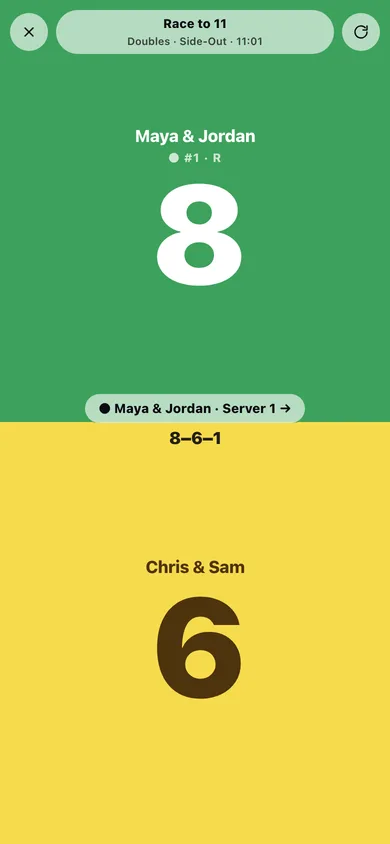
Tap the half under your team's colour. The app handles the server number, the server's side and side-out logic for you.
Rally and side-out, singles and doubles
The same scoring engine as the iPhone app — in side-out doubles only the serving team scores and the serve passes to server 2 before the other team gets it.
Race to 11, 15, 21 or your own number
Pick the target and whether the game has to be won by two. Custom targets and win-by-2 are unlocked here.
Undo and a point-by-point log
Tap Undo to roll back a mistap, or open the log to see every rally as “Maya & Jordan scores · 7–4” with side-outs marked.
Four court themes
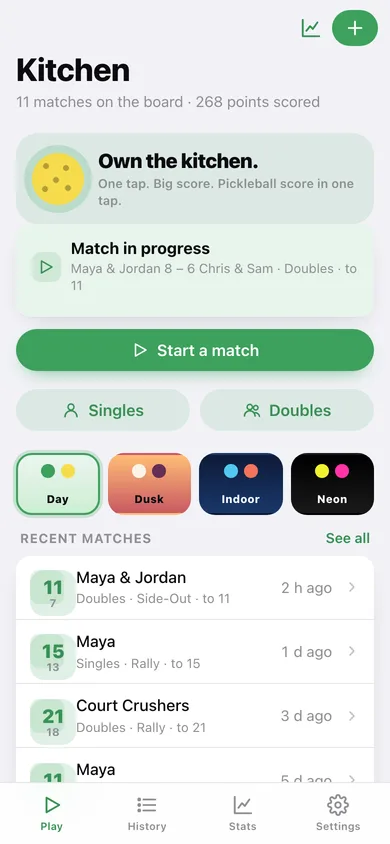
Day, Dusk, Indoor and Neon — high-contrast palettes tuned for real outdoor lighting, all four available.
Unlimited history and lifetime stats
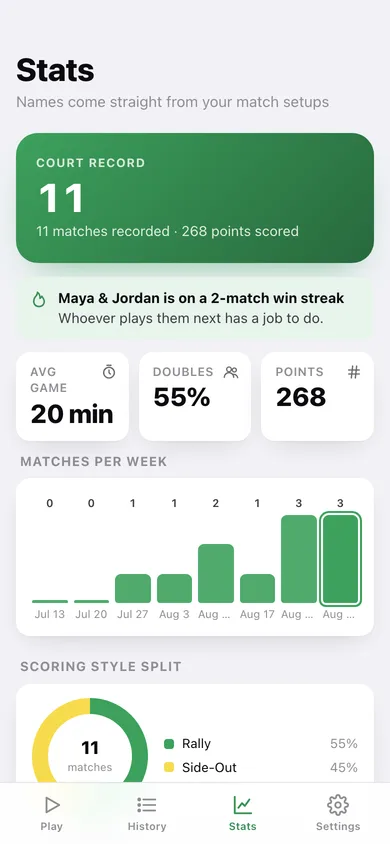
Every finished match is kept with score, format, duration and log, feeding a court record, a winners' circle and a win-streak callout.
Screens
Every screen, rebuilt for the browser
-
1
Play
Start a match, pick the court theme, resume a game in progress and see your last four results.
-
2
Scoreboard
The full-screen two-half scoreboard with the server indicator, called score line, undo and point log.
-
3
Stats
Court record, matches per week, rally-vs-side-out split, win streaks and the winners' circle.
-
4
New match
Format, scoring style, race-to, win-by-2 and team names before the first serve.
-
5
Match
Final score, when it was played, duration, race-to, format, scoring style and the rally-by-rally log.
-
6
History
Every finished match grouped by day, with a clear-all option.
-
7
Hand signals
What one finger, two fingers, a fist and an open palm mean in doubles side-out.
-
8
Settings
Court theme, match defaults, hand signals, CSV export, backup, sample data and erase.
Try it with sample data: Loads eight finished matches over the last three weeks — singles and doubles, rally and side-out — four of them with a full rally-by-rally log, plus a doubles game sitting at 8–6 on the scoreboard. You can start fresh at any time.
Ready? It's free.
No account, no install, no subscription. Everything you do stays in this browser.
Your say
Is Kitchen useful? Tell us what to build next.
Sign in with Google to vote.
Tell us what to build next.
Comments need a free Google sign-in, so every one is from a real person.
Sign in with Google to commentNo comments yet — be the first to say what this app should do next.
Questions
Is the web version of Kitchen free?+
Yes. Every screen is free to use: no subscription, no in-app purchases, no account.
Do I need an account?+
No. Open Kitchen and start using it right away. Sign in with Google only if you want to upvote an app, save it to your list, or leave a comment.
Where is my data stored?+
Only in this browser's local storage. Nothing you enter is sent to our servers, so we can't see it, back it up, or restore it. Clearing site data, a private window, or another device starts empty. Export a backup from the in-app menu to keep it.
How is the web version different from the Kitchen phone app?+
Shake-to-undo is an iPhone gesture; on the web the undo button in the top bar does the same job. No Apple Watch companion — the wrist scoring in the iPhone app has no browser equivalent. The screen may dim or sleep mid-game since a browser tab cannot hold the display awake the way the iPhone app does. The match in progress is saved in this browser only, so a different device or browser starts with a clean board.