
Web app · Utilities
CurbDay
Tap out the sweeping sign on your block and never guess again
Encode the rule from your curb — 2nd & 4th Tuesday, 8–10 AM, north side, Apr–Nov — and CurbDay computes every window offline, tells each parked car when to move, flags bundled holiday suspensions, and counts down every ticket's contest deadline. Free, no install, no account.
Stored in your browser only. Nothing you do in the web version is sent to our servers. Clear your browser data and it's gone — so export a backup from the in-app menu if you want to keep it.
This app is a community proposal.
Try the full browser version now. We build the iPhone and Android app once 100 people upvote it.
We'll email you once, when it ships. Unsubscribe anytime.
In your browser
What you can do in CurbDay on the web
A rule builder that speaks curb
Weekday, every week or 1st/2nd/3rd/4th/5th ordinals, a time window, the side of the street and a seasonal month range — including wrapped ranges like Nov–Mar.
Plain-English preview, live
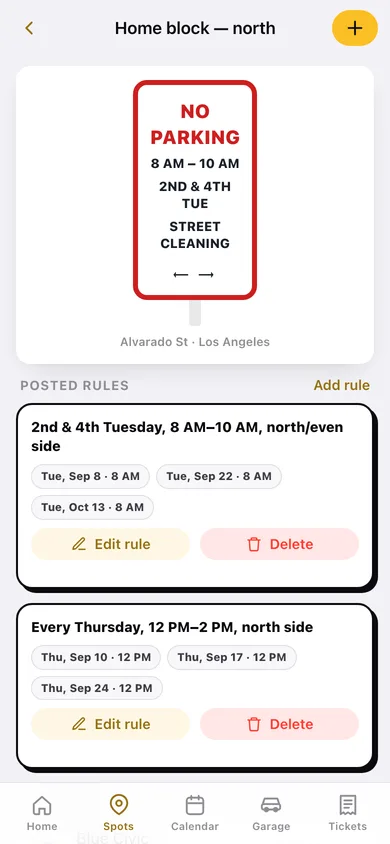
As you tap, CurbDay writes the rule back to you in words and shows the next three real dates it computes, so you can check it against the sign before you save.
One countdown per car
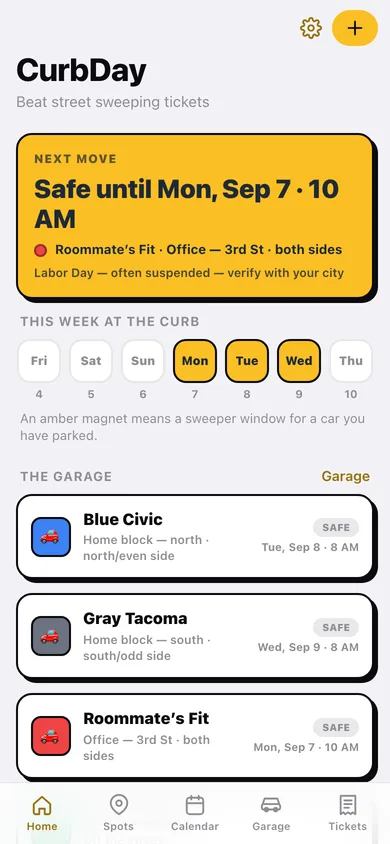
Every household car gets a name, colour and plate, parks at a saved spot and side, and gets its own MOVE / SAFE badge and next-window time.
Curb calendar
A month grid marking every sweep window across all your spots, plus the next ten windows in a list — all computed in your browser, no city feed to be wrong.
Holiday packs for eight cities
Bundled 2026–2027 suspension days for LA, San Francisco, Chicago, Boston, San Diego, Oakland, Sacramento and Philadelphia, every one labelled verify-with-your-city.
Ticket log with contest deadlines
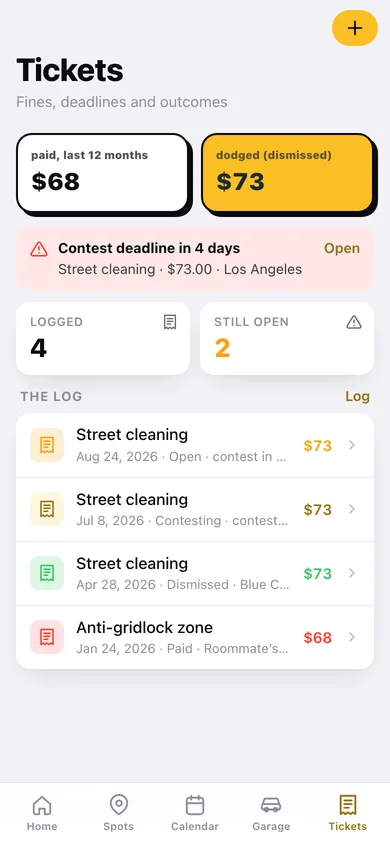
Fine, city, violation and the appeal deadline with a live countdown; track open, contesting, dismissed and paid, and see what you paid and dodged over the last twelve months.
Screens
Every screen, rebuilt for the browser
-
1
Home
The next-move countdown, the week-at-the-curb magnets, and a MOVE/SAFE card per car.
-
2
Spots
Every saved block with its rule chips, next sweep and the cars parked there.
-
3
Spot
The posted sign rendered from your rule, each rule's next three dates, cars parked here and tickets from this block.
-
4
Sign rule builder
Weekday, ordinals, time window, side and seasonal months with a live plain-English preview.
-
5
Curb calendar
Month grid of every sweep window plus the next ten, with holiday days marked green.
-
6
Holiday pack
Bundled suspension days for one city, every entry flagged verify-before-you-trust.
-
7
Garage
Cars on and off the street with each one's next window.
-
8
Car
Name, colour, plate and where it is parked, with its own move-by countdown.
-
9
Ticket log
Paid versus dismissed over twelve months, the soonest contest deadline, and every citation.
-
10
Ticket
Fine, days left to contest, status switcher and a copyable contest summary.
-
11
Log a ticket
Date, fine, violation, city, contest deadline, car and spot.
-
12
Settings
Reminder routine, all eight holiday packs, CSV of the ticket log, export, sample data and erase.
Try it with sample data: Loads four Los Angeles spots on Alvarado, 3rd and Hoover with five encoded sign rules (including a 2nd & 4th Tuesday and an Apr–Nov seasonal), four household cars with three parked, and four citations from an open one with a live contest deadline to a dismissed one. You can start fresh at any time.
Ready? It's free.
No account, no install, no subscription. Everything you do stays in this browser.
Your say
What should CurbDay do? Tell us before we build it.
Tell us what to build next.
Comments need a free Google sign-in, so every one is from a real person.
Sign in with Google to commentNo comments yet — be the first to say what this app should do next.
Questions
Is the web version of CurbDay free?+
Yes. Every screen is free to use: no subscription, no in-app purchases, no account.
Do I need an account?+
No. Open CurbDay and start using it right away. Sign in with Google only if you want to upvote an app, save it to your list, or leave a comment.
Where is my data stored?+
Only in this browser's local storage. Nothing you enter is sent to our servers, so we can't see it, back it up, or restore it. Clearing site data, a private window, or another device starts empty. Export a backup from the in-app menu to keep it.
Is there a CurbDay app for iPhone or Android?+
Not yet. CurbDay is a community proposal: the browser version is complete, and we build the iPhone and Android app once 100 people upvote it. Upvoters get one email when it ships.