
Web app · Health And Fitness
Cuffbook
The home blood-pressure log your doctor will actually read
Log systolic, diastolic and pulse in about ten seconds with arm and context tags, watch every reading get colour-coded against the AHA/ACC categories, and hand over a one-screen Doctor Summary with AM/PM averages and your full history. Free, no install.
Stored in your browser only. Nothing you do in the web version is sent to our servers. Clear your browser data and it's gone — so export a backup from the in-app menu if you want to keep it.
This app is a community proposal.
Try the full browser version now. We build the iPhone and Android app once 100 people upvote it.
We'll email you once, when it ships. Unsubscribe anytime.
In your browser
What you can do in Cuffbook on the web
Ten-second quick entry
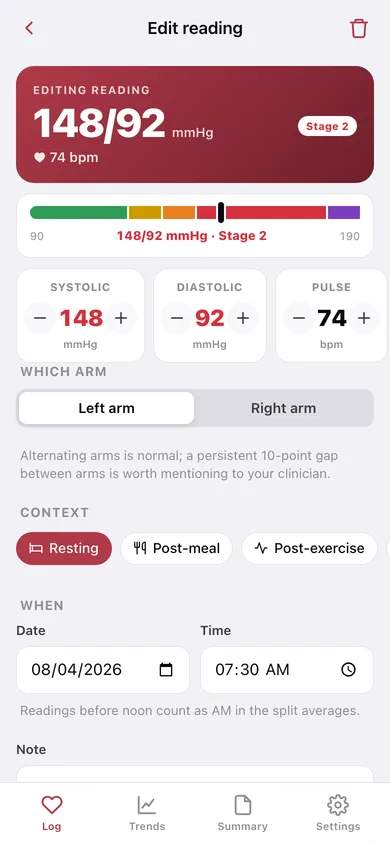
Big plus/minus steppers for systolic, diastolic and pulse with a live preview that recolours as you dial, plus arm and context tags — resting, post-meal, post-exercise or other.
Colour-coded categories
Every reading is labelled Normal, Elevated, Stage 1, Stage 2 or Crisis by the exact AHA/ACC rule, and shown on a guideline scale so you can see where it sits without reading a number.
AM/PM split averages
Readings before noon are the AM session, after noon the PM one, and the app tells you how many mmHg your mornings run above or below your evenings — the diurnal pattern a clinician looks for.
7, 30 and 90-day trends
Separate morning and evening systolic lines, a diastolic line across every session, the systolic and diastolic ranges, and a donut of how your readings fall across the categories.
Doctor Summary you can hand over
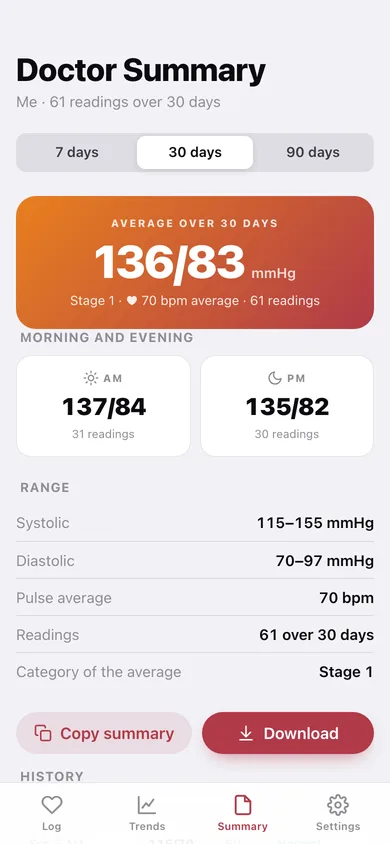
One screen: period average with its category, AM and PM split, min-max range, average pulse, reading count and the full history table — copy it to a patient portal or download it as a text file.
Multiple profiles for caregivers
Keep a separate log for a family member; the log, trends and summary all follow the active profile.
Offline and yours
No account, no cloud, no subscription — readings live in this browser, and CSV or JSON export gets them out whenever you want.
Screens
Every screen, rebuilt for the browser
-
1
Log
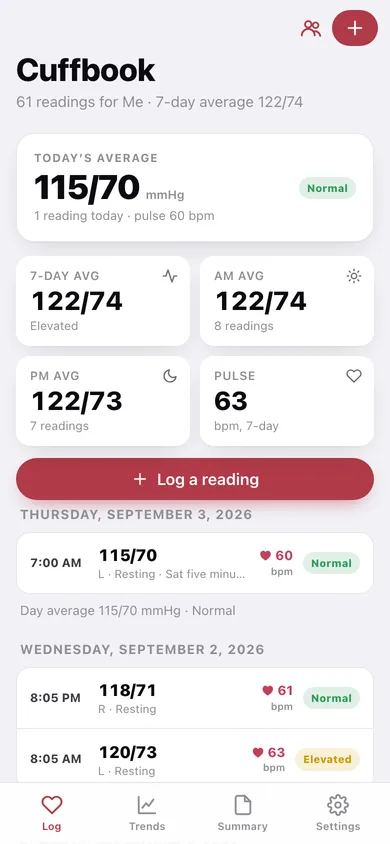
Today's average with its category badge, seven-day AM and PM averages, and every reading grouped by day with the day's average.
-
2
New reading
Live preview and guideline scale, three big steppers, arm selector, context chips, date and time, and a note.
-
3
Reading detail
The reading on the guideline scale with its category explanation, how it compares with your seven-day average and the previous reading.
-
4
Trends
Morning and evening systolic lines, the diastolic line, AM vs PM cards, ranges and the category donut over 7, 30 or 90 days.
-
5
Doctor Summary
Period average with category, AM/PM split, ranges and the full history table, copyable or downloadable.
-
6
BP categories
The five AHA/ACC bands with their ranges, how many of your readings fall in each, and how to take a reading that counts.
-
7
Profiles
Add, rename, switch or delete the people you log for — the caregiver case.
-
8
Settings
Default arm, crisis warning, profiles, CSV and JSON export, sample data and erase.
Try it with sample data: Loads the iPhone app's own sample log — 61 readings, two a day for a month, tracing a real hypertension trajectory from 152/95 down to 115/70 — plus a second 'Mum' profile with a week of wrist-cuff readings. You can start fresh at any time.
Ready? It's free.
No account, no install, no subscription. Everything you do stays in this browser.
Your say
What should Cuffbook do? Tell us before we build it.
Tell us what to build next.
Comments need a free Google sign-in, so every one is from a real person.
Sign in with Google to commentNo comments yet — be the first to say what this app should do next.
Questions
Is the web version of Cuffbook free?+
Yes. Every screen is free to use: no subscription, no in-app purchases, no account.
Do I need an account?+
No. Open Cuffbook and start using it right away. Sign in with Google only if you want to upvote an app, save it to your list, or leave a comment.
Where is my data stored?+
Only in this browser's local storage. Nothing you enter is sent to our servers, so we can't see it, back it up, or restore it. Clearing site data, a private window, or another device starts empty. Export a backup from the in-app menu to keep it.
Is there a Cuffbook app for iPhone or Android?+
Not yet. Cuffbook is a community proposal: the browser version is complete, and we build the iPhone and Android app once 100 people upvote it. Upvoters get one email when it ships.