
Web app · Sports
Crewrun
Run the club from one screen — roster, schedule, routes and who actually showed up
The volunteer organiser's clipboard: a member roster with pace groups and emergency contacts, your recurring weekly runs, a route library with plain-language turn notes, one-tap check-in and the streaks board it builds. Free, no install, nothing your members have to join.
Stored in your browser only. Nothing you do in the web version is sent to our servers. Clear your browser data and it's gone — so export a backup from the in-app menu if you want to keep it.
This app is a community proposal.
Try the full browser version now. We build the iPhone and Android app once 100 people upvote it.
We'll email you once, when it ships. Unsubscribe anytime.
In your browser
What you can do in Crewrun on the web
Member roster with pace groups
Name, pace group, join date, pace-leader flag, emergency contact and notes — filter by group, by pace leaders, or by who has gone quiet.
Recurring weekly schedule
Tuesday track, Thursday social, Saturday long run: day, time, meeting spot, attached route and the pace groups running. The home screen always shows the next one.
One-tap check-in with walk-ups
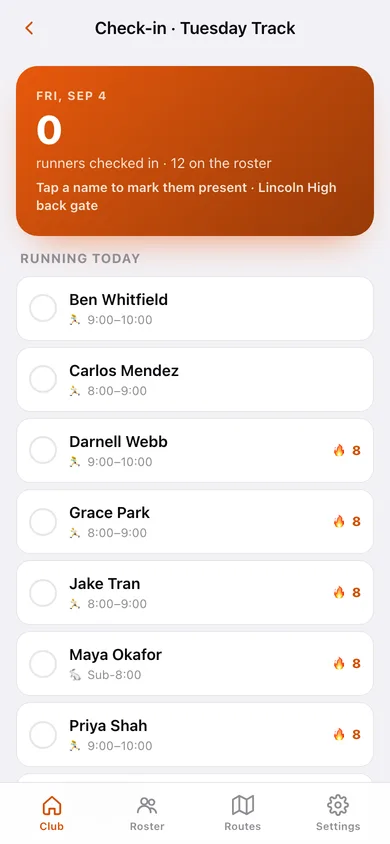
Big check targets sorted so the groups running today come first, plus a walk-up quick-add that puts a new name on the roster and checks them in at once.
Streaks, milestones and lapsed flags
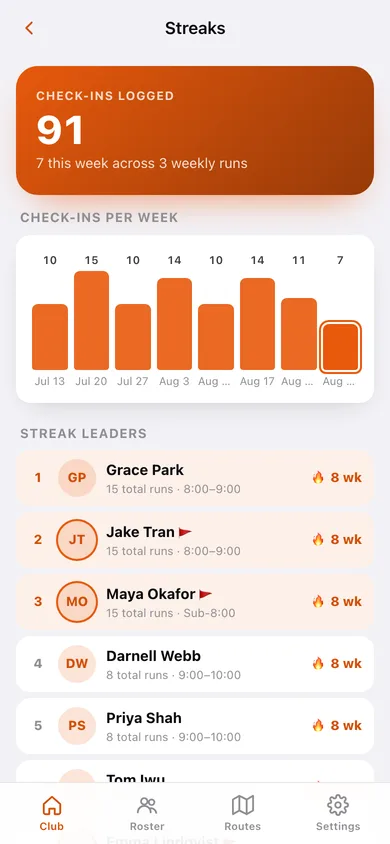
Check-ins become weekly attendance streaks, badges at 5, 10, 25, 50 and 100 runs, and a Lapsed pill on anyone with no check-in in four weeks.
Route library built for hand-off
Every loop carries distance, terrain, start point and plain-language turn notes, so the pace leader covering for you is not guessing at the course.
Roster CSV and run-day sheet
Export the roster with runs, streaks and contacts as CSV, or download a printable run-day check sheet for the next run — both unlocked here.
Screens
Every screen, rebuilt for the browser
-
1
Club
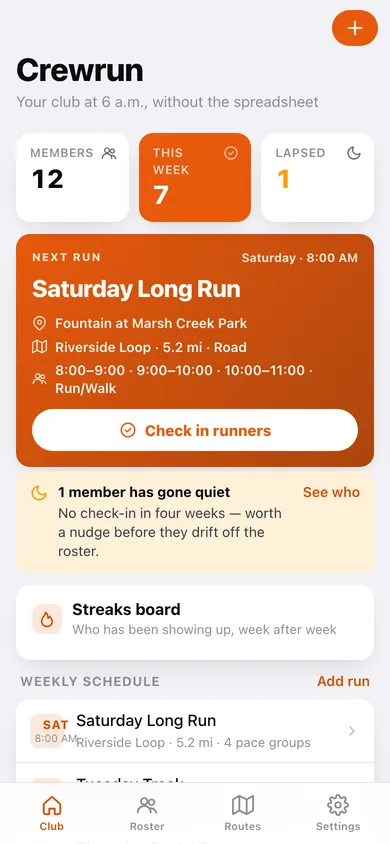
Members, check-ins this week and lapsed count, the next run card with its route, and the whole weekly schedule.
-
2
Check-in
Tap members present at the start line — groups running today first — with a walk-up quick-add.
-
3
Streaks board
Check-ins per week, the streak leaderboard and everyone who has hit a milestone.
-
4
Run detail
Day, time, meeting spot, pace groups, attached route and the last eight sessions' attendance.
-
5
Edit run
Create or change a weekly run: title, day, time, meeting spot, route and pace groups.
-
6
Roster
Every member with pace group, total runs and streak, searchable and filterable by group, leaders or lapsed.
-
7
Member
Total runs, week streak, milestone, emergency contact, notes and a per-week attendance chart.
-
8
Edit member
Name, pace group, join date, pace-leader flag, emergency contact and notes.
-
9
Routes
The saved loop library with distance, terrain and start point, plus a terrain breakdown.
-
10
Route
Distance, terrain, start point, full turn notes and the runs using this loop.
-
11
Edit route
Name, distance, terrain, start point and the turn notes any pace leader can follow.
-
12
Settings
Club name, lapsed flagging, roster CSV, run-day sheet, backup, sample club and erase.
Try it with sample data: Loads a 12-person club with four routes, three weekly runs (Tuesday track, Thursday social, Saturday long run) and eight weeks of check-ins — including one member who has quietly lapsed. You can start fresh at any time.
Ready? It's free.
No account, no install, no subscription. Everything you do stays in this browser.
Your say
What should Crewrun do? Tell us before we build it.
Tell us what to build next.
Comments need a free Google sign-in, so every one is from a real person.
Sign in with Google to commentNo comments yet — be the first to say what this app should do next.
Questions
Is the web version of Crewrun free?+
Yes. Every screen is free to use: no subscription, no in-app purchases, no account.
Do I need an account?+
No. Open Crewrun and start using it right away. Sign in with Google only if you want to upvote an app, save it to your list, or leave a comment.
Where is my data stored?+
Only in this browser's local storage. Nothing you enter is sent to our servers, so we can't see it, back it up, or restore it. Clearing site data, a private window, or another device starts empty. Export a backup from the in-app menu to keep it.
Is there a Crewrun app for iPhone or Android?+
Not yet. Crewrun is a community proposal: the browser version is complete, and we build the iPhone and Android app once 100 people upvote it. Upvoters get one email when it ships.