
Web app · Productivity
CreditKeep
Will you actually have enough credits when your cert renews?
Track CPE, CEU and PDU credits against the rules that decide renewal — total quota, per-category minimums and caps, annual floors and no-carryover windows — and get a deterministic qualifying check that names every rule you still miss. Free, in the browser.
Stored in your browser only. Nothing you do in the web version is sent to our servers. Clear your browser data and it's gone — so export a backup from the in-app menu if you want to keep it.
This app is a community proposal.
Try the full browser version now. We build the iPhone and Android app once 100 people upvote it.
We'll email you once, when it ships. Unsubscribe anytime.
In your browser
What you can do in CreditKeep on the web
Renewal models, not just an hours total
Each certification carries its own cycle: total credits required, per-category minimums and caps, a recommended annual floor, and whether credits carry over between cycles.
Qualifying check
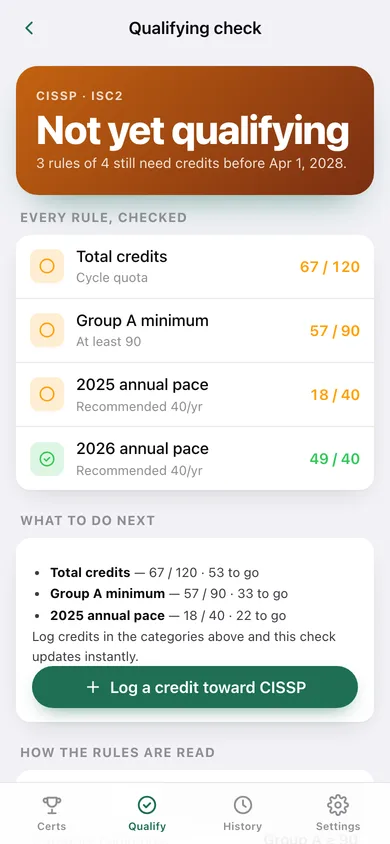
A deterministic pass over every rule — the cycle total, each category minimum, and each annual floor for a year that has already begun — listing exactly what is still unmet and how much is left to go.
Per-category gauges with cap markers
CISSP Group A/B, the PMP Talent Triangle, technical-versus-ethics splits — each with a live bar, its minimum, and a marker where its cap stops counting toward the total.
Annual-pace chart
One bar per cycle year against a dashed floor line, so a strong year cannot mask a weak one.
Five renewal templates
Start from CISSP (120/3yr, Group A ≥ 90, 40/yr), PMP (60 PDU across the Talent Triangle, giving back capped at 25), RN license (30 contact hours, no carryover), CPA (120 with a 20/yr floor) or a blank custom model — then adjust anything.
Audit export
A dated report with every rule, its verdict and every credit in the cycle, plus a CSV for an auditor or an employer reimbursement claim.
Searchable credit history
Every credit across every certification, filterable by certification and searchable by title, provider or category, with running hour totals.
Screens
Every screen, rebuilt for the browser
-
1
Certifications
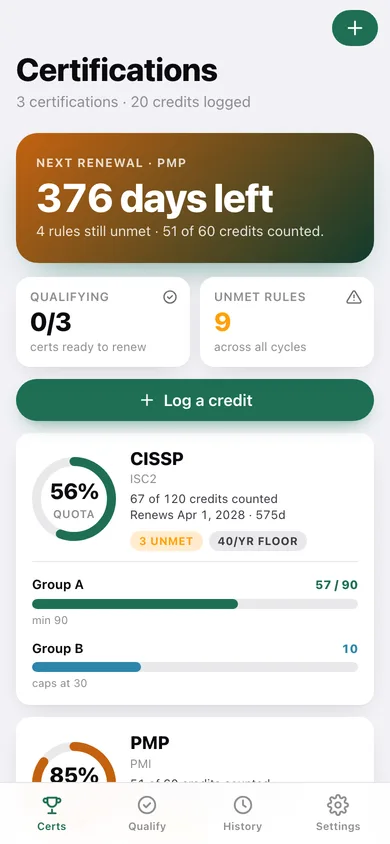
Next renewal countdown, then a ring gauge and category bars for every certification you track.
-
2
Certification
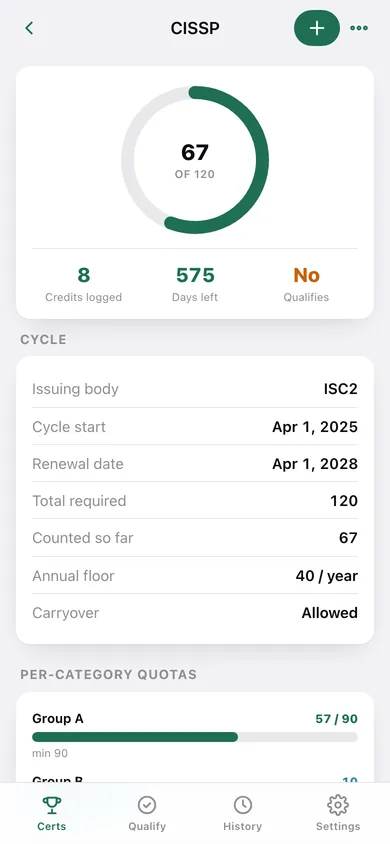
The big quota ring, cycle facts, per-category gauges, the annual-pace chart, the rule snapshot and recent credits.
-
3
Certification setup
Template picker, cycle dates, total, annual floor, carryover rule, and the category list with minimums and caps.
-
4
Log a credit
Pick the certification and category, set hours, provider and date — the category gauges update as you go.
-
5
Credit
One logged credit, editable in place, flagged if it falls outside a no-carryover window.
-
6
Qualify
Every certification at a glance: qualifying or not, with the unmet rules spelled out.
-
7
Qualifying check
The verdict for one certification, every rule checked one by one, and what to do about each gap.
-
8
History
Every credit ever logged, searchable and filterable by certification, grouped by month.
-
9
Export
A dated audit report and CSV of the cycle's credits, rules and verdict.
-
10
Settings
Record counts, logging defaults, JSON and CSV export, sample data and erase.
Try it with sample data: Loads three live cycles: a CISSP three-year cycle with eight credits split across Group A and B, a PMP cycle with all five Talent Triangle categories, and a no-carryover RN license with one credit deliberately dated in the previous cycle so the carryover rule is visible. You can start fresh at any time.
Ready? It's free.
No account, no install, no subscription. Everything you do stays in this browser.
Your say
What should CreditKeep do? Tell us before we build it.
Tell us what to build next.
Comments need a free Google sign-in, so every one is from a real person.
Sign in with Google to commentNo comments yet — be the first to say what this app should do next.
Questions
Is the web version of CreditKeep free?+
Yes. Every screen is free to use: no subscription, no in-app purchases, no account.
Do I need an account?+
No. Open CreditKeep and start using it right away. Sign in with Google only if you want to upvote an app, save it to your list, or leave a comment.
Where is my data stored?+
Only in this browser's local storage. Nothing you enter is sent to our servers, so we can't see it, back it up, or restore it. Clearing site data, a private window, or another device starts empty. Export a backup from the in-app menu to keep it.
Is there a CreditKeep app for iPhone or Android?+
Not yet. CreditKeep is a community proposal: the browser version is complete, and we build the iPhone and Android app once 100 people upvote it. Upvoters get one email when it ships.