
Web app · Lifestyle
Crate
Catalog your records — the shelf you browse, not a marketplace
An offline vinyl catalog in the browser: Goldmine sleeve and media grading, price paid against what you think it's worth, shelf location down to the slot, a wantlist for the shop, and insights by decade, genre and label. No account, no listings.
Stored in your browser only. Nothing you do in the web version is sent to our servers. Clear your browser data and it's gone — so export a backup from the in-app menu if you want to keep it.
This app is a community proposal.
Try the full browser version now. We build the iPhone and Android app once 100 people upvote it.
We'll email you once, when it ships. Unsubscribe anytime.
In your browser
What you can do in Crate on the web
A shelf you can actually browse
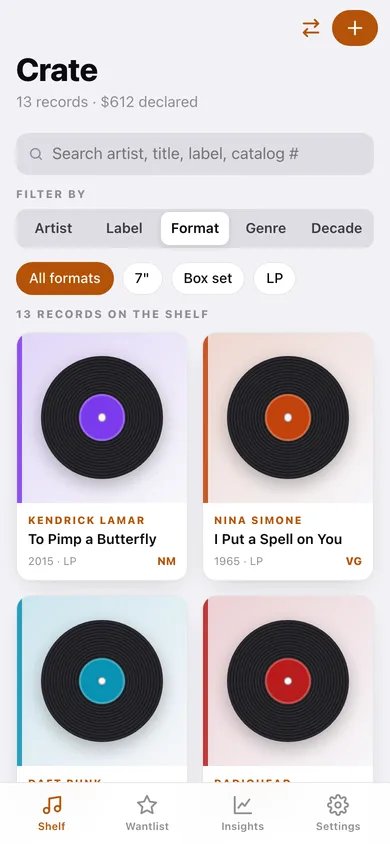
Every record as a tile with a pressed-vinyl motif coloured by genre, filtered by artist, label, format, genre or decade and sorted six ways — recently added, artist, title, year either way, or value.
Goldmine condition grading
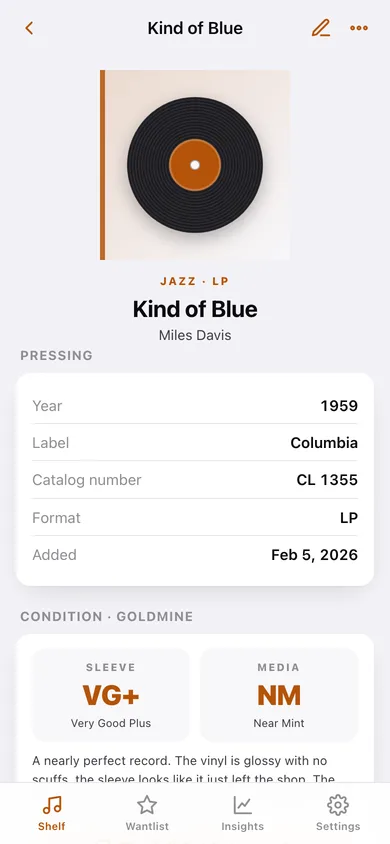
Sleeve and media graded separately on the collectors' standard — M, NM, VG+, VG and G — with the full description of each grade bundled offline.
Price paid vs what it's worth
Record what you paid and what you reckon it's worth now, and Crate shows the net on each record plus the declared value of the whole shelf.
Shelf location down to the slot
Crate B, slot 14. Find any record in a 2,000-piece collection instead of flicking through every sleeve.
Wantlist for the shop
The records you're still chasing, with a note about which pressing — and a warning when you already own a copy, so you don't buy a dupe in the aisle.
Collection insights and CSV export
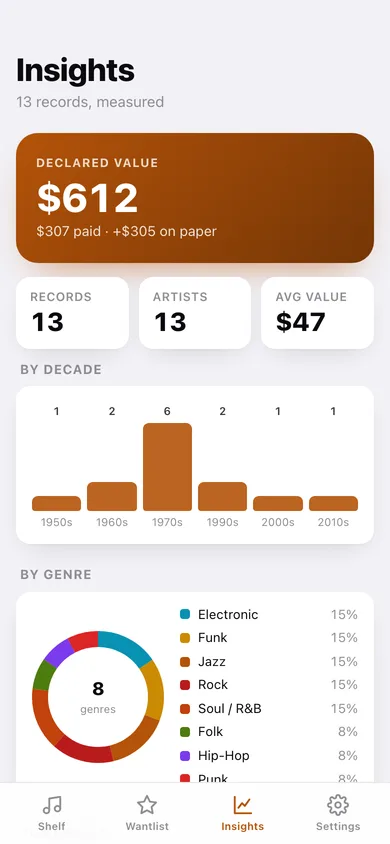
Records by decade, genre, top labels, media condition and format, your standouts, and a CSV of the whole collection for a spreadsheet or your insurer.
Screens
Every screen, rebuilt for the browser
-
1
Shelf
The full collection as vinyl tiles, searchable and filterable by artist, label, format, genre or decade.
-
2
Record
One record: pressing details, Goldmine sleeve and media grades, price paid vs current value, and where it sits on the shelf.
-
3
Insights
Declared value, records by decade, a genre donut, top labels, condition spread and your standouts.
-
4
Wantlist
Records you're hunting, with dupe warnings and a one-tap move to the shelf when you find one.
-
5
Goldmine grading
The five-grade collectors' scale in full, with how many of your records sit at each grade.
-
6
Add a record
Artist, title, year, label, catalog number, format, genre, both grades, prices, shelf location and notes.
-
7
Settings
Defaults for new records, dupe warnings, the grading reference, CSV and JSON export, and erase.
Try it with sample data: Loads thirteen records from 1959 to 2015 across jazz, soul, rock, punk, funk, folk, electronic and hip-hop — graded, priced and shelved — plus three records on the wantlist. You can start fresh at any time.
Ready? It's free.
No account, no install, no subscription. Everything you do stays in this browser.
Your say
What should Crate do? Tell us before we build it.
Tell us what to build next.
Comments need a free Google sign-in, so every one is from a real person.
Sign in with Google to commentNo comments yet — be the first to say what this app should do next.
Questions
Is the web version of Crate free?+
Yes. Every screen is free to use: no subscription, no in-app purchases, no account.
Do I need an account?+
No. Open Crate and start using it right away. Sign in with Google only if you want to upvote an app, save it to your list, or leave a comment.
Where is my data stored?+
Only in this browser's local storage. Nothing you enter is sent to our servers, so we can't see it, back it up, or restore it. Clearing site data, a private window, or another device starts empty. Export a backup from the in-app menu to keep it.
Is there a Crate app for iPhone or Android?+
Not yet. Crate is a community proposal: the browser version is complete, and we build the iPhone and Android app once 100 people upvote it. Upvoters get one email when it ships.