
Web app · Health And Fitness
CPAT Ready
Eight events, ten minutes twenty, and a plan that counts backward
The full CPAT protocol — every event's layout, pass criteria and failure mode — plus a 60-steps-per-minute StepMill metronome, a full-course 10:20 simulation with per-event splits, a periodized plan built from your test date and a 0-100 readiness score. Free, no install.
Stored in your browser only. Nothing you do in the web version is sent to our servers. Clear your browser data and it's gone — so export a backup from the in-app menu if you want to keep it.
This app is a community proposal.
Try the full browser version now. We build the iPhone and Android app once 100 people upvote it.
We'll email you once, when it ships. Unsubscribe anytime.
In your browser
What you can do in CPAT Ready on the web
All eight events in course order
Stair climb, hose drag, equipment carry, ladder raise, forcible entry, search, rescue drag, ceiling breach — each with the real layout, what the proctor is watching, the way candidates actually fail it, and how to train it.
StepMill cadence metronome
One click per step at exactly 60 steps per minute with a 3:00 event clock, alternating LEFT/RIGHT call, a pulsing beat and vest presets from none to the 75-lb test weight — then it offers to log the block.
Full-course 10:20 simulation
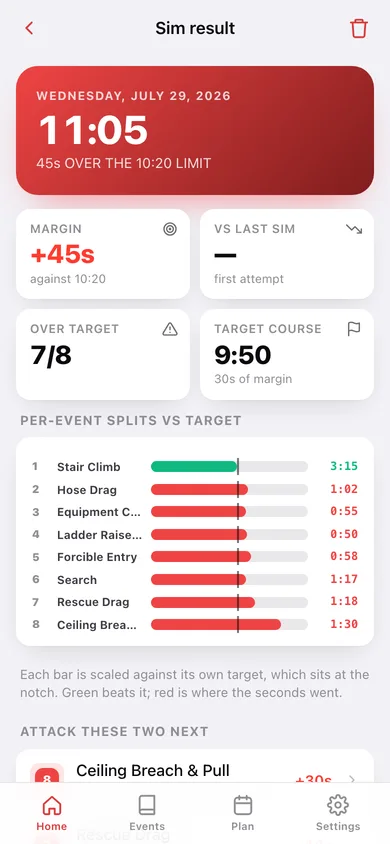
Start the clock, tap Split as you finish each station, and the attempt saves itself with all eight splits, your margin against the limit and the two slowest events to attack next.
Periodized plan from your test date
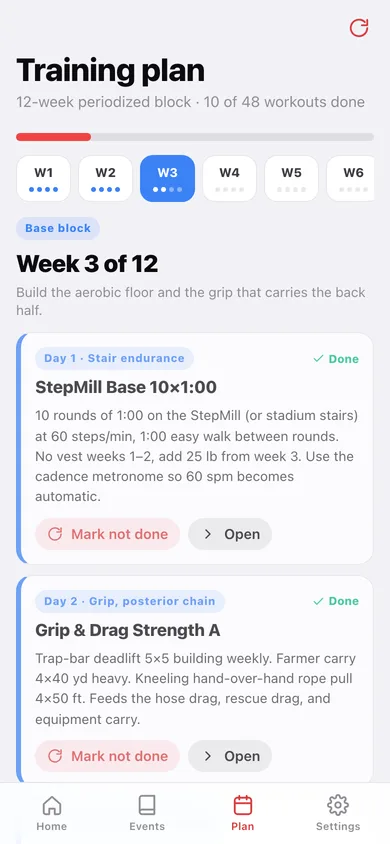
Twelve template weeks — Base, Capacity, Peak, Taper — counted backward from the date you enter. A short runway compresses to the last weeks so peak work and the taper always survive.
Readiness score, computed not stored
40% longest StepMill block at 50 lb or more against the 3:00 event, 35% best full-course pace against 10:20, 25% workouts checked off in the last 28 days — with one specific sentence telling you what to fix.
Test day
A countdown to the date, the seven-item gear and logistics checklist, and a pacing card with every target split — 9:50 total, 30 seconds of margin under the limit.
Screens
Every screen, rebuilt for the browser
-
1
Home
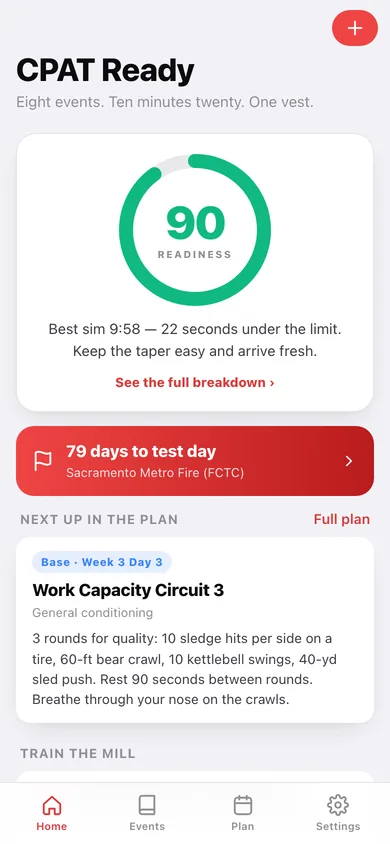
The readiness ring with its one line of advice, the countdown, your next plan workout, the metronome, and your last simulation with its splits.
-
2
The eight events
Every event in course order with its target split and how your best attempt compares.
-
3
Event detail
Course layout, pass criteria, the common failure mode, four training cues, and your logged attempts at that station.
-
4
Cadence metronome
60 steps per minute, 3:00 clock or free run, LEFT/RIGHT call, vest presets, and one-tap session logging.
-
5
Full-course simulation
The 10:20 clock, the live station, and every split as you tap it in.
-
6
Sim result
Total against the limit, per-event split bars with the target notch, the two events to attack, and every attempt as a chart.
-
7
Training plan
The week rail with block colours, this week's four workouts in full, and check-offs that feed the readiness score.
-
8
Workout
One session in full — the block, the focus, the prescription, and where to log it.
-
9
Readiness
The score broken into its three weighted parts, StepMill progression as bars, and every simulation.
-
10
Session log
Every StepMill block, single-event attempt and strength day, grouped by date and filterable.
-
11
Log a session
Kind, event, date, minutes and seconds, vest weight, cadence and RPE.
-
12
Test day
Days-to-test countdown, the gear and logistics checklist, and the pacing card with every target split.
-
13
Settings
Name, agency, test date, vest and StepMill access, plan rebuild, cues, CSV and JSON export, sample data and erase.
Try it with sample data: Loads a candidate 79 days out from a Sacramento Metro Fire test: the full 12-week periodized plan with ten workouts checked off, ten logged sessions including loaded StepMill blocks, and four full-course simulations tracing the 11:05 → 9:58 improvement arc. You can start fresh at any time.
Ready? It's free.
No account, no install, no subscription. Everything you do stays in this browser.
Your say
What should CPAT Ready do? Tell us before we build it.
Tell us what to build next.
Comments need a free Google sign-in, so every one is from a real person.
Sign in with Google to commentNo comments yet — be the first to say what this app should do next.
Questions
Is the web version of CPAT Ready free?+
Yes. Every screen is free to use: no subscription, no in-app purchases, no account.
Do I need an account?+
No. Open CPAT Ready and start using it right away. Sign in with Google only if you want to upvote an app, save it to your list, or leave a comment.
Where is my data stored?+
Only in this browser's local storage. Nothing you enter is sent to our servers, so we can't see it, back it up, or restore it. Clearing site data, a private window, or another device starts empty. Export a backup from the in-app menu to keep it.
Is there a CPAT Ready app for iPhone or Android?+
Not yet. CPAT Ready is a community proposal: the browser version is complete, and we build the iPhone and Android app once 100 people upvote it. Upvoters get one email when it ships.