
Web app · Utilities
CoverKit: Paint & Tile
Measure the walls, buy exactly enough paint, wallpaper or tile
Enter each wall's run and ceiling height, tap out the windows and doors, and CoverKit returns the gallons, rolls, or tile boxes plus grout to buy — with the safety buffer, the real formula, a per-room shopping list and a project total. Free, no install, no account.
Stored in your browser only. Nothing you do in the web version is sent to our servers. Clear your browser data and it's gone — so export a backup from the in-app menu if you want to keep it.
This app is a community proposal.
Try the full browser version now. We build the iPhone and Android app once 100 people upvote it.
We'll email you once, when it ships. Unsubscribe anytime.
In your browser
What you can do in CoverKit: Paint & Tile on the web
Wall-by-wall, not a guessed average
Every wall keeps its own width × height and its own subtracted openings, so a room with a picture window and a room without do not come out the same.
Tap out windows and doors
Quick-add chips subtract a standard door (21 sq ft), a window (12 sq ft) or a big window (24 sq ft) — you never pay to cover glass.
Paint gallons for your coats
Net area × buffer × coats ÷ the coverage printed on your can, rounded up, priced per gallon — the formula is shown so you can check it.
Wallpaper rolls with pattern repeat
A 1.15× repeat adds 15% of waste before the rolls are counted, because a patterned paper never cuts to zero.
Tile boxes plus grout bags
Tile size in inches becomes tiles per square foot, tiles become boxes at your count-per-box, and the raw net area becomes bags of grout.
A shopping ticket for the whole job
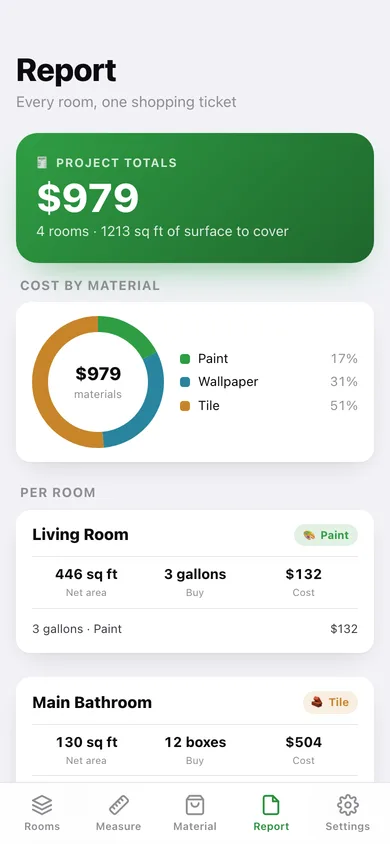
Project totals, a cost-by-material donut, per-room line items, and a plain-text list you can copy or download for the store.
Screens
Every screen, rebuilt for the browser
-
1
Rooms
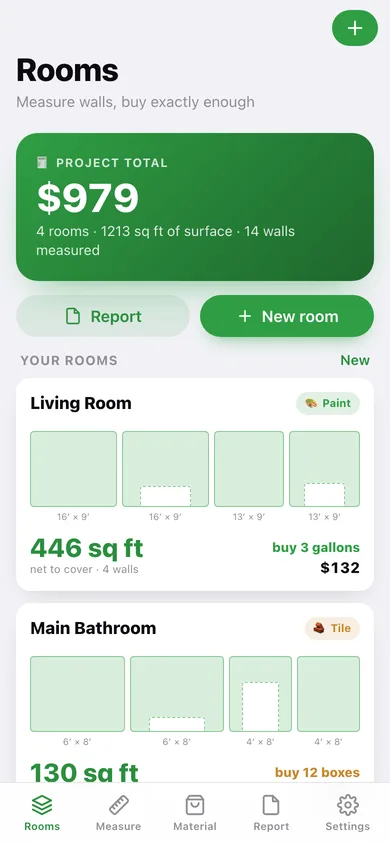
Project total, a scale elevation of every room's walls, net area and what to buy.
-
2
Room
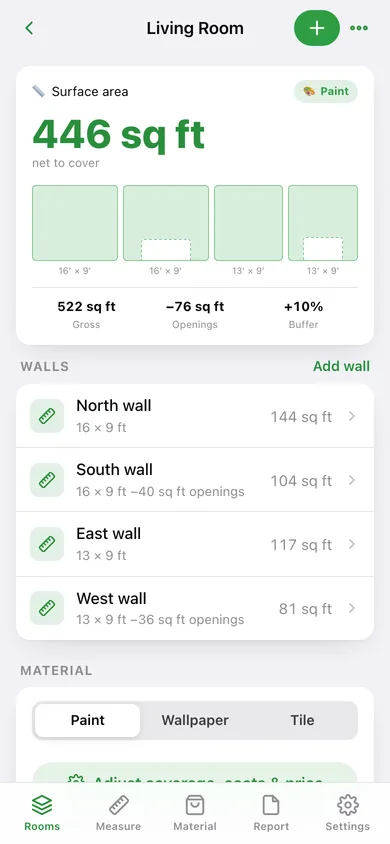
Gross minus openings plus buffer, the wall list, material picker and the shopping list with its formula.
-
3
New room
Name, material and a first wall, with the net area previewed as you type.
-
4
Wall editor
Width, height and openings for one wall, with door and window quick-add chips.
-
5
Measure
How a room gets measured wall by wall, the standard opening sizes, and a sample room loader.
-
6
Material setup
Coats and coverage, roll coverage and pattern repeat, or tile size, box count and grout — with a live buy quantity.
-
7
Report
Project totals, cost by material, per-room line items and a copyable shopping list.
-
8
Settings
Default buffer, coats and paint price, CSV of every wall, export, sample data and erase.
Try it with sample data: Loads four measured rooms — a painted living room, a tiled main bathroom, a wallpapered sample bedroom and a one-coat hallway — with fourteen walls and their windows and doors already subtracted. You can start fresh at any time.
Ready? It's free.
No account, no install, no subscription. Everything you do stays in this browser.
Your say
What should CoverKit: Paint & Tile do? Tell us before we build it.
Tell us what to build next.
Comments need a free Google sign-in, so every one is from a real person.
Sign in with Google to commentNo comments yet — be the first to say what this app should do next.
Questions
Is the web version of CoverKit: Paint & Tile free?+
Yes. Every screen is free to use: no subscription, no in-app purchases, no account.
Do I need an account?+
No. Open CoverKit: Paint & Tile and start using it right away. Sign in with Google only if you want to upvote an app, save it to your list, or leave a comment.
Where is my data stored?+
Only in this browser's local storage. Nothing you enter is sent to our servers, so we can't see it, back it up, or restore it. Clearing site data, a private window, or another device starts empty. Export a backup from the in-app menu to keep it.
Is there a CoverKit: Paint & Tile app for iPhone or Android?+
Not yet. CoverKit: Paint & Tile is a community proposal: the browser version is complete, and we build the iPhone and Android app once 100 people upvote it. Upvoters get one email when it ships.