
Web app · Lifestyle
Confetti
Guests, budget, checklist and the day-of run of show — one card per party
Plan a birthday, baby shower or holiday dinner in the browser: RSVP headcount with plus-ones, a live budget by category, a checklist tied to the event date, and an hour-by-hour run of show. Free, no account, no install.
Stored in your browser only. Nothing you do in the web version is sent to our servers. Clear your browser data and it's gone — so export a backup from the in-app menu if you want to keep it.
This app is a community proposal.
Try the full browser version now. We build the iPhone and Android app once 100 people upvote it.
We'll email you once, when it ships. Unsubscribe anytime.
In your browser
What you can do in Confetti on the web
Events hub with live countdowns
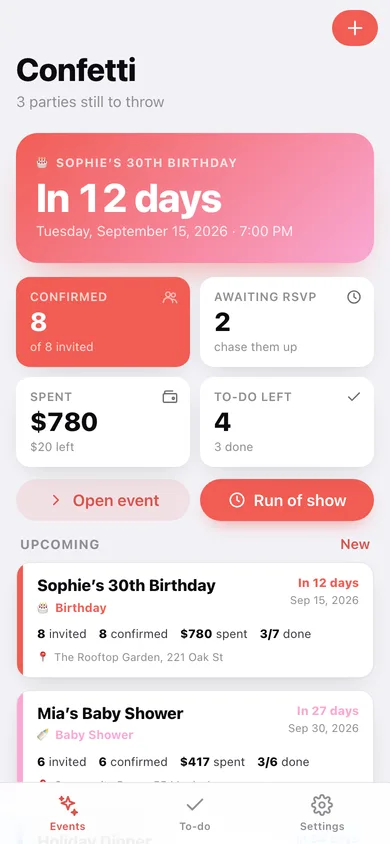
Every party as a colour-striped card — In 12 days, Tomorrow!, Today! — with invited, confirmed, spent and tasks-done at a glance, split into Upcoming and Past.
RSVP tracker that counts plus-ones
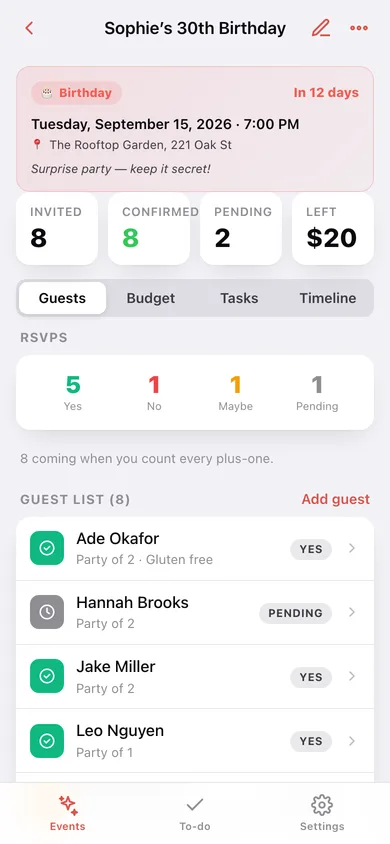
Log each guest as Yes, No, Maybe or Pending with a party size, and the header shows real confirmed headcount, total invited and who is still to reply.
Live budget by category
Set a total, log line items across Food & Drinks, Venue, Decor, Entertainment, Gifts, Photography, Invitations and Other, and watch the bar go amber at 80% and red when you go over.
Checklist tied to the event date
Every task carries a due offset — 30 days before through Day-of — and the To-do tab rolls all your parties into Overdue, Today & tomorrow, This week and Later.
Starter checklists for every event type
Birthday, Baby Shower, Dinner Party, Wedding, Graduation, Holiday and Other each come with a real starter to-do list you can drop in with one tap.
Day-of run of show
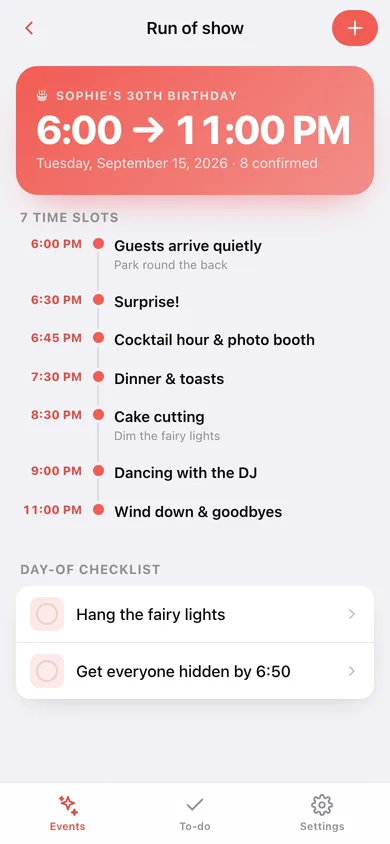
A vertical timeline of labelled time slots — 6:30 Surprise!, 8:30 Cake cutting — with the day-of checklist underneath so the party runs itself.
Screens
Every screen, rebuilt for the browser
-
1
Events
Countdown to the next party, confirmed headcount, spend and open tasks, then every event as a card.
-
2
Event card
One party with four tabs: Guests and RSVPs, budget with a category donut, the checklist, and the timeline.
-
3
Run of show
The full day-of timeline as a rail of time slots, with the day-of checklist underneath.
-
4
New event
Title, type, date and time, location, total budget, notes — and an optional starter checklist.
-
5
To-do
Every open task across every party, bucketed into Overdue, Today & tomorrow, This week and Later.
-
6
Settings
Starter-checklist and headcount options, a list of your parties, CSV guest export, backup and erase.
Try it with sample data: Loads four parties — a surprise 30th, a baby shower, a holiday dinner and a retirement dinner that already happened — with 22 guests, 20 budget lines, 20 tasks and 17 timeline slots. You can start fresh at any time.
Ready? It's free.
No account, no install, no subscription. Everything you do stays in this browser.
Your say
What should Confetti do? Tell us before we build it.
Tell us what to build next.
Comments need a free Google sign-in, so every one is from a real person.
Sign in with Google to commentNo comments yet — be the first to say what this app should do next.
Questions
Is the web version of Confetti free?+
Yes. Every screen is free to use: no subscription, no in-app purchases, no account.
Do I need an account?+
No. Open Confetti and start using it right away. Sign in with Google only if you want to upvote an app, save it to your list, or leave a comment.
Where is my data stored?+
Only in this browser's local storage. Nothing you enter is sent to our servers, so we can't see it, back it up, or restore it. Clearing site data, a private window, or another device starts empty. Export a backup from the in-app menu to keep it.
Is there a Confetti app for iPhone or Android?+
Not yet. Confetti is a community proposal: the browser version is complete, and we build the iPhone and Android app once 100 people upvote it. Upvoters get one email when it ships.