
Web app · Utilities
CleanRoom
Size a smoke-safe room with EPA CADR math — in any browser
Enter a room's square footage and ceiling height, add the purifiers and DIY box-fan builds you own, and get an instant undersized / adequate / strong verdict at 4–5 air changes per hour. Log the day's AQI and every filter's countdown speeds up on smoke days. Free, no install.
Stored in your browser only. Nothing you do in the web version is sent to our servers. Clear your browser data and it's gone — so export a backup from the in-app menu if you want to keep it.
This app is a community proposal.
Try the full browser version now. We build the iPhone and Android app once 100 people upvote it.
We'll email you once, when it ships. Unsubscribe anytime.
In your browser
What you can do in CleanRoom on the web
EPA room sizing, done for you
Required smoke CADR equals the room's square footage; delivered ACH is (CADR × 60) ÷ room volume, graded against the EPA wildfire target of 4–5 air changes per hour.
Purifiers and DIY box-fan builds
Six real presets — Coway AP-1512HH, Levoit Core 300, Winix 5500-2, Blueair Blue 211+, box fan + MERV-13 and the Corsi-Rosenthal cube — or type in any unit's rated CADR and media life.
Exposure-accelerated filter life
Filters wear ×0.3 on a clear day, ×1 at moderate, ×2 for sensitive groups, ×3.5 unhealthy, ×5 very unhealthy and ×7 hazardous — so a smoke week can spend months of media.
Daily AQI log and burndown
Log the outdoor AQI on a colour-banded slider; the trend chart, the wear multiplier and every device's burndown line update together.
The six-step smoke playbook
Seal the room, block the gaps, run filtration on high, recirculate HVAC on MERV-13, keep it cool, re-check after it clears — each with the full detail and quick tips, tickable as you go.
Unlimited rooms, all unlocked
Bedroom, nursery, office, living room — every room keeps its own devices, verdict and notes, and exports as JSON or a CSV of the AQI log.
Screens
Every screen, rebuilt for the browser
-
1
Rooms
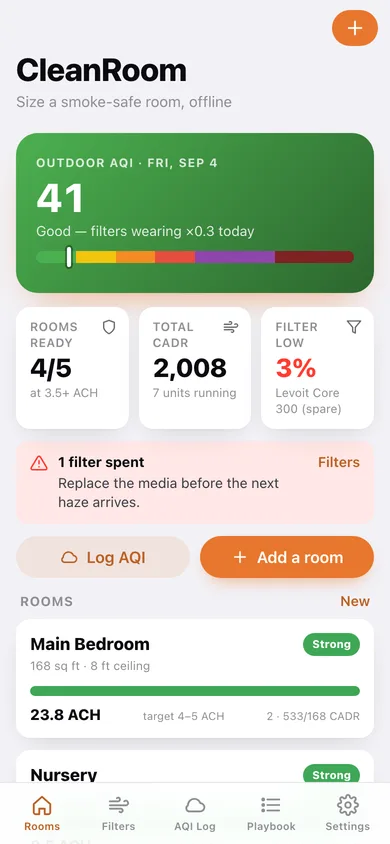
Today's AQI with its wear multiplier, rooms-ready count, and an ACH card per room.
-
2
Room verdict
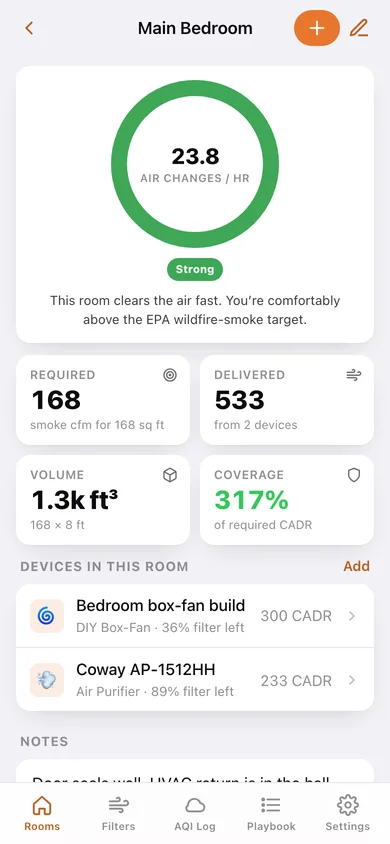
The air-changes ring, required vs delivered CADR, room volume, coverage and every device in the room.
-
3
Room sizing
Name, floor area and ceiling height with the required smoke CADR recalculated as you step.
-
4
Add a device
Purifier or DIY box-fan, rated smoke CADR and media life, with six real quick presets.
-
5
Filters
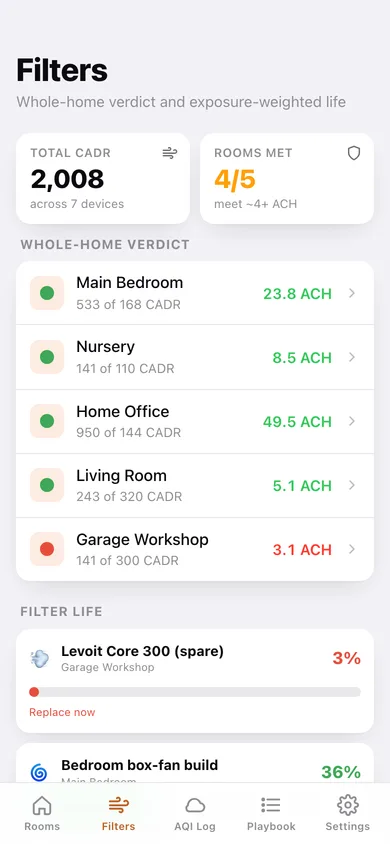
Whole-home verdict per room plus every filter's remaining-life bar, weakest first.
-
6
Filter timeline
Remaining-life ring, exposure burndown across logged AQI days, and Mark filter replaced.
-
7
AQI log
Colour-banded trend chart, smoke-day count, filter-days burned and the full day history.
-
8
Smoke playbook
The six-step checklist to seal a room and clear the air, with your progress.
-
9
Playbook step
One step in full — what to do and its quick tips — with next/previous.
-
10
Settings
ACH target, sensitive-group wording, reset all filter clocks, export, sample data and erase.
Try it with sample data: Loads five sized rooms (bedroom, nursery, office, living room and an undersized garage workshop with spent media) holding seven real purifiers and box-fan builds, plus a ten-day haze event from AQI 38 up to 241 and back down. You can start fresh at any time.
Ready? It's free.
No account, no install, no subscription. Everything you do stays in this browser.
Your say
What should CleanRoom do? Tell us before we build it.
Tell us what to build next.
Comments need a free Google sign-in, so every one is from a real person.
Sign in with Google to commentNo comments yet — be the first to say what this app should do next.
Questions
Is the web version of CleanRoom free?+
Yes. Every screen is free to use: no subscription, no in-app purchases, no account.
Do I need an account?+
No. Open CleanRoom and start using it right away. Sign in with Google only if you want to upvote an app, save it to your list, or leave a comment.
Where is my data stored?+
Only in this browser's local storage. Nothing you enter is sent to our servers, so we can't see it, back it up, or restore it. Clearing site data, a private window, or another device starts empty. Export a backup from the in-app menu to keep it.
Is there a CleanRoom app for iPhone or Android?+
Not yet. CleanRoom is a community proposal: the browser version is complete, and we build the iPhone and Android app once 100 people upvote it. Upvoters get one email when it ships.