
Web app · Productivity
ClassProof
Keep your own attendance record for a court-ordered weekly class
Log every session in seconds, watch your absence budget against the program's cap, project your completion date from your real pace, and keep a dated fee ledger with a running balance. Free, in the browser, nothing sent anywhere.
Stored in your browser only. Nothing you do in the web version is sent to our servers. Clear your browser data and it's gone — so export a backup from the in-app menu if you want to keep it.
This app is a community proposal.
Try the full browser version now. We build the iPhone and Android app once 100 people upvote it.
We'll email you once, when it ships. Unsubscribe anytime.
In your browser
What you can do in ClassProof on the web
Session log with a running count
Attended, excused absence, unexcused absence or makeup — with the date, week number, facilitator, fee charged and a note. The dashboard counts attended + makeup sessions toward the required total.
Absence budget against the cap
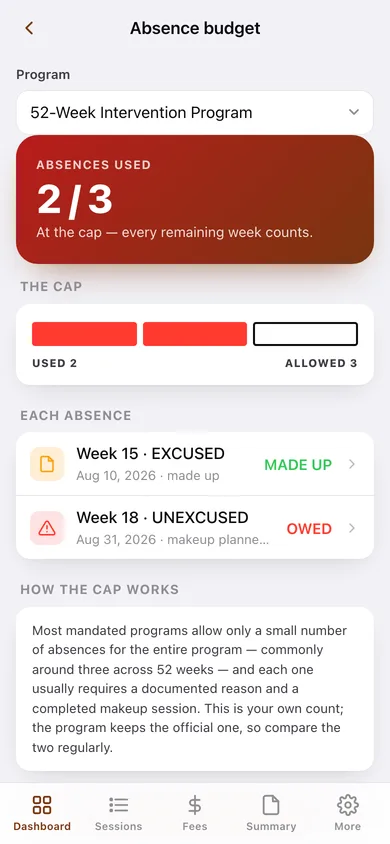
The number that decides compliance: absences used out of the program's allowance, drawn as filled blocks, with every absence flagged until its makeup is logged.
Makeup planner
Each absence carries a planned makeup date you can move. Logging the makeup adds a MAKEUP session at the next week number with the program's fee and clears the flag.
Deadline projection from your real pace
Sessions remaining ÷ your observed sessions-per-week gives a projected finish date, plotted on the program window with the weeks of slack — or overrun — against the completion deadline.
Fee ledger with a running balance
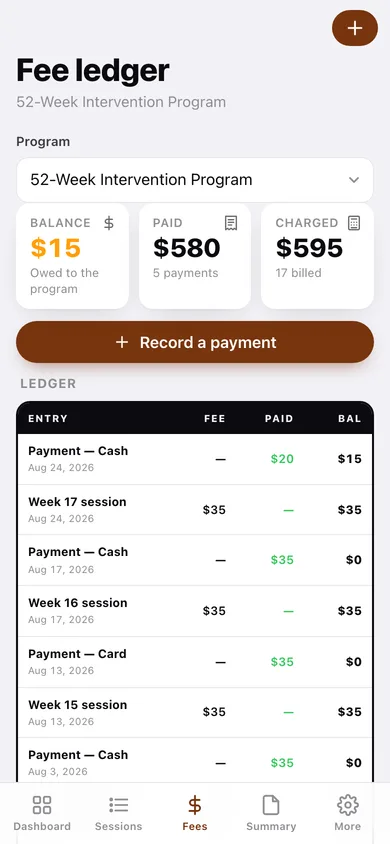
Every session fee and every payment (cash, card, money order) in one dated table, newest first, with the balance recalculated row by row and paid amounts called out.
More than one program at once
A 52-week intervention program alongside a 16-week parenting class, each with its own required sessions, absence cap, deadline and per-session fee — switch between them anywhere.
Dated summary you can hand someone
A plain-text attendance-and-payment summary for a date range, plus a sessions CSV — download or copy it for a probation officer, case manager or the program itself.
Screens
Every screen, rebuilt for the browser
-
1
Dashboard
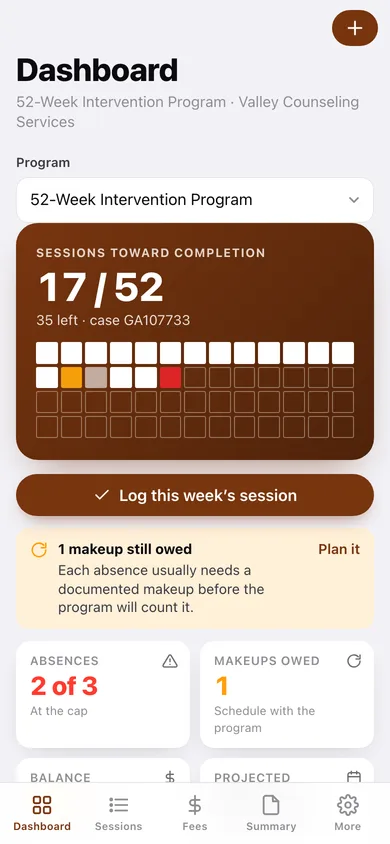
Sessions toward completion as a 52-square grid, absence and makeup counters, balance, projected finish and the log-this-week button.
-
2
Session log
Every logged session grouped by month, filterable to attendances, absences or makeups.
-
3
Session detail
One week's record: status, facilitator, fee charged, note, attached payments and the makeup state.
-
4
Log a session
Date, status, facilitator, fee charged and what you paid at the door — with the absence and makeup consequences spelled out.
-
5
Absence budget
Absences used against the program's hard cap, each absence listed with its makeup state, and how the cap actually works.
-
6
Makeup planner
Absences still owing a makeup, each with an editable planned date and a one-tap log-the-makeup button.
-
7
Deadline projection
On track or at risk, the program window as a timeline with today marked, the pace math, and sessions logged per week.
-
8
Fee ledger
Balance, total paid and total charged, then the ledger table of fees and payments with a running balance.
-
9
Record a payment
Date, amount, method and which session it applies to, with a note for the receipt number.
-
10
Programs
Every mandated program you are tracking, with progress, absences used and balance — and which one is active.
-
11
Program setup
Name, type, provider, case number, start date, required sessions, allowed absences, completion deadline and per-session fee.
-
12
Summary export
A dated attendance-and-payment summary for a date range, previewed in full, downloadable as text or CSV.
-
13
Settings
Shortcuts into your record, log defaults, backup, sample data and erase.
Try it with sample data: Loads a 17-week 52-week intervention program (13 backfilled weeks, an excused absence with its completed makeup, an unexcused absence still owing one, five payments and a partial), plus a 16-week parenting class with two sessions. You can start fresh at any time.
Ready? It's free.
No account, no install, no subscription. Everything you do stays in this browser.
Your say
What should ClassProof do? Tell us before we build it.
Tell us what to build next.
Comments need a free Google sign-in, so every one is from a real person.
Sign in with Google to commentNo comments yet — be the first to say what this app should do next.
Questions
Is the web version of ClassProof free?+
Yes. Every screen is free to use: no subscription, no in-app purchases, no account.
Do I need an account?+
No. Open ClassProof and start using it right away. Sign in with Google only if you want to upvote an app, save it to your list, or leave a comment.
Where is my data stored?+
Only in this browser's local storage. Nothing you enter is sent to our servers, so we can't see it, back it up, or restore it. Clearing site data, a private window, or another device starts empty. Export a backup from the in-app menu to keep it.
Is there a ClassProof app for iPhone or Android?+
Not yet. ClassProof is a community proposal: the browser version is complete, and we build the iPhone and Android app once 100 people upvote it. Upvoters get one email when it ships.