
Web app · News
Civicwatch
A personal subscription to what happens at your city hall
Keep the calendar of council, school board, planning and library meetings, write the 200-word summary after you watch, and track every open-records request with a clock on it. One city, deep. Free, no install, no account.
Stored in your browser only. Nothing you do in the web version is sent to our servers. Clear your browser data and it's gone — so export a backup from the in-app menu if you want to keep it.
This app is a community proposal.
Try the full browser version now. We build the iPhone and Android app once 100 people upvote it.
We'll email you once, when it ships. Unsubscribe anytime.
In your browser
What you can do in Civicwatch on the web
Subscribe to one city
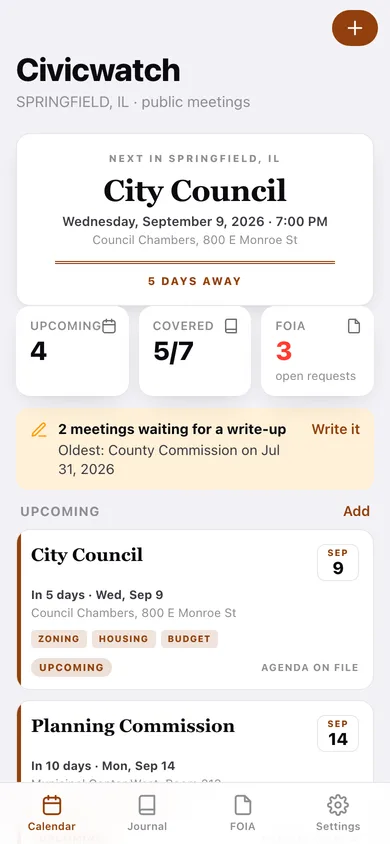
Set your city and state, then build the calendar from a starter pack of eight bodies — City Council, School Board, Planning Commission, Parks, Library, County Commission, Zoning and Police Commission.
Meeting cards with agendas and topics
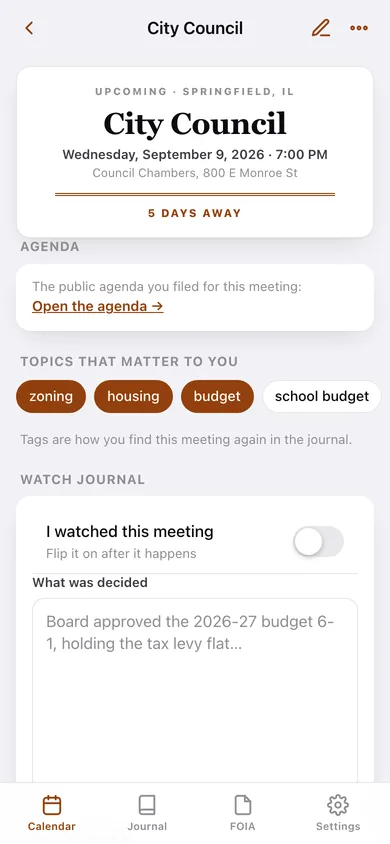
Date, time, room, the public agenda link and the topics you care about (zoning, school budget, housing) as tags you can filter the journal by.
The watch journal
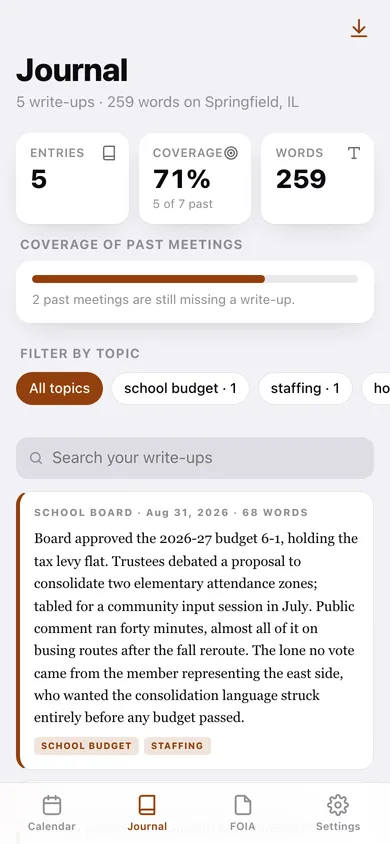
After the meeting, write about 200 words on what was decided — a live word counter keeps you honest, and every entry stays searchable by body, topic or phrase.
Coverage you can see
The calendar nags you with how many past meetings still have no write-up, and the journal shows the percentage of past meetings you have actually covered.
FOIA log with a clock
Log who you asked, what you asked for and when. Civicwatch counts the calendar days, walks each request through submitted → acknowledged → fulfilled or denied, and flags anything past your response window.
Plain-text export
Download the whole journal as Markdown for your newsletter, Substack or Notion, the FOIA log as CSV, or a full JSON backup.
Screens
Every screen, rebuilt for the browser
-
1
Calendar
The next meeting as a masthead, coverage counts, upcoming meetings and every past one waiting for a write-up.
-
2
Meeting
One meeting: agenda link, topic tags, the watched toggle and the 200-word write-up box.
-
3
New meeting
Type, date, time, room, agenda URL and comma-separated topics.
-
4
Journal
Every write-up you have filed, with coverage percentage, topic filters, search and Markdown export.
-
5
FOIA log
Open-records requests with days waiting, status counts and an overdue flag.
-
6
Records request
One request: the days-waiting clock, the status track, the text you sent and what came back.
-
7
Settings
City and state, the FOIA response window, the starter meeting types, and export / sample / erase.
Try it with sample data: Loads a month of Springfield, IL civic life: eleven meetings across seven bodies (four upcoming, five already written up in the journal) and five records requests, including one fulfilled, one denied and one sitting past the response window. You can start fresh at any time.
Ready? It's free.
No account, no install, no subscription. Everything you do stays in this browser.
Your say
What should Civicwatch do? Tell us before we build it.
Tell us what to build next.
Comments need a free Google sign-in, so every one is from a real person.
Sign in with Google to commentNo comments yet — be the first to say what this app should do next.
Questions
Is the web version of Civicwatch free?+
Yes. Every screen is free to use: no subscription, no in-app purchases, no account.
Do I need an account?+
No. Open Civicwatch and start using it right away. Sign in with Google only if you want to upvote an app, save it to your list, or leave a comment.
Where is my data stored?+
Only in this browser's local storage. Nothing you enter is sent to our servers, so we can't see it, back it up, or restore it. Clearing site data, a private window, or another device starts empty. Export a backup from the in-app menu to keep it.
Is there a Civicwatch app for iPhone or Android?+
Not yet. Civicwatch is a community proposal: the browser version is complete, and we build the iPhone and Android app once 100 people upvote it. Upvoters get one email when it ships.