
Web app · Lifestyle
Choretrade
The chore wheel with a fourth column — human, shared, humanoid
Every chore gets a lane (human only, rotating, or handed to the robot), a cadence and an effort in minutes. The board shows what is due, the shared lane rotates to whoever has carried the fewest minutes, and one number tells you the silicon share of your week. Free, offline, no install.
Stored in your browser only. Nothing you do in the web version is sent to our servers. Clear your browser data and it's gone — so export a backup from the in-app menu if you want to keep it.
This app is a community proposal.
Try the full browser version now. We build the iPhone and Android app once 100 people upvote it.
We'll email you once, when it ships. Unsubscribe anytime.
In your browser
What you can do in Choretrade on the web
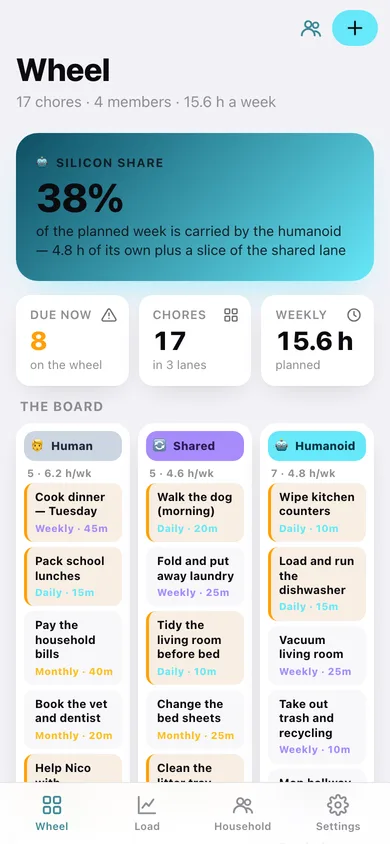
A three-lane board
Human only, shared, humanoid only — side by side, with each lane's chore count and weekly minutes, and every overdue tile flagged.
Silicon share
One headline number: what percentage of the household's planned weekly minutes the humanoid carries, counting its own lane plus its slice of the rotating one.
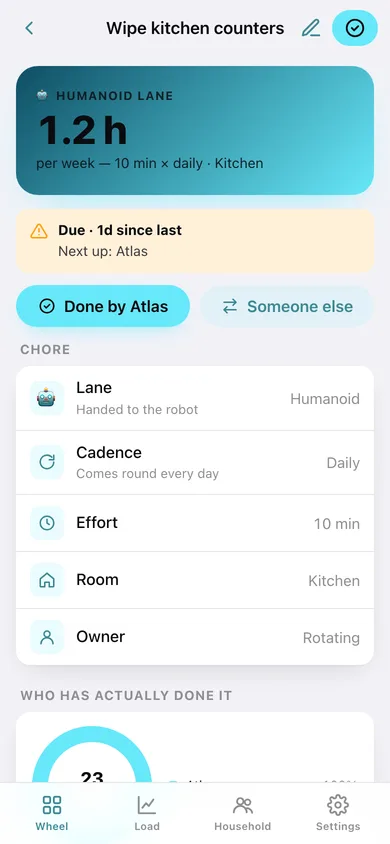
Cadence and effort per chore
Daily, weekly or monthly with an effort in minutes, so 10 minutes daily is correctly worth seven times more than 10 minutes weekly.
Fair rotation on the shared lane
A shared chore is offered to whoever has logged the fewest minutes in the last seven days — human or humanoid — unless you pin an owner.
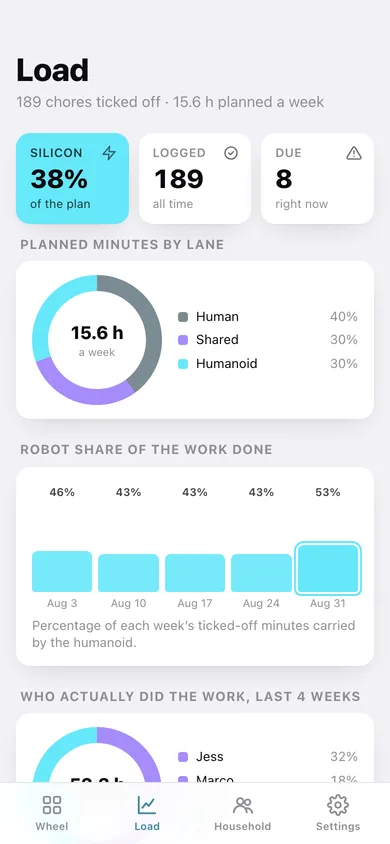
Load balance over time
Planned minutes by lane, the robot's share of each of the last six weeks, who actually did the work over four weeks, a 12-week effort heatmap and the chores slipping furthest past their cadence.
Household roster
Add the people and the humanoid, each with a role. Nothing in the human lane is ever handed to the robot — that is the point of the lane.
Screens
Every screen, rebuilt for the browser
-
1
Wheel
Silicon share, the three-lane board and everything due right now with one-tap tick-off.
-
2
Chore
One chore's lane, cadence, weekly cost, who is up next, who has actually done it, and its full history.
-
3
New chore
Label, lane, cadence, effort in minutes, room and an optional fixed owner.
-
4
Load
Planned minutes by lane, the robot's weekly share, who did the work, an effort heatmap and the chores slipping most.
-
5
Household
Every member with their last-seven-days load bar, chores owned and lane eligibility.
-
6
Add a member
Name, human or humanoid, and a role.
-
7
Settings
Wheel totals, the three lanes, JSON backup, wheel CSV, sample household and erase.
Try it with sample data: Loads a four-member household — Jess, Marco, Nico and the humanoid Atlas — with seventeen chores across all three lanes and four weeks of tick-offs, including a few genuine misses. You can start fresh at any time.
Ready? It's free.
No account, no install, no subscription. Everything you do stays in this browser.
Your say
What should Choretrade do? Tell us before we build it.
Tell us what to build next.
Comments need a free Google sign-in, so every one is from a real person.
Sign in with Google to commentNo comments yet — be the first to say what this app should do next.
Questions
Is the web version of Choretrade free?+
Yes. Every screen is free to use: no subscription, no in-app purchases, no account.
Do I need an account?+
No. Open Choretrade and start using it right away. Sign in with Google only if you want to upvote an app, save it to your list, or leave a comment.
Where is my data stored?+
Only in this browser's local storage. Nothing you enter is sent to our servers, so we can't see it, back it up, or restore it. Clearing site data, a private window, or another device starts empty. Export a backup from the in-app menu to keep it.
Is there a Choretrade app for iPhone or Android?+
Not yet. Choretrade is a community proposal: the browser version is complete, and we build the iPhone and Android app once 100 people upvote it. Upvoters get one email when it ships.