
Web app · Music
Chordbook
Your song repertoire, with a transpose stepper that rewrites every chord
Save songs with labelled chord sections, shift the whole chart up or down a semitone to match any singer, mark what you actually know, build setlists and read them from a dark stage view. Free, offline, no account.
Stored in your browser only. Nothing you do in the web version is sent to our servers. Clear your browser data and it's gone — so export a backup from the in-app menu if you want to keep it.
This app is a community proposal.
Try the full browser version now. We build the iPhone and Android app once 100 people upvote it.
We'll email you once, when it ships. Unsubscribe anytime.
In your browser
What you can do in Chordbook on the web
Songs with labelled sections
Title, artist, key, capo and any number of Intro / Verse / Pre-Chorus / Chorus / Bridge / Solo / Outro sections, written the way you play them.
Live semitone transpose
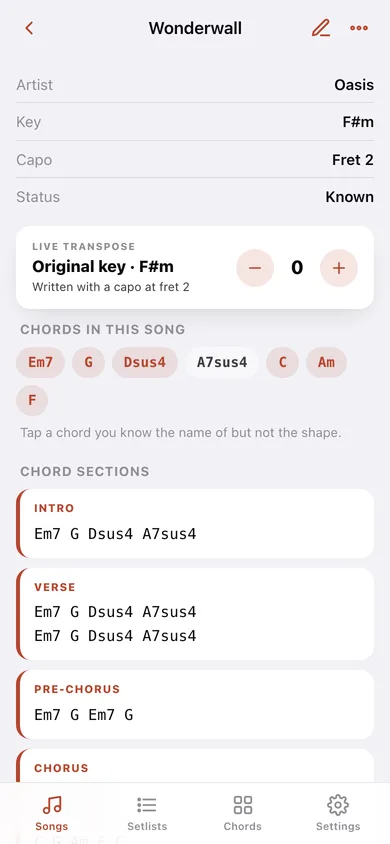
One stepper rewrites every chord in every section at once — slash chords and line breaks included — and tells you which capo fret gets the same sound from the shapes you already know.
Learning / Known repertoire
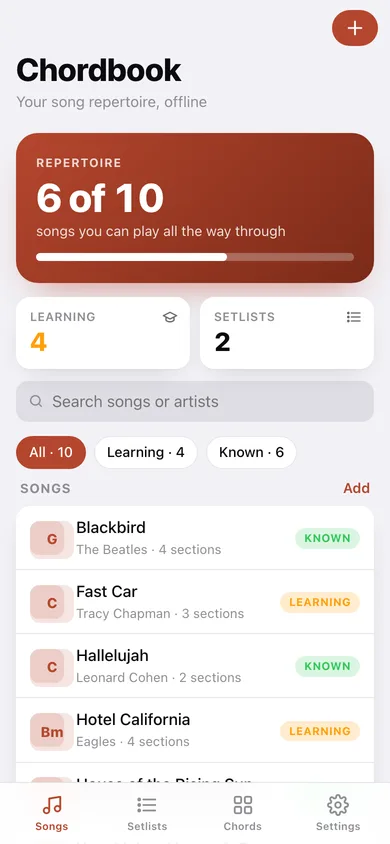
Mark each song and the home screen shows how much of your library you can actually play start to finish, with filter chips and search over titles and artists.
Setlists and stage view
Build a running order for the gig, reorder it, then open a black full-screen stage view with big monospace chords and per-song transpose.
27 chord shapes with real fretboards
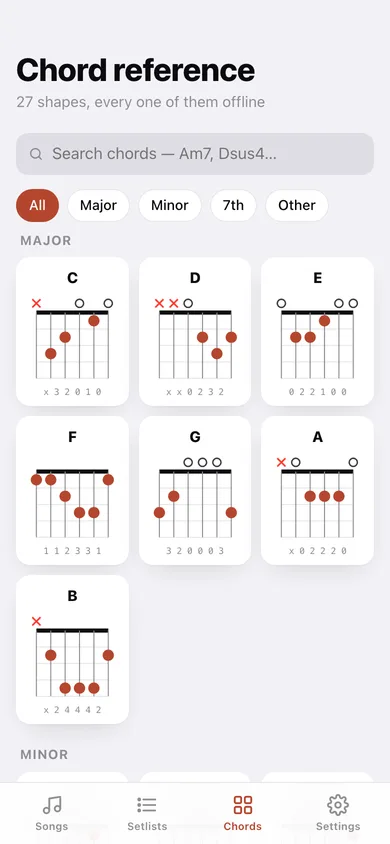
The built-in chart draws every open and barre shape — major, minor, 7th and colour chords — with muted strings, open strings and the fret position marked.
Export the whole book
A JSON backup or one plain-text file with every chart in your repertoire.
Screens
Every screen, rebuilt for the browser
-
1
Songs
How much of your repertoire you know, search and status filters, and every song with its key badge.
-
2
Song
Key, capo and status, the live transpose stepper with a capo hint, the chords used, and each labelled section.
-
3
Song editor
Title, artist, key, capo, status and the chord sections — add, rename, reorder-by-adding and delete.
-
4
Setlists
Every setlist with its song count and note.
-
5
Setlist
The running order, with arrows to reorder, a remove button and a link into stage view.
-
6
Stage view
Black full-screen chart with big chords, key and capo tags, per-song transpose and next/previous.
-
7
Chord reference
Searchable chart of 27 guitar shapes grouped by family, each drawn as a real fretboard diagram.
-
8
Settings
Default key and capo for new songs, stage-view chord size, chart export, sample repertoire and erase.
Try it with sample data: Adds ten songs — Wonderwall through Hotel California — with their real chord sections, keys and capos, plus the Open Mic Night and Practice Queue setlists. You can start fresh at any time.
Ready? It's free.
No account, no install, no subscription. Everything you do stays in this browser.
Your say
What should Chordbook do? Tell us before we build it.
Tell us what to build next.
Comments need a free Google sign-in, so every one is from a real person.
Sign in with Google to commentNo comments yet — be the first to say what this app should do next.
Questions
Is the web version of Chordbook free?+
Yes. Every screen is free to use: no subscription, no in-app purchases, no account.
Do I need an account?+
No. Open Chordbook and start using it right away. Sign in with Google only if you want to upvote an app, save it to your list, or leave a comment.
Where is my data stored?+
Only in this browser's local storage. Nothing you enter is sent to our servers, so we can't see it, back it up, or restore it. Clearing site data, a private window, or another device starts empty. Export a backup from the in-app menu to keep it.
Is there a Chordbook app for iPhone or Android?+
Not yet. Chordbook is a community proposal: the browser version is complete, and we build the iPhone and Android app once 100 people upvote it. Upvoters get one email when it ships.