
Web app · Utilities
Chargebook
Know what charging your EV really costs — per kWh and per mile
Log each charge in about twenty seconds — kWh added, what it cost, battery before and after, home or public — and Chargebook works out your cost per kWh, cost per mile and rolling monthly spend. Free, offline, no account.
Stored in your browser only. Nothing you do in the web version is sent to our servers. Clear your browser data and it's gone — so export a backup from the in-app menu if you want to keep it.
This app is a community proposal.
Try the full browser version now. We build the iPhone and Android app once 100 people upvote it.
We'll email you once, when it ships. Unsubscribe anytime.
In your browser
What you can do in Chargebook on the web
A charge logged in twenty seconds
kWh added, total cost, start and end battery percent, distance gained, home or public, and a station label — with cost per kWh and cost per mile updating as you type.
It fills in the hard numbers
Estimate the kWh from the battery percent you gained and your pack size, estimate the distance from your car's rated efficiency, and price a home charge straight from your own electricity tariff.
Vehicle profiles for 24 common EVs
Tap a Model 3 LR, Bolt EV, Ioniq 5, ID.4, Mach-E or F-150 Lightning to fill in usable battery capacity and rated efficiency, then adjust anything. Unlimited cars, miles or kilometres per car.
The rolling-30-day dashboard
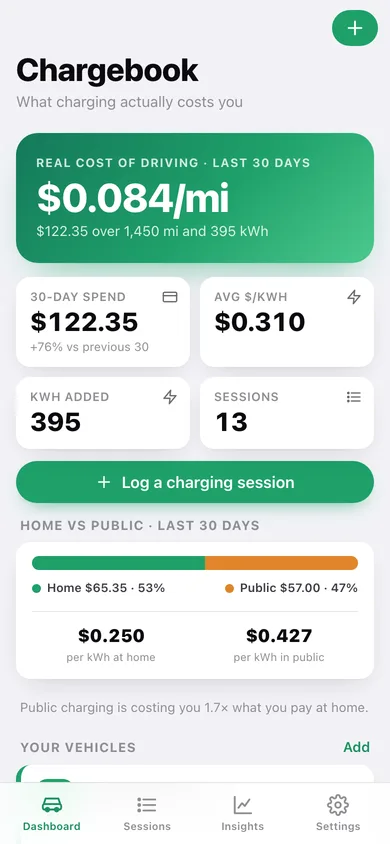
Your real cost of driving, spend against the previous 30 days, blended cost per kWh, and a home-versus-public split that shows exactly how much more the public network charges you.
Insights that answer a question
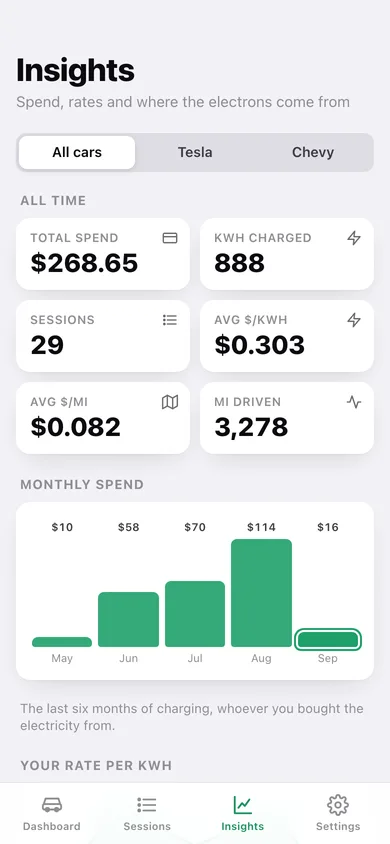
Six months of spend as bars, your blended rate per kWh month by month, cost per 100 miles, real efficiency, and the public stations you spend the most at.
CSV export and a JSON backup
One row per charge with every computed rate — for reimbursement, taxes or a spreadsheet. Everything stays in this browser.
Screens
Every screen, rebuilt for the browser
-
1
Dashboard
Real cost per mile over the last 30 days, spend, home-versus-public split, vehicle cards and the latest sessions.
-
2
All sessions
Every charge grouped by month, searchable and filterable by home, public or vehicle.
-
3
Session detail
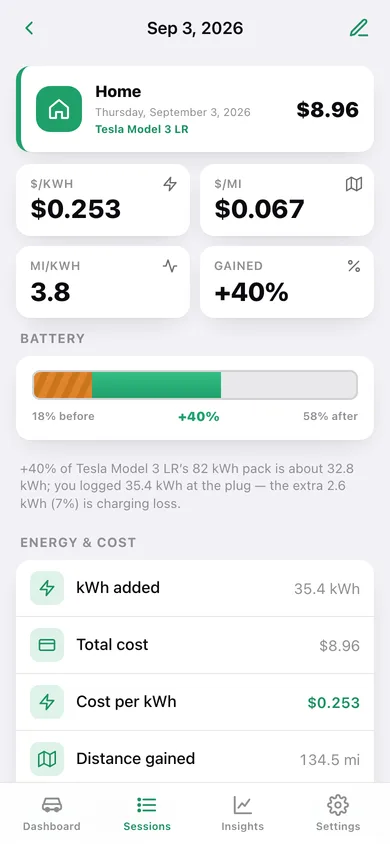
Cost per kWh, cost per mile, efficiency, a battery gauge from start to finish percent, and notes.
-
4
Log a session
The 20-second entry form with battery sliders, kWh and distance estimators and a live computed panel.
-
5
Vehicle
One car over 30 days, 90 days or all time: cost, kWh, sessions, average rates and its own charge history.
-
6
Vehicle profile
Name, usable battery capacity, rated efficiency, distance unit and colour — starting from a common-EV preset.
-
7
Insights
Monthly spend bars, your rate per kWh over time, home versus public, cost per 100 miles and your most-used public stations.
-
8
Settings
Vehicles, distance unit, currency, home electricity tariff, CSV and JSON export, sample data and erase.
Try it with sample data: Adds a Tesla Model 3 LR and a Chevy Bolt EV with 29 charging sessions spread over the last four months — home overnight charges, Superchargers, Electrify America and EVgo — plus a 0.25/kWh home tariff. You can start fresh at any time.
Ready? It's free.
No account, no install, no subscription. Everything you do stays in this browser.
Your say
What should Chargebook do? Tell us before we build it.
Tell us what to build next.
Comments need a free Google sign-in, so every one is from a real person.
Sign in with Google to commentNo comments yet — be the first to say what this app should do next.
Questions
Is the web version of Chargebook free?+
Yes. Every screen is free to use: no subscription, no in-app purchases, no account.
Do I need an account?+
No. Open Chargebook and start using it right away. Sign in with Google only if you want to upvote an app, save it to your list, or leave a comment.
Where is my data stored?+
Only in this browser's local storage. Nothing you enter is sent to our servers, so we can't see it, back it up, or restore it. Clearing site data, a private window, or another device starts empty. Export a backup from the in-app menu to keep it.
Is there a Chargebook app for iPhone or Android?+
Not yet. Chargebook is a community proposal: the browser version is complete, and we build the iPhone and Android app once 100 people upvote it. Upvoters get one email when it ships.