
Web app · Medical
Caregiver Ledger
The visit packet your parent's doctor wants — free, in your browser
Keep an aging parent's medications, dose times and symptom diary in one place, then print the packet the doctor actually asks for: current meds, the last 30 days of symptoms, and your questions for today. Several ledgers on one browser, no account, no cloud, no subscription.
Stored in your browser only. Nothing you do in the web version is sent to our servers. Clear your browser data and it's gone — so export a backup from the in-app menu if you want to keep it.
In your browser
What you can do in Caregiver Ledger on the web
One browser, several ledgers
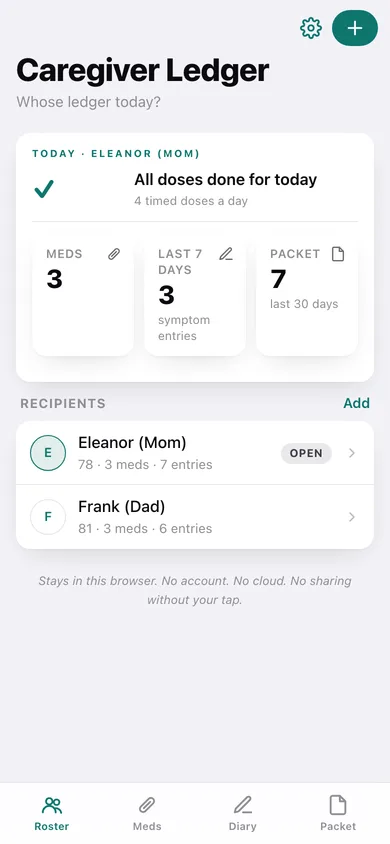
Mom's ledger and Dad's ledger side by side — meds, diary, dose times and questions kept apart, switched with a tap.
Med list in the bottle's own words
Name, strength, prescriber, notes and the schedule written exactly as the label reads it — “8am/8pm”, “8:30pm”, “after dinner”.
Dose times worked out for you
The schedule parser turns those labels into a clock-ordered dose list for the day, marking what has passed and what is still coming.
Body-region symptom diary
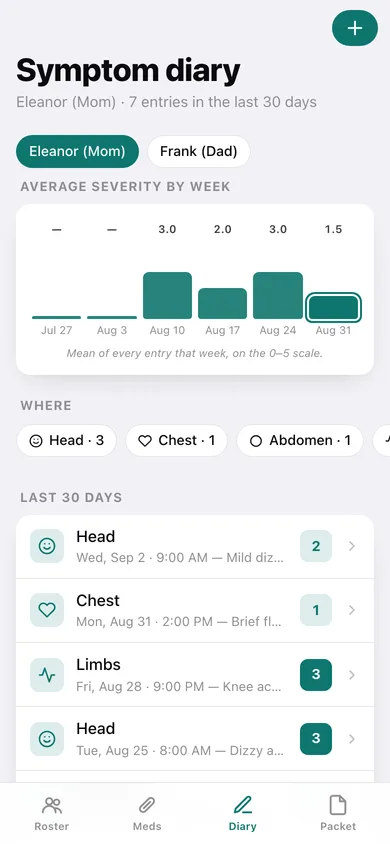
Head, chest, abdomen, back, limbs or other, severity 0–5, one line of note — with average severity per week so the pattern shows.
The visit packet, one tap
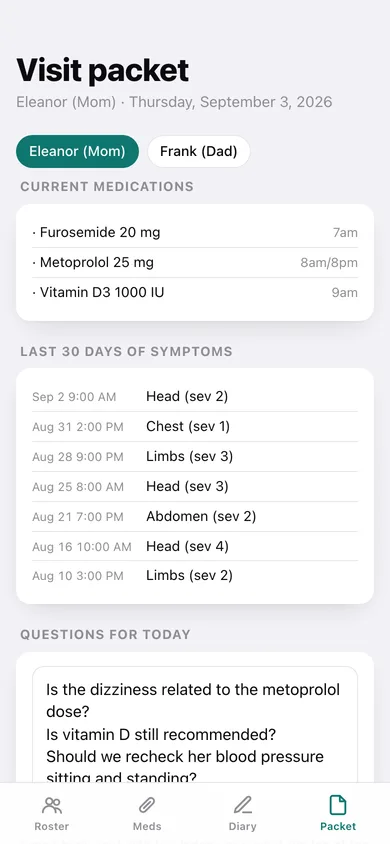
Current meds + the last 30 days of symptoms + your questions, downloaded as a printable file or copied straight into an email to a sibling.
Nothing leaves this browser
No account, no cloud sync, no analytics of anyone's health — and a JSON backup you can take with you.
Screens
Every screen, rebuilt for the browser
-
1
Roster
Whose ledger today — the next dose, the last week of symptoms, and everyone you care for.
-
2
One ledger
A parent's hub: meds, symptom diary, visit packet and dose times.
-
3
Medications
The current med list with strength, schedule, prescriber and notes, plus the dose times parsed from it.
-
4
Add / edit medication
Name, strength, schedule in the bottle's wording, prescriber and notes.
-
5
Symptom diary
Average severity by week, where it hurt, and every entry from the last 30 days.
-
6
Symptom entry
Day, time, body region, severity 0–5 and a one-line note.
-
7
Dose times
Every timed dose for the day in clock order, with the free-text schedules listed separately.
-
8
Visit packet
Meds, the last 30 days of symptoms and your questions for today — download or copy it.
-
9
Settings
Ledgers, the severity flag, the packet window, backup, sample data and erase.
Try it with sample data: Adds two ledgers — Eleanor (Mom), 78 and Frank (Dad), 81 — with six medications between them, thirteen symptom entries across the last month, and a starter list of questions for each doctor visit. You can start fresh at any time.
Ready? It's free.
No account, no install, no subscription. Everything you do stays in this browser.
Your say
Is Caregiver Ledger useful? Tell us what to build next.
Sign in with Google to vote.
Tell us what to build next.
Comments need a free Google sign-in, so every one is from a real person.
Sign in with Google to commentNo comments yet — be the first to say what this app should do next.
Questions
Is the web version of Caregiver Ledger free?+
Yes. Every screen is free to use: no subscription, no in-app purchases, no account.
Do I need an account?+
No. Open Caregiver Ledger and start using it right away. Sign in with Google only if you want to upvote an app, save it to your list, or leave a comment.
Where is my data stored?+
Only in this browser's local storage. Nothing you enter is sent to our servers, so we can't see it, back it up, or restore it. Clearing site data, a private window, or another device starts empty. Export a backup from the in-app menu to keep it.
How is the web version different from the Caregiver Ledger phone app?+
There is no pill-bottle scan: the iPhone app reads the label with VisionKit on-device, and a browser tab has no equivalent, so medications are typed in by hand. Dose reminders cannot ring while the tab is closed — the Dose times screen shows the day's schedule instead of firing local notifications. The visit packet downloads as a printable text file rather than the formatted PDF the iPhone app renders for AirDrop or the hospital print kiosk. Every ledger lives in this browser's storage — a different browser or device starts empty, so export a backup before you switch.