
Web app · Travel
Campnotes
Remember which campsite was shady, quiet and worth rebooking
A private campsite journal: log the site number, dates and camp type, rate shade, privacy, noise, facilities and cell signal out of five, and keep the gear notes you wish you had last time. Free, no install, nothing leaves your browser.
Stored in your browser only. Nothing you do in the web version is sent to our servers. Clear your browser data and it's gone — so export a backup from the in-app menu if you want to keep it.
This app is a community proposal.
Try the full browser version now. We build the iPhone and Android app once 100 people upvote it.
We'll email you once, when it ships. Unsubscribe anytime.
In your browser
What you can do in Campnotes on the web
Site-level, not campground-level
Every stay belongs to a campground but is logged by its own site number — C-14, W-03 (walk-in), Elk Prairie 18 — because that is what you book next year.
The five ratings reviews skip
Shade, privacy, noise, facilities and cell signal, each one to five stars, tap again to clear. Unrated attributes are ignored in the average instead of counting as zero.
Campground averages that pick your site
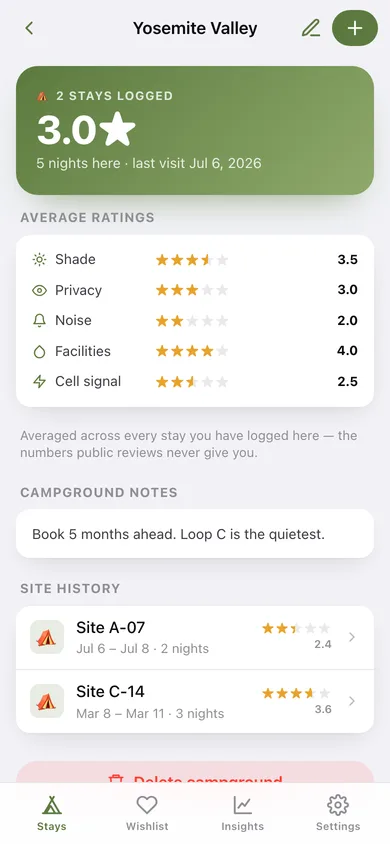
Each campground page averages every stay you logged there, per attribute, and ranks the sites so you know which loop to book when reservations open.
Notes and a pack-next-time list
Free-form observations plus a one-item-per-line packing list — bear canister, earplugs, levelling blocks — that comes back with the stay.
Wishlist for someday campgrounds
Save a place and why you want to go; when you finally camp there, one tap turns the wish into a logged stay.
Insights and CSV export
Bar charts for what you rate highest and nights per month, a rebook-these-sites ranking, and a full CSV of every stay with all five ratings.
Screens
Every screen, rebuilt for the browser
-
1
Stays
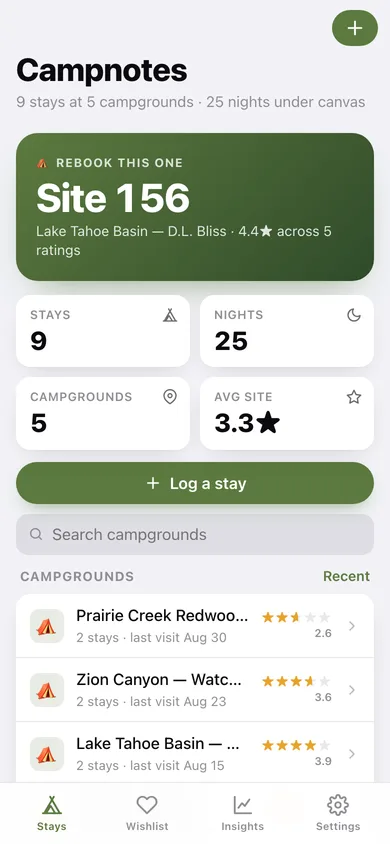
Your best site to rebook, totals for stays, nights and campgrounds, plus every campground with its average stars.
-
2
Campground
Average ratings across every stay there, your booking notes, and the full site history.
-
3
Stay detail
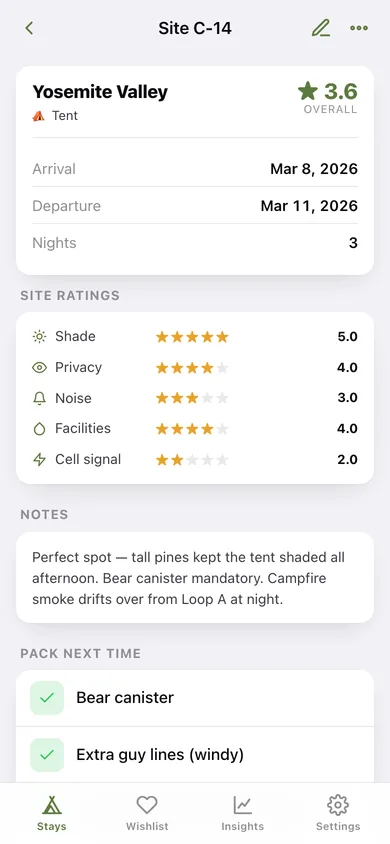
One site: dates, nights, the five star ratings, your notes and the pack-next-time list.
-
4
Log a stay
Pick or create a campground, enter site number, camp type and dates, then tap the stars for each attribute.
-
5
Wishlist
Campgrounds you want to try, each with a why-note, convertible into a logged stay.
-
6
Insights
What you rate highest, nights per month, your top five sites and how you camp.
-
7
Settings
Default camp type, campground sorting, JSON backup, CSV export, sample data and erase.
Try it with sample data: Loads five real campgrounds — Yosemite Valley, Pfeiffer Big Sur, D.L. Bliss, Watchman and Prairie Creek — with nine rated stays across the last six months and three wishlist campgrounds. You can start fresh at any time.
Ready? It's free.
No account, no install, no subscription. Everything you do stays in this browser.
Your say
What should Campnotes do? Tell us before we build it.
Tell us what to build next.
Comments need a free Google sign-in, so every one is from a real person.
Sign in with Google to commentNo comments yet — be the first to say what this app should do next.
Questions
Is the web version of Campnotes free?+
Yes. Every screen is free to use: no subscription, no in-app purchases, no account.
Do I need an account?+
No. Open Campnotes and start using it right away. Sign in with Google only if you want to upvote an app, save it to your list, or leave a comment.
Where is my data stored?+
Only in this browser's local storage. Nothing you enter is sent to our servers, so we can't see it, back it up, or restore it. Clearing site data, a private window, or another device starts empty. Export a backup from the in-app menu to keep it.
Is there a Campnotes app for iPhone or Android?+
Not yet. Campnotes is a community proposal: the browser version is complete, and we build the iPhone and Android app once 100 people upvote it. Upvoters get one email when it ships.