
Web app · Lifestyle
Calm Cards
When the meltdown hits, draw a card — 77 scripts, no chatbot, no typing
A deck of evidence-based de-escalation cards indexed by age (1–3, 3–5, 5–8) and trigger. Each one gives you what to DO, what to SAY, what NOT to say, why it works and the book it comes from. Search, draw, pin the ones that land. Free, offline, nothing to install.
Stored in your browser only. Nothing you do in the web version is sent to our servers. Clear your browser data and it's gone — so export a backup from the in-app menu if you want to keep it.
This app is a community proposal.
Try the full browser version now. We build the iPhone and Android app once 100 people upvote it.
We'll email you once, when it ships. Unsubscribe anytime.
In your browser
What you can do in Calm Cards on the web
77 cards, every one sourced
Siegel & Bryson, Faber & Mazlish, Ross Greene, Becky Kennedy, Ellyn Satter, Bowlby, Weissbluth, AAP guidance — the book and chapter is printed on the card. No AI, no invented advice.
Random draw in one tap
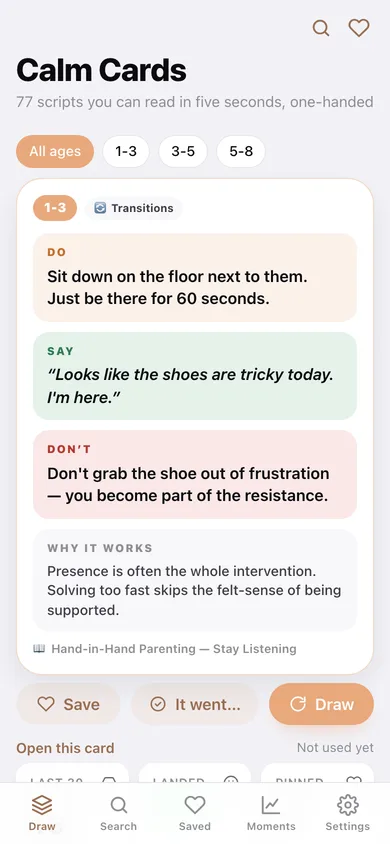
Hit Draw and read the card in five seconds with one thumb: DO, SAY, DON'T, WHY IT WORKS. Filter the deck to 1–3, 3–5 or 5–8 first.
Search by trigger
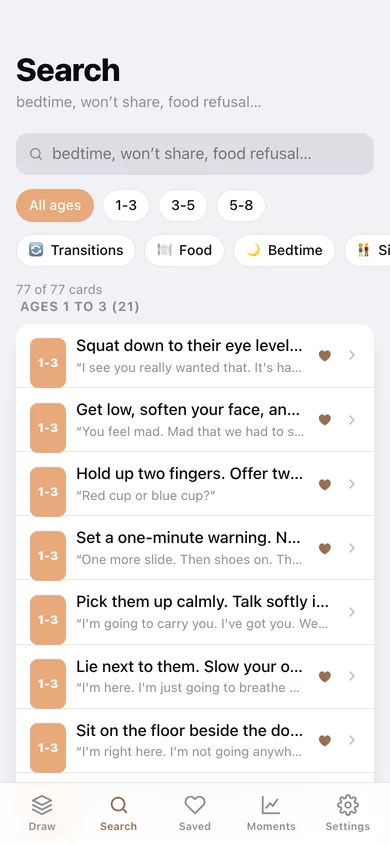
Eight triggers — transitions, food, bedtime, siblings, separation, sensory, frustration and public — combine with free text like “won't share” or “food refusal”.
Pin what works for your kid
Save any card to the Saved deck, grouped by age band, with your best-performing scripts ranked at the top.
Moment log
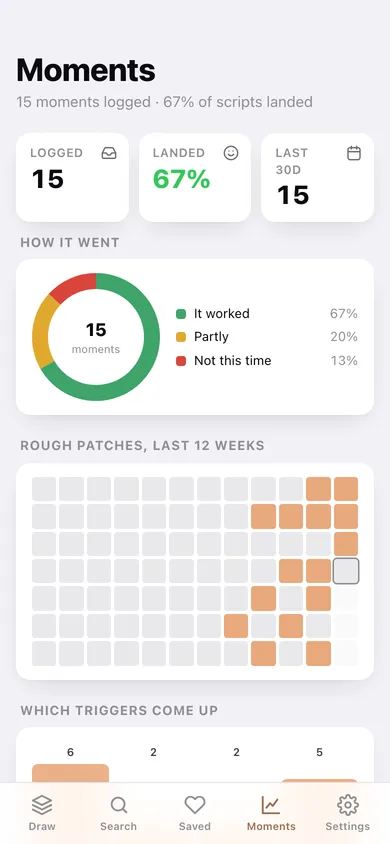
After you use a script, tap It went… and pick worked, partly, or not this time. Over a few weeks you see your hit rate, which triggers come up most, and which cards actually land.
Private by construction
Cards, pins and moments never leave this browser — no account, no chatbot, no network call. Export the moments as CSV whenever you want.
Screens
Every screen, rebuilt for the browser
-
1
Draw
The age filter, one full card, and Save / It went… / Draw — plus your last-30-days hit rate.
-
2
Search
Age chips, eight trigger chips and free-text search over every word of the deck, grouped by age band.
-
3
Card
One card in full with its source, how it has gone for your kid, and other cards for the same trigger.
-
4
Saved
Your pinned cards by age band, with the ones proven with your kid ranked first.
-
5
Moments
Hit rate, an outcome donut, a 12-week rough-patch heatmap, trigger frequency and the cards that work for your kid.
-
6
Settings
Deck stats, default age band, the full source list, CSV export, sample data and erase.
Try it with sample data: Pins six starter cards and logs fifteen real-feeling moments over the last four weeks so the hit rate, heatmap and “cards that work for your kid” ranking have something to show. You can start fresh at any time.
Ready? It's free.
No account, no install, no subscription. Everything you do stays in this browser.
Your say
What should Calm Cards do? Tell us before we build it.
Tell us what to build next.
Comments need a free Google sign-in, so every one is from a real person.
Sign in with Google to commentNo comments yet — be the first to say what this app should do next.
Questions
Is the web version of Calm Cards free?+
Yes. Every screen is free to use: no subscription, no in-app purchases, no account.
Do I need an account?+
No. Open Calm Cards and start using it right away. Sign in with Google only if you want to upvote an app, save it to your list, or leave a comment.
Where is my data stored?+
Only in this browser's local storage. Nothing you enter is sent to our servers, so we can't see it, back it up, or restore it. Clearing site data, a private window, or another device starts empty. Export a backup from the in-app menu to keep it.
Is there a Calm Cards app for iPhone or Android?+
Not yet. Calm Cards is a community proposal: the browser version is complete, and we build the iPhone and Android app once 100 people upvote it. Upvoters get one email when it ships.