
Web app · Lifestyle
Bucketly
A bucket list with a target year, a progress ring and a proper done ceremony
Capture dreams across eight categories, give each one a year and a priority, and watch the ring fill. Marking one done records the date, a reflection and a memory icon into a Done gallery you keep forever. Free, offline, nothing to install.
Stored in your browser only. Nothing you do in the web version is sent to our servers. Clear your browser data and it's gone — so export a backup from the in-app menu if you want to keep it.
This app is a community proposal.
Try the full browser version now. We build the iPhone and Android app once 100 people upvote it.
We'll email you once, when it ships. Unsubscribe anytime.
In your browser
What you can do in Bucketly on the web
Eight categories with progress rings
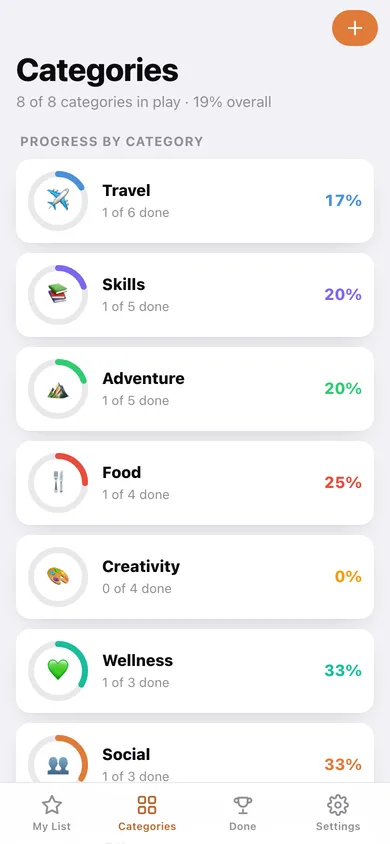
Travel, Skills, Adventure, Food, Creativity, Wellness, Social and Other — each with its own ring, percentage and colour, plus a donut of where your list leans.
Target-year planning
Every dream carries the year you mean to do it. The home list groups by year, flags the ones dated this year, and marks anything past its year as overdue.
The done ceremony
Mark as done opens a celebration screen: completion date, a written reflection and a memory icon, saved together as one memory.
Done gallery
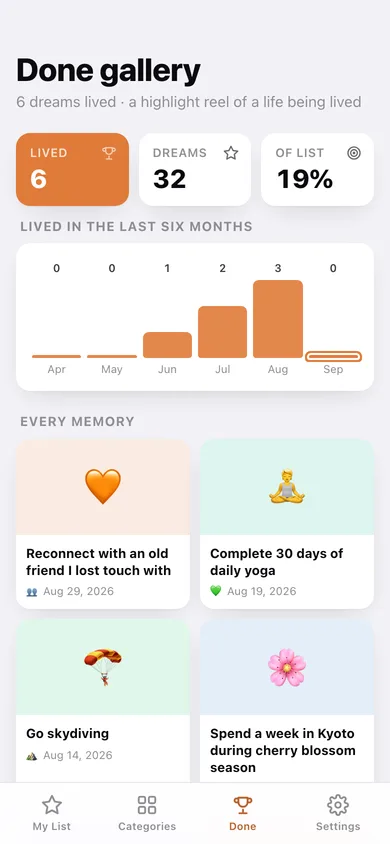
A card grid of every dream you have lived, newest first, with a bar chart of how many you completed each year and your latest reflections.
Filter, search and timeline
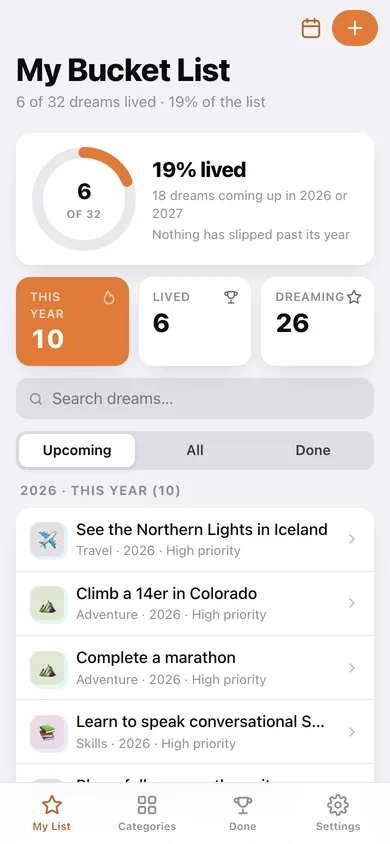
Switch between Upcoming, All and Done, search by dream or category, or open the year timeline to see how loaded each year ahead is.
Yours alone
Dreams and reflections stay in this browser; export the whole list as JSON or a CSV whenever you want a copy.
Screens
Every screen, rebuilt for the browser
-
1
My Bucket List
Overall progress ring, this-year count, search and filter, and every dream grouped by target year.
-
2
Categories
A progress ring per category with completion percentage, and a donut of the whole list.
-
3
Category
One category's ring, its percentage and every dream in it, with a chip row to hop between categories.
-
4
Dream
One dream in full — category, target year, priority and years left, or the saved memory if it is lived.
-
5
New dream
Title, category chooser, target year and priority for a new or edited dream.
-
6
Mark as done
The You-did-it ceremony: completion date, reflection and a memory icon.
-
7
Done gallery
Every completed dream as a memory card, with lived-per-year bars and your latest reflections.
-
8
Year timeline
How many open dreams sit in each target year, with overdue years called out in red.
-
9
Settings
Default filter and priority, JSON backup, CSV export, sample list and erase.
Try it with sample data: Loads a 32-dream life list across all eight categories, six of them already lived with dates, reflections and memory icons. You can start fresh at any time.
Ready? It's free.
No account, no install, no subscription. Everything you do stays in this browser.
Your say
What should Bucketly do? Tell us before we build it.
Tell us what to build next.
Comments need a free Google sign-in, so every one is from a real person.
Sign in with Google to commentNo comments yet — be the first to say what this app should do next.
Questions
Is the web version of Bucketly free?+
Yes. Every screen is free to use: no subscription, no in-app purchases, no account.
Do I need an account?+
No. Open Bucketly and start using it right away. Sign in with Google only if you want to upvote an app, save it to your list, or leave a comment.
Where is my data stored?+
Only in this browser's local storage. Nothing you enter is sent to our servers, so we can't see it, back it up, or restore it. Clearing site data, a private window, or another device starts empty. Export a backup from the in-app menu to keep it.
Is there a Bucketly app for iPhone or Android?+
Not yet. Bucketly is a community proposal: the browser version is complete, and we build the iPhone and Android app once 100 people upvote it. Upvoters get one email when it ships.