
Web app · Productivity
Brainfold
The parent's brain, finally on one screen — in any browser
Today's drop-offs, the forms still sitting in the house, what each kid needs to bring, their sizes and allergies, and every number you never want to hunt for. Plus a quiet tally of the invisible work you closed out. Free, no account, nothing leaves this browser.
Stored in your browser only. Nothing you do in the web version is sent to our servers. Clear your browser data and it's gone — so export a backup from the in-app menu if you want to keep it.
This app is a community proposal.
Try the full browser version now. We build the iPhone and Android app once 100 people upvote it.
We'll email you once, when it ships. Unsubscribe anytime.
In your browser
What you can do in Brainfold on the web
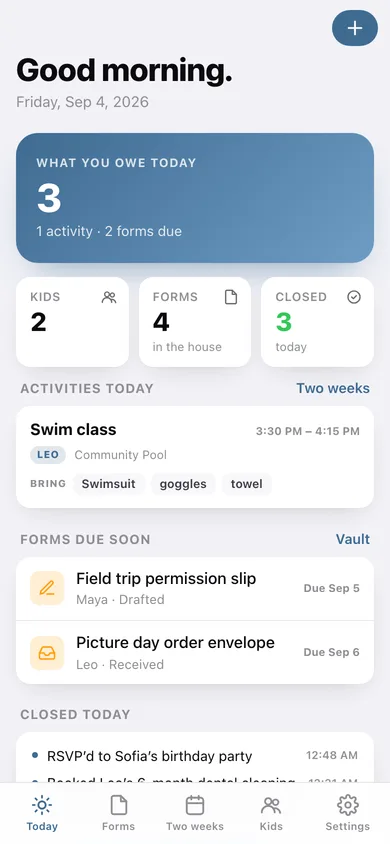
A Today screen that is your queue
Activities running today with what to bring, forms due in the next three days, and anything overdue — sorted by time, one scroll, no app-hopping.
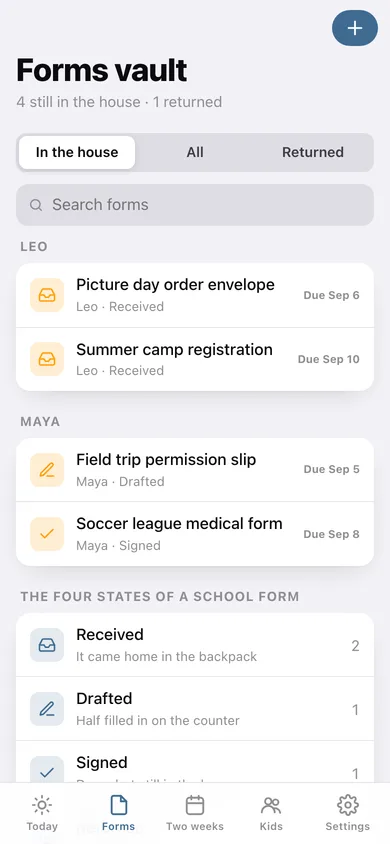
Forms vault with four honest states
Received, drafted, signed, returned. A form only leaves your head at Returned — and marking it so drops it straight onto the mental-load tally.
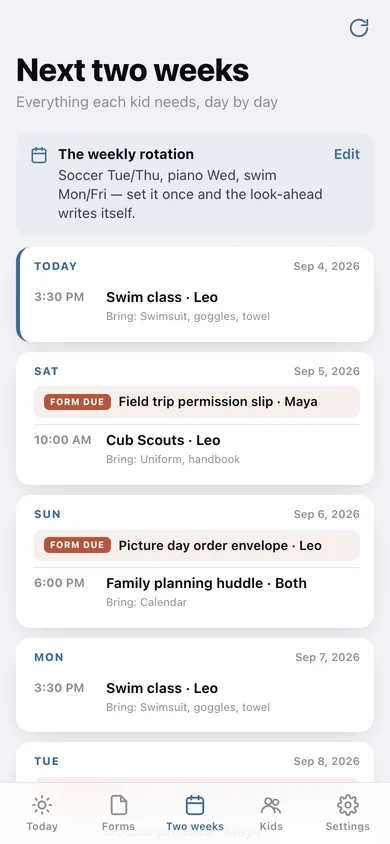
Weekly rotation, two-week look-ahead
Soccer Tue/Thu, piano Wed, swim Mon/Fri: set the rotation once and the next fourteen days write themselves, with the bring-list on every entry.
Kid profiles you actually reference
Age, grade, school, allergies, medications, shoe/pant/shirt/jacket size, pediatrician and emergency contact — plus that child's forms and activities.
Family contacts, tap to call
Pediatrician, school office, school nurse, after-care, the grandparent with a key — each number is a real tel: link on your phone.
Mental-load tally
Not a streak, not a shame loop: a per-day count of the things you closed out, with a two-week chart, because nobody else is counting it.
Screens
Every screen, rebuilt for the browser
-
1
Today
What you owe today: activities, forms due, overdue warnings and the day's closed-out tally.
-
2
Next two weeks
Fourteen days of drop-offs and form deadlines, with the bring-list on every entry.
-
3
Forms vault
Every form grouped by kid, filtered by whether it is still in the house.
-
4
One form
The received → drafted → signed → returned track, notes, and one tap to move it on.
-
5
Weekly rotation
Every repeating activity by weekday, with days, times, location and bring-list.
-
6
Kids & contacts
Kid cards with allergy flags and open-form counts, plus the family phone directory.
-
7
Kid profile
Health, sizes, pediatrician, emergency contact, their forms and their weekly activities.
-
8
Mental load
Everything you closed out, by day, with a two-week chart of the invisible work.
-
9
Settings
Due-soon window, tally options, CSV and JSON export, erase everything.
Try it with sample data: Loads the Carter family — Maya (grade 4, peanut allergy) and Leo (grade 1) — with five school forms at different stages, the soccer/piano/swim/scouts rotation, five family contacts and a week of closed-out items on the tally. You can start fresh at any time.
Ready? It's free.
No account, no install, no subscription. Everything you do stays in this browser.
Your say
What should Brainfold do? Tell us before we build it.
Tell us what to build next.
Comments need a free Google sign-in, so every one is from a real person.
Sign in with Google to commentNo comments yet — be the first to say what this app should do next.
Questions
Is the web version of Brainfold free?+
Yes. Every screen is free to use: no subscription, no in-app purchases, no account.
Do I need an account?+
No. Open Brainfold and start using it right away. Sign in with Google only if you want to upvote an app, save it to your list, or leave a comment.
Where is my data stored?+
Only in this browser's local storage. Nothing you enter is sent to our servers, so we can't see it, back it up, or restore it. Clearing site data, a private window, or another device starts empty. Export a backup from the in-app menu to keep it.
Is there a Brainfold app for iPhone or Android?+
Not yet. Brainfold is a community proposal: the browser version is complete, and we build the iPhone and Android app once 100 people upvote it. Upvoters get one email when it ships.