
Web app · Lifestyle
Beehive
Log every hive inspection the same way — and watch the season total climb
Add each hive once, then record queen, brood pattern, temperament, stores, varroa and treatments in a structured form. Beehive flags a colony as due after 7, 10 or 14 days and tallies honey pulls into a season total. Free, offline, no install.
Stored in your browser only. Nothing you do in the web version is sent to our servers. Clear your browser data and it's gone — so export a backup from the in-app menu if you want to keep it.
This app is a community proposal.
Try the full browser version now. We build the iPhone and Android app once 100 people upvote it.
We'll email you once, when it ships. Unsubscribe anytime.
In your browser
What you can do in Beehive on the web
Structured inspection log
Queen seen, brood pattern (Excellent → Poor), temperament, stores level, varroa wash, treatments and time in the hive — the same fields every visit, so two inspections are always comparable.
Inspection-due cadence
Each hive carries a 7, 10 or 14-day cadence; the apiary home flags every colony that has gone longer than that since its last logged inspection.
Harvest tracker with season total
Record each pull in kg or lb; Beehive converts, sums the calendar-season total, ranks yield per hive and charts season over season.
12 treatment presets
Oxalic vapour and dribble, formic, Apiguard, Apivar, Api-Life Var, HopGuard, drone-brood removal, sugar dusting and feed — tap to attach, or type your own.
Apiary stats dashboard
Average gap between inspections, queen-sighting rate, brood and temperament mix for the season, a 12-week inspection heatmap and a per-hive snapshot.
Yours alone
Hives, inspections and harvests live in this browser; export a JSON backup or a CSV of every inspection whenever you like.
Screens
Every screen, rebuilt for the browser
-
1
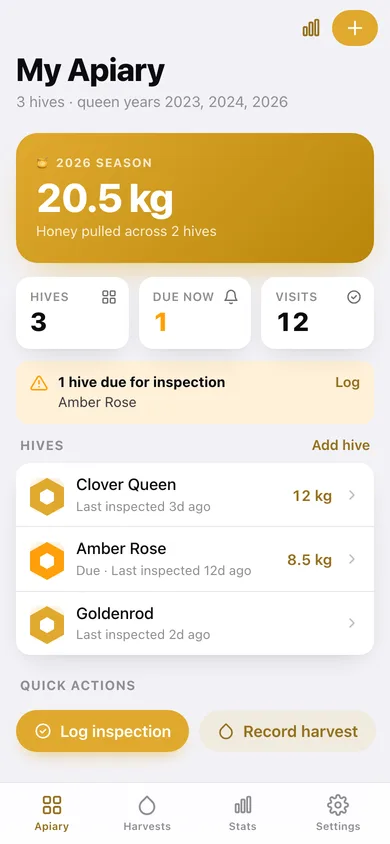
My Apiary
Season honey total, which colonies are due, and every hive with its last-inspected age.
-
2
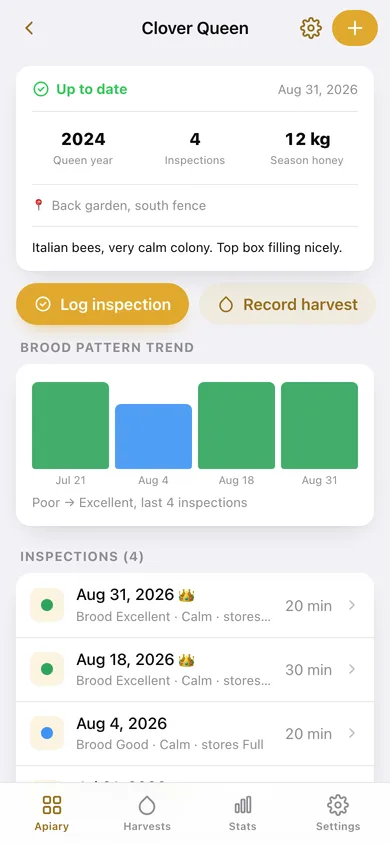
Hive
Status card, queen year, brood-pattern trend, full inspection history and harvest list for one colony.
-
3
Inspection
One visit in full: queen, brood, temperament, stores, varroa, treatments and notes.
-
4
Log inspection
The structured inspection form with brood/temperament/stores choices and treatment presets.
-
5
Record harvest
Date, weight in kg or lb, hive and notes, with the running season total above it.
-
6
Hive settings
Name, location, install date, queen year, notes and the inspection cadence.
-
7
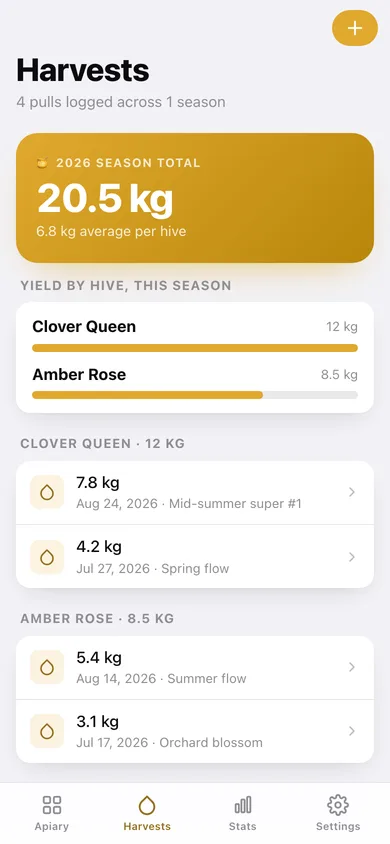
Harvests
Season total, yield bars per hive, season-over-season chart and every pull grouped by colony.
-
8
Apiary stats
Inspection habits, brood and temperament mix, a 12-week rhythm heatmap and treatments applied.
-
9
Settings
kg/lb, default cadence, JSON backup, inspection CSV, sample apiary and erase.
Try it with sample data: Loads a three-hive apiary — Clover Queen, Amber Rose and Goldenrod — with twelve inspections and four honey pulls spread across the current season. You can start fresh at any time.
Ready? It's free.
No account, no install, no subscription. Everything you do stays in this browser.
Your say
What should Beehive do? Tell us before we build it.
Tell us what to build next.
Comments need a free Google sign-in, so every one is from a real person.
Sign in with Google to commentNo comments yet — be the first to say what this app should do next.
Questions
Is the web version of Beehive free?+
Yes. Every screen is free to use: no subscription, no in-app purchases, no account.
Do I need an account?+
No. Open Beehive and start using it right away. Sign in with Google only if you want to upvote an app, save it to your list, or leave a comment.
Where is my data stored?+
Only in this browser's local storage. Nothing you enter is sent to our servers, so we can't see it, back it up, or restore it. Clearing site data, a private window, or another device starts empty. Export a backup from the in-app menu to keep it.
Is there a Beehive app for iPhone or Android?+
Not yet. Beehive is a community proposal: the browser version is complete, and we build the iPhone and Android app once 100 people upvote it. Upvoters get one email when it ships.