
Web app · Medical
BeatLog
The symptom diary your Holter or patch monitor came with — in the browser
One tap stamps the exact clock time the moment a symptom hits, then you pick the symptom and activity from the AHA picklist. Set your monitor's start time and ID once and hand the clinic a clean timestamped report instead of the paper sheet. Free, no account.
Stored in your browser only. Nothing you do in the web version is sent to our servers. Clear your browser data and it's gone — so export a backup from the in-app menu if you want to keep it.
This app is a community proposal.
Try the full browser version now. We build the iPhone and Android app once 100 people upvote it.
We'll email you once, when it ships. Unsubscribe anytime.
In your browser
What you can do in BeatLog on the web
One tap, exact time
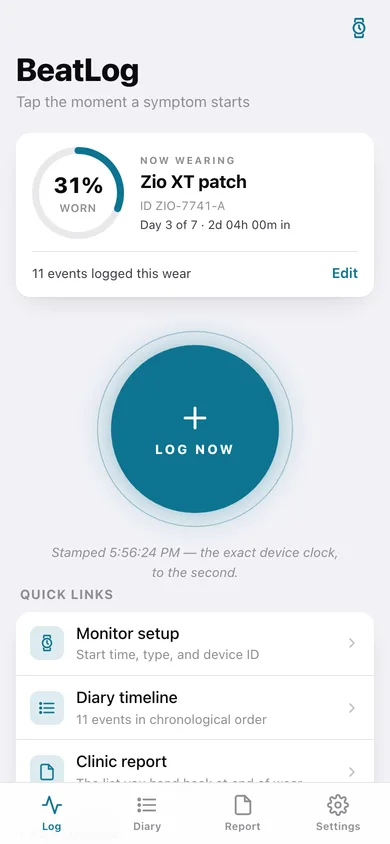
The big LOG NOW button stamps the clock to the second the instant a symptom starts — no typing, no recall, no reconstruction hours later.
The AHA picklist, built in
Palpitations, dizziness, chest pain, shortness of breath, near-fainting, unusual fatigue or other — and sitting, walking, exercising, eating, taking medication, sleeping or stressed.
Set the monitor once
Holter, patch or event recorder, its label, device ID, exact start time and planned wear days — every entry is measured from that moment.
Diary timeline against the wear
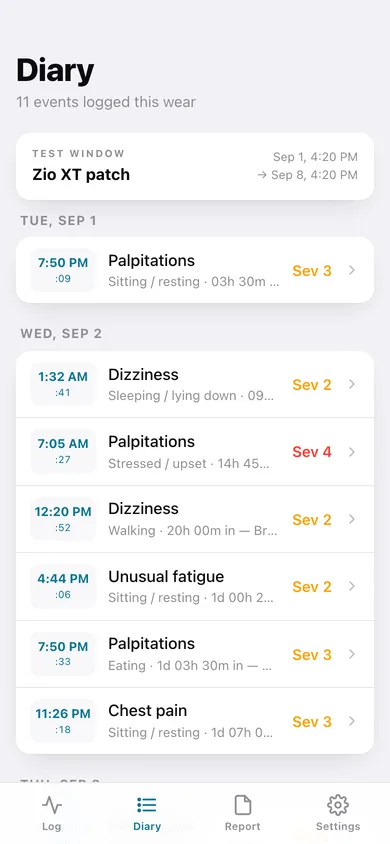
Every event grouped by day with its seconds tick and how far into the wear it fell, e.g. 1d 03h 12m in.
A clinic report you can hand back
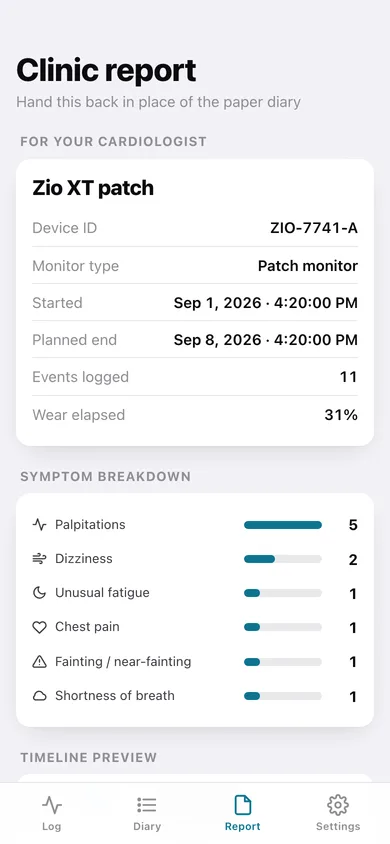
Session details, symptom breakdown and the full chronological list — download it as a printable text report or a CSV, or copy it.
Severity, notes and corrections
Rate 1–5, add a line like “fluttering, about 20 seconds”, and nudge the time if you tapped a moment late.
Screens
Every screen, rebuilt for the browser
-
1
Log
The wear dial, your monitor and the one-tap button that stamps the moment a symptom starts.
-
2
Diary timeline
Every event in chronological order, grouped by day, with the time to the second and its position in the wear.
-
3
Event detail
Refine one event: stamped time, symptom, activity, severity 1–5 and a note.
-
4
Monitor setup
Monitor type, label, device ID, exact start date and time, and planned wear days.
-
5
Clinic report
The report for your cardiologist — session block, symptom breakdown, timeline preview, and text or CSV export.
-
6
Settings
The empty-day nudge, your local data counts, backup, sample data and erase.
Try it with sample data: Adds a 7-day Zio XT patch wear started 52 hours ago and eleven timestamped events across it — palpitations while stressed, near-fainting on a walk, shortness of breath on the treadmill and more, each with an activity, severity and note. You can start fresh at any time.
Ready? It's free.
No account, no install, no subscription. Everything you do stays in this browser.
Your say
What should BeatLog do? Tell us before we build it.
Tell us what to build next.
Comments need a free Google sign-in, so every one is from a real person.
Sign in with Google to commentNo comments yet — be the first to say what this app should do next.
Questions
Is the web version of BeatLog free?+
Yes. Every screen is free to use: no subscription, no in-app purchases, no account.
Do I need an account?+
No. Open BeatLog and start using it right away. Sign in with Google only if you want to upvote an app, save it to your list, or leave a comment.
Where is my data stored?+
Only in this browser's local storage. Nothing you enter is sent to our servers, so we can't see it, back it up, or restore it. Clearing site data, a private window, or another device starts empty. Export a backup from the in-app menu to keep it.
Is there a BeatLog app for iPhone or Android?+
Not yet. BeatLog is a community proposal: the browser version is complete, and we build the iPhone and Android app once 100 people upvote it. Upvoters get one email when it ships.