
Web app · Music
Bandmate
Hum it, build it — the songwriting notebook before the DAW
Tap the tune stuck in your head and Bandmate names the key, hands you the seven diatonic chords, a curated progression library, and a verse/chorus block builder with a runtime estimate and a syllable-counting lyrics pad. Free, no install.
Stored in your browser only. Nothing you do in the web version is sent to our servers. Clear your browser data and it's gone — so export a backup from the in-app menu if you want to keep it.
This app is a community proposal.
Try the full browser version now. We build the iPhone and Android app once 100 people upvote it.
We'll email you once, when it ships. Unsubscribe anytime.
In your browser
What you can do in Bandmate on the web
Tap a melody, get the key
Play your tune on the two-octave keyboard and a Krumhansl–Kessler pitch-class profile names the key it lives in, with a confidence fit.
The seven diatonic chords
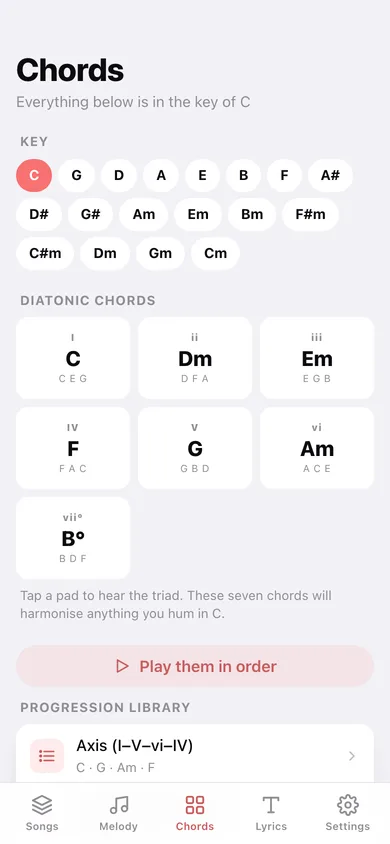
Pick any of 18 major and minor keys and hear I, ii, iii, IV, V, vi and vii° played as real triads synthesised in your browser.
Curated progression library
Axis, Doo-wop, twelve-bar blues, Pachelbel, Andalusian cadence, Royal Road, neo-soul and more — every one resolved into your key and playable.
Verse / chorus block builder
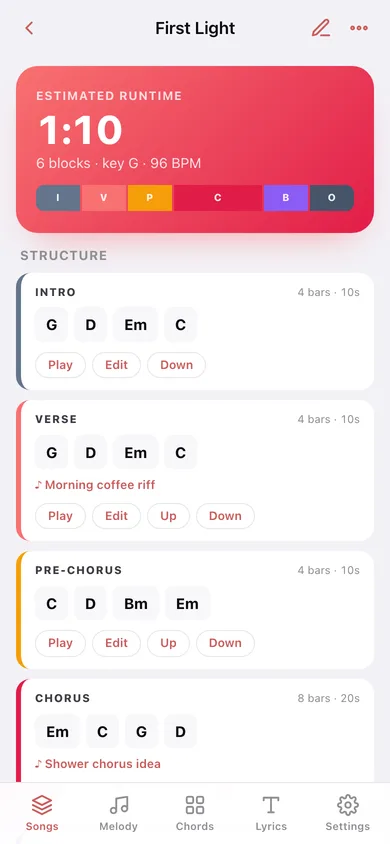
Stack intro, verse, pre-chorus, chorus, bridge and outro blocks, give each one a progression, bars and a melody take, and watch the runtime estimate add up.
Lyrics pad with a syllable counter
Every line gets a live syllable count from the same vowel-run counter the iPhone app uses, so words lock onto the tune.
Everything unlocked, nothing uploaded
The whole progression library, unlimited songs and chart export — saved in this browser only, no account.
Screens
Every screen, rebuilt for the browser
-
1
Songs
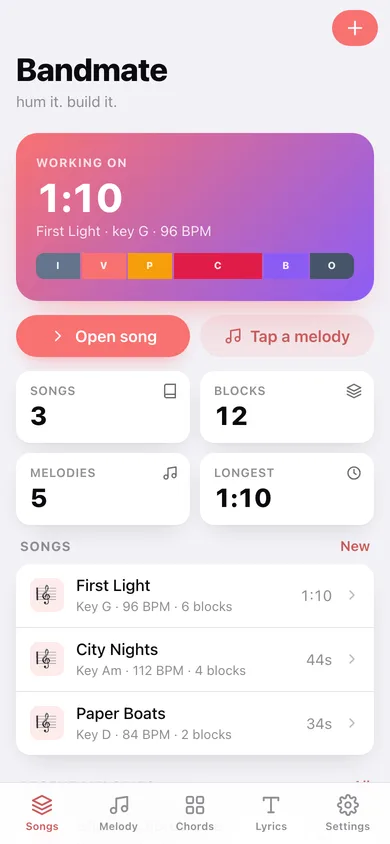
The song you are working on, its structure strip and runtime, plus every song and recent melody take.
-
2
Song
Runtime estimate, the coloured block arrangement, tappable chords under each block and the lyrics preview.
-
3
New song
Working title, key and tempo — a new song is born with intro, verse and chorus blocks.
-
4
Melodies
The two-octave keyboard, a live key guess as you tap, and every saved take.
-
5
Melody take
Key guess, melody contour, the diatonic chords that sit under it and progressions in that key.
-
6
Chords
Diatonic chord pads for the chosen key and the full progression library.
-
7
Progression
One progression resolved into your key, chord by chord, playable and droppable into a song.
-
8
Lyrics pad
Write lines and watch the syllable count per line and for the whole verse.
-
9
Settings
Default key, tempo and block length, chart export, sample songs and erase.
Try it with sample data: Adds five melody takes tapped over the last three weeks and three arrangements — First Light in G, City Nights in A minor and Paper Boats in D — with blocks, progressions and lyrics. You can start fresh at any time.
Ready? It's free.
No account, no install, no subscription. Everything you do stays in this browser.
Your say
What should Bandmate do? Tell us before we build it.
Tell us what to build next.
Comments need a free Google sign-in, so every one is from a real person.
Sign in with Google to commentNo comments yet — be the first to say what this app should do next.
Questions
Is the web version of Bandmate free?+
Yes. Every screen is free to use: no subscription, no in-app purchases, no account.
Do I need an account?+
No. Open Bandmate and start using it right away. Sign in with Google only if you want to upvote an app, save it to your list, or leave a comment.
Where is my data stored?+
Only in this browser's local storage. Nothing you enter is sent to our servers, so we can't see it, back it up, or restore it. Clearing site data, a private window, or another device starts empty. Export a backup from the in-app menu to keep it.
Is there a Bandmate app for iPhone or Android?+
Not yet. Bandmate is a community proposal: the browser version is complete, and we build the iPhone and Android app once 100 people upvote it. Upvoters get one email when it ships.