
Web app · Lifestyle
AwayCheck
Turn “all good” texts into a dated record an adjuster accepts
Whoever holds your key walks a guided checklist, and every visit is stamped with the date, time, duration and result. An interval clock keeps the policy schedule honest, and one tap turns the season into a proof-of-checks report. Free, no account.
Stored in your browser only. Nothing you do in the web version is sent to our servers. Clear your browser data and it's gone — so export a backup from the in-app menu if you want to keep it.
This app is a community proposal.
Try the full browser version now. We build the iPhone and Android app once 100 people upvote it.
We'll email you once, when it ships. Unsubscribe anytime.
In your browser
What you can do in AwayCheck on the web
Guided walk-through
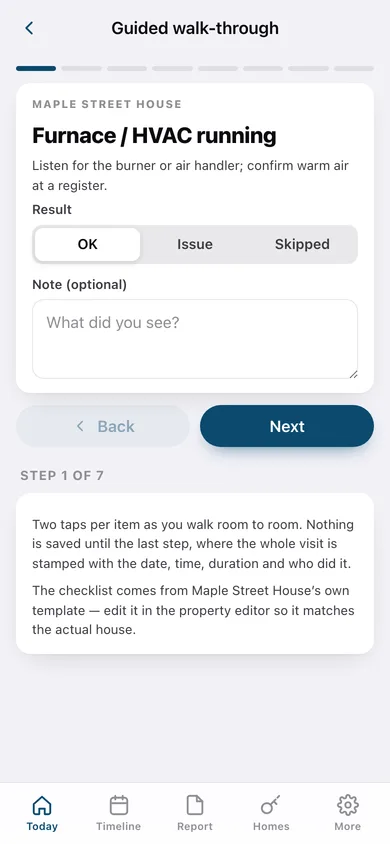
Step through furnace, thermostat reading, pipes and ceilings, sump pump, water heater, doors and exterior — OK, Issue or Skipped with a note on each, then stamp the visit.
Interval clock
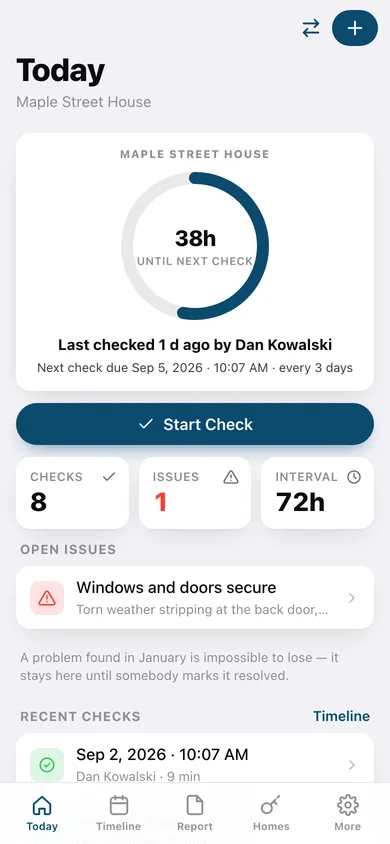
Set the check frequency your own policy requires and the ring counts down from the last stamped visit, colouring from calm to urgent and reading “Due” the moment the window closes.
Season timeline
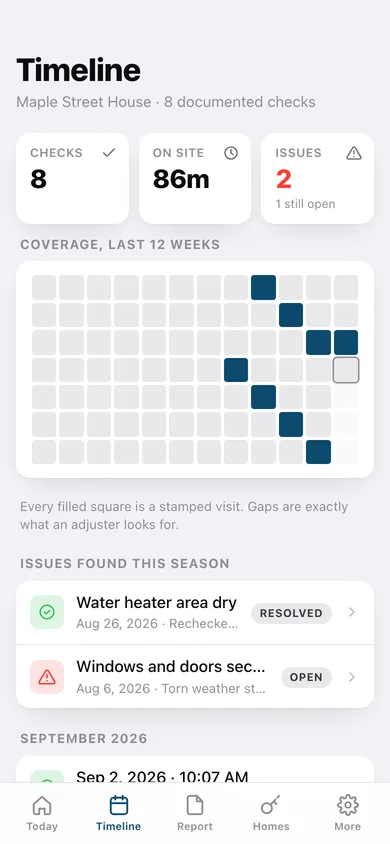
Every completed check in reverse-chronological order with a twelve-week coverage heatmap, so the gaps an adjuster looks for are visible at a glance.
Issues that cannot be lost
A flagged item stays open on the home screen and the timeline until somebody records what fixed it — a problem found in January survives to spring.
Proof-of-checks report
Pick the date range, choose what to include, and download a dated chronological report (or copy it as text) ready to print to PDF and send to an adjuster.
Multiple homes, each with its own rules
Address, insurer, policy number, required interval, heating-season dates and an editable checklist per house — one home, or the whole street.
Departure checklist
Water main, drained lines, thermostat setback, mail hold, key handoff and alarm — each stamped the moment it is ticked, so the season starts documented too.
Screens
Every screen, rebuilt for the browser
-
1
Today
The interval clock, who checked last and when, the Start Check button, open issues and recent checks.
-
2
Interval clock
The big ring, the exact deadline, the policy frequency explainer and the policy on file.
-
3
Guided walk-through
One checklist item per step with OK / Issue / Skipped, notes and readings, then the stamped finish screen.
-
4
Check detail
The stamp, checker, duration, every checklist result, and resolve-or-reopen on any flagged item.
-
5
Departure checklist
The leave-day and winterization list with a completion ring and a stamp on every tick.
-
6
Season timeline
Coverage heatmap, the season's issues, and every stamped visit grouped by month.
-
7
Season report
Date range, content toggles, a live preview, and download-as-HTML, copy-as-text or CSV export.
-
8
Homes
Every property with its interval, check count and hours remaining, and what each home holds.
-
9
Property editor
Name, address, insurer, policy number, required interval, season dates and the per-house checklist.
-
10
More
Checker name, homes, JSON backup, restore the default walk-through, sample data and erase.
Try it with sample data: Loads two homes — a 72-hour Ottawa house and a 96-hour Muskoka cottage — with nine stamped visits across the last four weeks, a resolved water-heater issue, an open weather-stripping issue, and a completed leave-day checklist. You can start fresh at any time.
Ready? It's free.
No account, no install, no subscription. Everything you do stays in this browser.
Your say
What should AwayCheck do? Tell us before we build it.
Tell us what to build next.
Comments need a free Google sign-in, so every one is from a real person.
Sign in with Google to commentNo comments yet — be the first to say what this app should do next.
Questions
Is the web version of AwayCheck free?+
Yes. Every screen is free to use: no subscription, no in-app purchases, no account.
Do I need an account?+
No. Open AwayCheck and start using it right away. Sign in with Google only if you want to upvote an app, save it to your list, or leave a comment.
Where is my data stored?+
Only in this browser's local storage. Nothing you enter is sent to our servers, so we can't see it, back it up, or restore it. Clearing site data, a private window, or another device starts empty. Export a backup from the in-app menu to keep it.
Is there a AwayCheck app for iPhone or Android?+
Not yet. AwayCheck is a community proposal: the browser version is complete, and we build the iPhone and Android app once 100 people upvote it. Upvoters get one email when it ships.