
Web app · Productivity
Atomizer
Turn one pillar into forty posts — and see exactly where reach is leaking
Capture a blog post, video or podcast as a Pillar, break it into Atoms (quotes, hooks, frameworks, stats), then shape each atom into platform-ready Derivatives with live character targets. The coverage grid shows every pillar against every platform. Free, everything unlocked.
Stored in your browser only. Nothing you do in the web version is sent to our servers. Clear your browser data and it's gone — so export a backup from the in-app menu if you want to keep it.
This app is a community proposal.
Try the full browser version now. We build the iPhone and Android app once 100 people upvote it.
We'll email you once, when it ships. Unsubscribe anytime.
In your browser
What you can do in Atomizer on the web
Pillar → atom → derivative
The whole derivation tree stays linked, so a topic that performed can be reopened months later and spun into a fresh batch from the same source.
Composer with real targets
280 for an X thread, 150 for a TikTok hook, 3,000 for LinkedIn, 2,200 for an IG caption — the counter and meter go red when you break the format, with the format's own writing hint underneath.
The coverage grid
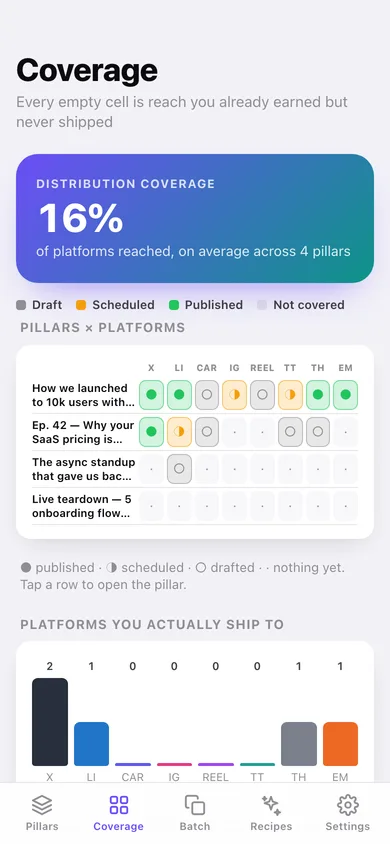
A live matrix of every pillar against all eight platforms: published, scheduled, drafted or nothing. Coverage counts published only, exactly as on the iPhone.
Format batching
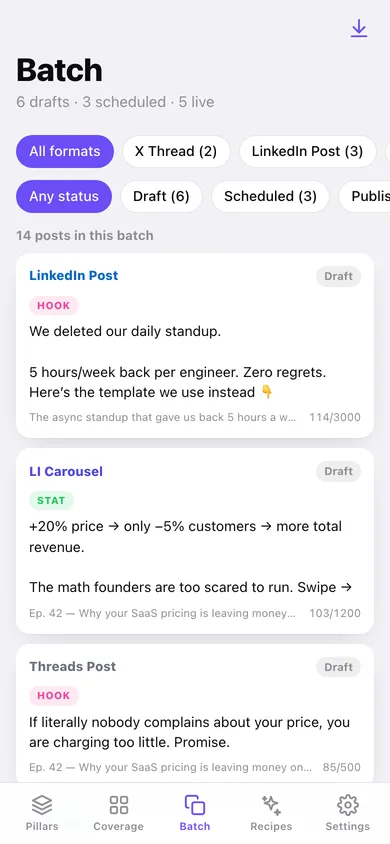
Filter every derivative by platform and status to write ten of the same thing in one focused session instead of context-switching all week.
Six repurposing recipes
Blog, podcast, video, newsletter, webinar and talk packs each queue their atom slots and one pre-filled draft per format — the template packs are free here.
Export to your scheduler
Every derivative out as CSV or as a Markdown pipeline grouped by pillar and atom, ready to hand to Buffer, a VA or a doc.
Screens
Every screen, rebuilt for the browser
-
1
Pillar library
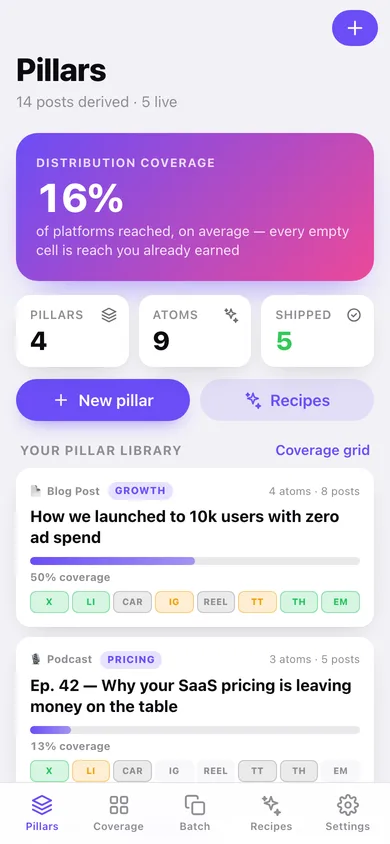
Overall coverage, your pillars with coverage bars and a per-platform strip on every card.
-
2
Coverage grid
Pillars against all eight platforms, plus how many pillars have gone live on each format.
-
3
One pillar
Source, theme, notes, coverage, its atoms and every post derived from it.
-
4
New pillar
Title, source type, theme, notes and the URL of the original piece.
-
5
One atom
The nugget itself, its derivatives, and one-tap buttons for every format it has not been shaped for yet.
-
6
Composer
Write the post against its character target with the format hint, status, schedule date and live URL.
-
7
Batch
Every derivative as a card, filtered by format and status for a single focused writing session.
-
8
Recipes
Six repurposing packs, the six atom kinds and the character target for every format.
-
9
Settings
Composer options, CSV and Markdown export, sample data, erase everything.
Try it with sample data: Loads four pillars from the last three weeks — a zero-ad-spend launch post, a pricing podcast, an async-standup newsletter and an un-atomized webinar — with nine atoms and fourteen derivatives spread across draft, scheduled and published. You can start fresh at any time.
Ready? It's free.
No account, no install, no subscription. Everything you do stays in this browser.
Your say
What should Atomizer do? Tell us before we build it.
Tell us what to build next.
Comments need a free Google sign-in, so every one is from a real person.
Sign in with Google to commentNo comments yet — be the first to say what this app should do next.
Questions
Is the web version of Atomizer free?+
Yes. Every screen is free to use: no subscription, no in-app purchases, no account.
Do I need an account?+
No. Open Atomizer and start using it right away. Sign in with Google only if you want to upvote an app, save it to your list, or leave a comment.
Where is my data stored?+
Only in this browser's local storage. Nothing you enter is sent to our servers, so we can't see it, back it up, or restore it. Clearing site data, a private window, or another device starts empty. Export a backup from the in-app menu to keep it.
Is there a Atomizer app for iPhone or Android?+
Not yet. Atomizer is a community proposal: the browser version is complete, and we build the iPhone and Android app once 100 people upvote it. Upvoters get one email when it ships.