
Web app · Lifestyle
AptBook
The $1,700 apartment costs $2,110 — AptBook does that math
Log every unit you tour, add the fees the leasing office quotes, and get one honest monthly number per unit: mandatory fees added, one-time charges and move-in specials spread across the lease. Then rank your finalists. Free, no account.
Stored in your browser only. Nothing you do in the web version is sent to our servers. Clear your browser data and it's gone — so export a backup from the in-app menu if you want to keep it.
In App Review — coming to the App Store
AptBook is with Apple now. You can use the full browser version today, and we'll email you the day the app is live.
0 waiting for launch
We'll email you once, when it ships. Unsubscribe anytime.
In your browser
What you can do in AptBook on the web
Sixty-second tour capture
Nickname, source, quoted rent, deposit, lease term, beds, baths, square feet and the move-in special — with the true monthly number updating as you type.
True-monthly-cost engine
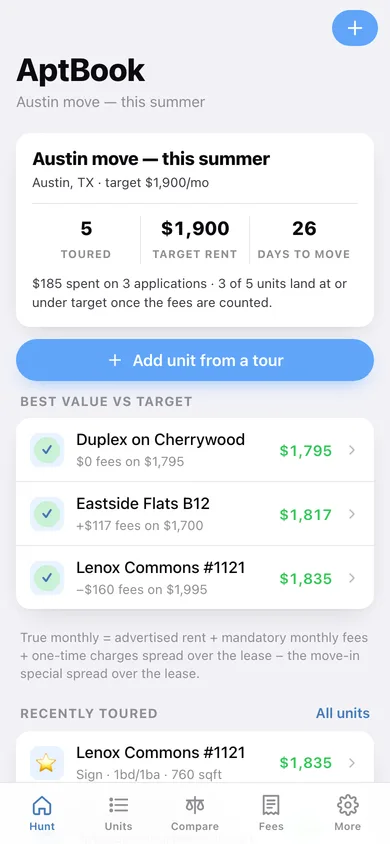
Advertised rent + mandatory monthly fees + one-time charges ÷ lease term − the move-in special ÷ lease term, with a delta badge against the advertised rent.
Ten-point tour checklist
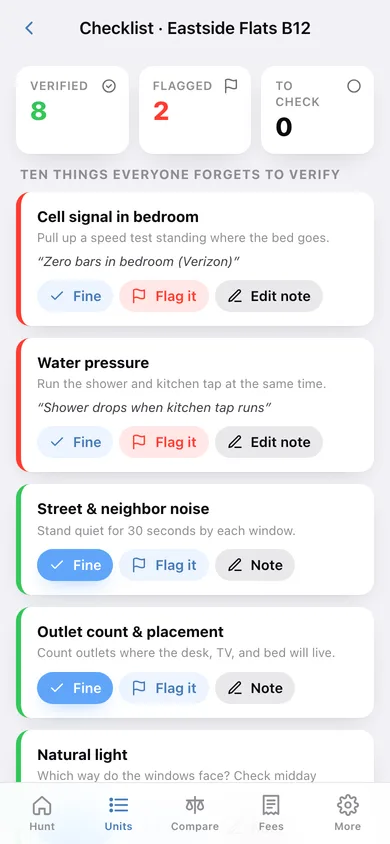
Cell signal, water pressure, noise, outlets, light, laundry, storage, smell, parking and commute — answered fine, flagged or unchecked, each with a note.
Weighted compare board
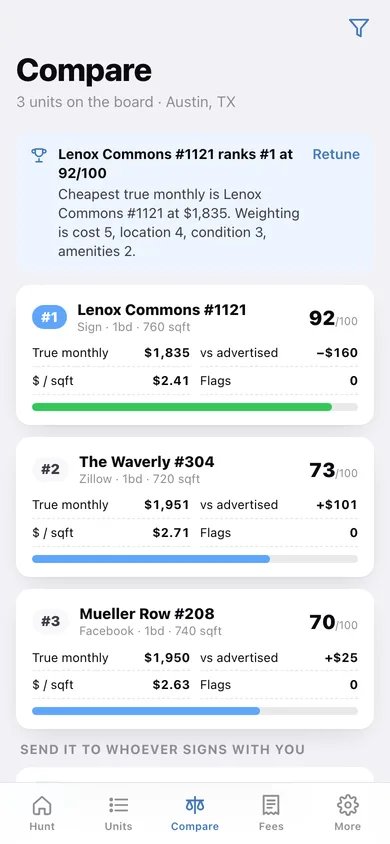
Finalists ranked 0–100 on a weighted blend of cost, location, condition and amenities, with true monthly, price per square foot and flag counts side by side.
Application fee ledger
Every $30–$75 application and admin charge with its building, date and status, plus a running total and fees-per-week chart so the cost of the search stays visible.
Shareable comparison sheet
Copy the ranked sheet as text or download it as CSV to send to a partner or co-signer before anyone signs.
Screens
Every screen, rebuilt for the browser
-
1
Hunt dashboard
Your move, target rent, days to move-in, application spend, best value against target and recently toured units.
-
2
Units
Every unit you toured, searchable and sortable by true cost, score, price per square foot or tour date.
-
3
Unit detail
True monthly hero with the fee delta, score, price per square foot, flags, ratings, applications and notes.
-
4
Capture a unit
The mid-tour form, with a live true-monthly readout as you enter rent, lease term and the move-in special.
-
5
Fee editor
Tap-to-fill chips for the usual junk fees, then log each line as monthly or one-time, mandatory or optional.
-
6
Tour checklist
The ten-point walk-through with fine / flag / note on each item and a running verified-flagged-unchecked count.
-
7
True cost breakdown
Line by line: advertised rent, mandatory monthly fees, one-time charges over the term, the special over the term.
-
8
Compare board
Finalists ranked with score bars, true monthly, delta, price per square foot and flags, plus copy and CSV export.
-
9
Weights & ratings
Slide what matters — cost, location, condition, amenities — and rate every unit on the three human axes.
-
10
Applications
Total application spend, status counts, fees per week, every application and a by-building breakdown.
-
11
More
Switch, edit or archive hunts, export JSON or CSV, load sample data, and read exactly how the math works.
Try it with sample data: Loads a five-unit Austin hunt with a $1,900 target: real fee lines (valet trash, amenity, package locker, required internet, admin), a six-weeks-free special, filled-in tour checklists with genuine flags, and three logged applications. You can start fresh at any time.
Ready? It's free.
No account, no install, no subscription. Everything you do stays in this browser.
Your say
What should AptBook do? Tell us before we build it.
Tell us what to build next.
Comments need a free Google sign-in, so every one is from a real person.
Sign in with Google to commentNo comments yet — be the first to say what this app should do next.
Questions
Is the web version of AptBook free?+
Yes. Every screen is free to use: no subscription, no in-app purchases, no account.
Do I need an account?+
No. Open AptBook and start using it right away. Sign in with Google only if you want to upvote an app, save it to your list, or leave a comment.
Where is my data stored?+
Only in this browser's local storage. Nothing you enter is sent to our servers, so we can't see it, back it up, or restore it. Clearing site data, a private window, or another device starts empty. Export a backup from the in-app menu to keep it.
When is the AptBook iPhone app out?+
AptBook is in App Review with Apple now. Tap “Notify me at launch” and we'll email you once, the day it's live.