
Web app · Productivity
Agentmate
Paste yesterday's agent logs, get a journal of what shipped and what needs you
Agentmate splits a morning paste into per-agent line items, classifies each one as shipped, in progress, needs your review or blocked, and keeps the whole thing as a searchable digest journal with a review queue and a run-rate chart. Free, no install.
Stored in your browser only. Nothing you do in the web version is sent to our servers. Clear your browser data and it's gone — so export a backup from the in-app menu if you want to keep it.
This app is a community proposal.
Try the full browser version now. We build the iPhone and Android app once 100 people upvote it.
We'll email you once, when it ships. Unsubscribe anytime.
In your browser
What you can do in Agentmate on the web
Paste and it splits itself
Prefix a line with “Deploy agent:” and Agentmate files every sentence under that agent — with a live preview of the split before you save.
Four statuses, auto-detected
Shipped, in progress, needs your review and blocked are read straight out of the wording (“redlined the MSA — needs your review”), and you can re-classify any line in a tap.
A review queue that empties
Every line an agent handed back sits in one queue, grouped by agent, until you clear it. Reopen anything that turned out not to be done.
Agent roster
Each agent gets a page: what it does, when it runs, its 14-day bar chart and every line it has ever reported.
Run rate and streak
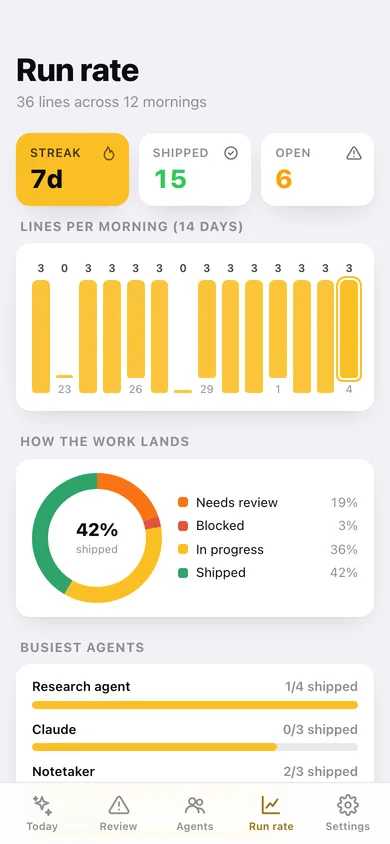
Lines per morning, a shipped-percentage donut, a busiest-agents leaderboard and a 12-week heatmap of the mornings you actually sat down with the logs.
Searchable journal + CSV
Search every morning by agent, wording or raw paste; export the whole journal as CSV or a JSON backup.
Screens
Every screen, rebuilt for the browser
-
1
Today
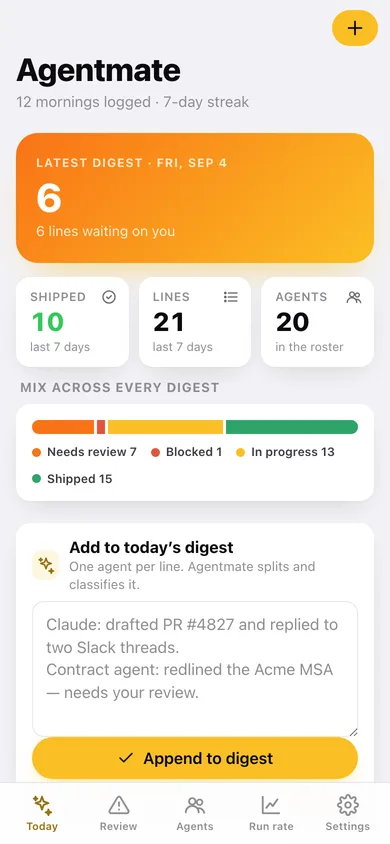
How many lines are waiting on you, the paste box, and the last week of mornings.
-
2
One morning
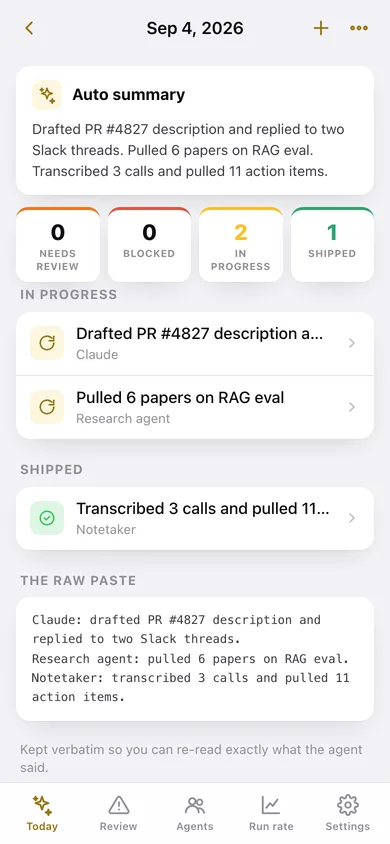
Auto summary, the counts, every line grouped by status, and the raw paste kept verbatim.
-
3
New digest
Paste the logs for any date and watch the parser split them live before you save.
-
4
Journal
Every morning by month, searchable across agents, wording and raw text.
-
5
Review queue
Needs-review and blocked lines grouped by the agent that handed them back.
-
6
Agents
The roster of everything running for you, with lines attributed and shipped counts.
-
7
Agent page
One agent: cadence, status split, 14-day bars and its full history.
-
8
Run rate
Lines per morning, shipped share, busiest agents and a 12-week logging heatmap.
-
9
Settings
Parsing options, CSV/JSON export, restore the starter roster, erase everything.
Try it with sample data: Loads twelve mornings of pasted agent logs over the last two weeks — about forty line items across a roster of coding, research, deploy, comms and finance agents, including a blocked release and a contract that needs your review. You can start fresh at any time.
Ready? It's free.
No account, no install, no subscription. Everything you do stays in this browser.
Your say
What should Agentmate do? Tell us before we build it.
Tell us what to build next.
Comments need a free Google sign-in, so every one is from a real person.
Sign in with Google to commentNo comments yet — be the first to say what this app should do next.
Questions
Is the web version of Agentmate free?+
Yes. Every screen is free to use: no subscription, no in-app purchases, no account.
Do I need an account?+
No. Open Agentmate and start using it right away. Sign in with Google only if you want to upvote an app, save it to your list, or leave a comment.
Where is my data stored?+
Only in this browser's local storage. Nothing you enter is sent to our servers, so we can't see it, back it up, or restore it. Clearing site data, a private window, or another device starts empty. Export a backup from the in-app menu to keep it.
Is there a Agentmate app for iPhone or Android?+
Not yet. Agentmate is a community proposal: the browser version is complete, and we build the iPhone and Android app once 100 people upvote it. Upvoters get one email when it ships.