
Lifestyle
Dayleaf: one-line-a-day journal
One line. Every day. Yours.
No account, no install. What you do stays in your browser.
This app is a community proposal.
Try the full browser version now. We build the iPhone and Android app once 100 people upvote it.
We'll email you once, when it ships. Unsubscribe anytime.
| Price | Free, no subscription |
|---|---|
| Account | None needed to try |
| Works offline | Yes |
| Data | On your device, never on our servers |
| Platforms | Browser |
| Status | Community proposal (built for phones at 100 upvotes) |
| Last updated | 2026-06-08 |
Accessibility: Larger Text · Light & Dark · iPad layout · Browser version How we checked →
 Try it live
The full Dayleaf, right here in your browser.
No account and no install. What you enter is saved in this browser only, never on our servers.
Open Dayleaf →


About this app
What Dayleaf does
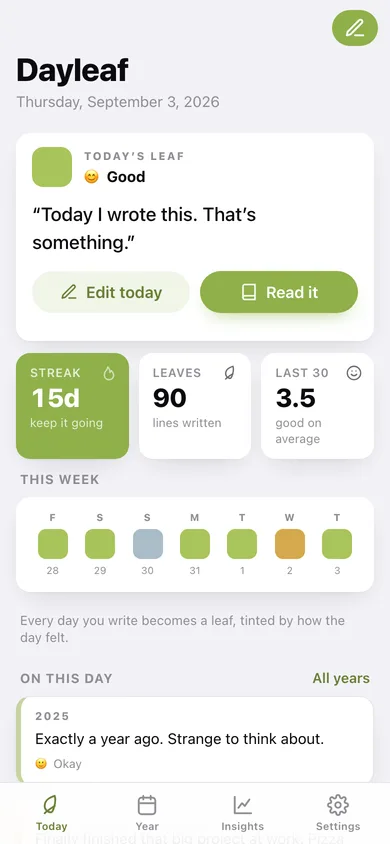
Dayleaf is a one-line-a-day journal designed for real life. Open the app, see today's gentle prompt, write a single sentence, and you're done. No paragraphs, no guilt, no blank pages — just a tiny daily habit that adds up to something beautiful. Every entry becomes a leaf in your Year Grid: a full calendar view where each day is shaded by mood, so you can see at a glance which weeks felt warm, which felt muted, and where the turning points were. Tap any leaf to read what you wrote, then scroll to On This Day to rediscover entries from the same date in past years — a quiet, delightful form of memory that longer journals rarely surface. Built entirely on-device with SwiftData. No account, no subscription, no internet connection ever required.
Features
Built to be useful, not noisy.
Today's Leaf
A focused home screen showing the date, a rotating daily prompt, a single-line text field, and a five-point mood picker. After saving, the entry is sealed for the day with a gentle animation.
Year Grid
A full 12-month calendar grid where every past day is rendered as a small rounded rectangle (leaf) tinted by mood — from warm amber (high) to cool slate (low) with white for empty days. Tap any leaf to read its entry in EntryDetailView.
On This Day
Each morning the app surfaces any entries written on the same calendar date in previous years, presented as layered cards with the year prominently displayed — a moment of personal time-travel before the user writes today's line.
Mood Insights
A monthly bar chart showing average mood per week, a running streak display, and a simple heatmap of the best and hardest days — enough signal to spot rhythms without becoming a clinical dashboard.
Why it exists
The problem
Most people who want to journal never stick with it because the blank page is overwhelming and the time commitment feels too large. Existing journal apps either demand lengthy entries, require an account, or bury memories so deeply they are never revisited — killing the motivation loop.
What's different
How Dayleaf stands out
Dayleaf uniquely combines a hard one-line constraint with a visual Year Grid (mood-colored leaf per day) and an On This Day memory resurfacing engine — a triumvirate no single competitor offers fully offline and free of subscription. The leaf aesthetic and the sustainable micro-habit format set it apart from wordy jou…
You might also like
All apps →
Auraboard
Lifestyle
Your daily aesthetic vibe, as a shareable aura card.

Weekdots: Life in Weeks
Lifestyle
See your life in weeks

Ins & Outs
Lifestyle
Make shareable editorial list cards

Receiptd
Lifestyle
Turn your day into a retro receipt

Blind Box Vault
Lifestyle
Collect, complete, trade your figures

AptBook
Lifestyle
Tour, compare, see true rent
FAQ
Questions about Dayleaf
How much does Dayleaf cost?▾
Dayleaf is free. All features are included from day one — no subscription, no in-app purchases, no paid tiers. Everything you see in this listing works the moment you install it.
Where does Dayleaf store my data?▾
Dayleaf stores what you enter on your device. No account is required, and we never sell your data. Any anonymous usage data or optional notifications are explained in the Dayleaf privacy policy.
What platforms does Dayleaf support?▾
iOS, on iPhone and iPad. You can find the latest availability on this page.
How do I get support for Dayleaf?▾
Use the Support link on this page, or email support@allthingsn.com. We answer every message and keep responses on the same thread.
More in Lifestyle

